November 14, 2026
Commercial Cleaning Cost Per Hour: 2026 Rates Explained
Commercial cleaning cost per hour in 2026: typical U.S. rates, what drives them, and how to price every bid to win work and keep margin.

Sunday, November 15, 2026
Learn how voice agents AI answers cleaning company calls, captures details for estimates, and knows when to hand off to a person. A practical 2026 guide.
In 1990, Dragon Dictate became the first consumer speech-recognition product and reportedly cost $9,000, according to a history of speech recognition systems. That price explains the old assumption that automated voice was a novelty for large companies. It isn't true anymore. A cleaning company can now put an AI agent on its phone line, have it collect job details, and send an estimate while the crew is still on site. The purchase decision isn't whether the voice sounds polished. It's whether the agent knows when to stop, transfer, and protect the estimate from bad information.
A homeowner calls at 8.40 p.m. after finding your number online. She wants a deep clean before relatives arrive on Friday. An AI voice agent is the software that answers that call, understands what the caller says, replies in a natural voice, and takes action. It can check availability, capture job details, explain standard services, and book the work. A press-1 phone menu only routes callers. Voicemail asks a ready buyer to wait.
It behaves like a receptionist who never sleeps, knows your full price sheet, and writes every detail down in the same format each time. A human receptionist may be off duty at 8.40 p.m., but the agent answers in your business name, asks about the home, and moves the caller toward an estimate instead of a callback she may never return.
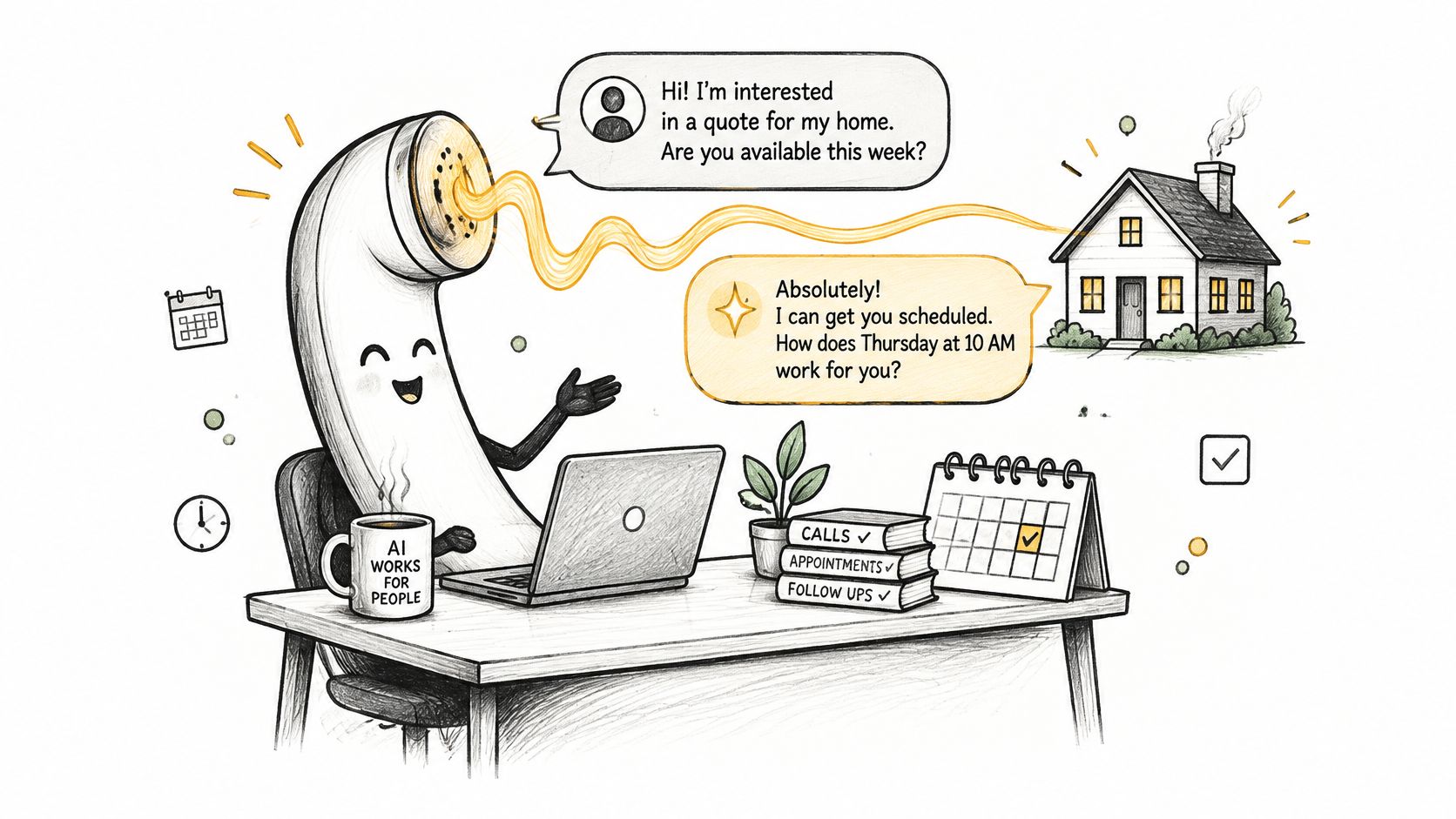
Cleaning calls arrive while you're driving between jobs, cleaning a kitchen, training a new hire, or eating dinner. Nights and weekends are not spare inquiry time. They're often when homeowners finally sit down and search. A missed call on Saturday usually isn't a delayed estimate request. It's a lost one, because the caller dials the next company on the list.
Industry analysts project strong growth in voice-AI-agent adoption over the coming years, and a Trillet market analysis counts inbound agents, receptionists, support lines, and booking systems among the major application categories. Analysts define the market differently, so the totals matter less than the direction. The useful point for an owner is simpler: buyers already expect an immediate answer.
None of that works on a shaky phone setup. If you're switching from traditional phone lines, sort out your number, call forwarding, and transfer path before you connect any automation. A smart agent on a broken phone line still loses calls.
A voice agent earns its place when it captures demand you are currently missing, not when it merely sounds impressive in a demo.
Run a simple test before you buy. Count missed calls, after-hours voicemails, and web inquiries that waited more than an hour for a reply during the last two weeks. If that list contains real cleaning jobs, you have an intake problem worth solving. The three calls to automate first are new estimate requests, standard service and hours questions, and booking inquiries with clear job details.
Then weight your comparison toward the parts demos hide. Ask how the agent hands a call to a person when it hits a limit, and how it copes with accented speech and background noise on a real line. Those two answers decide whether the system makes you money. The voice in the sales demo does not.
Say a caller says, "I need a three-bedroom house cleaned on Saturday." A good system doesn't wait for the whole conversation, transcribe it later, and then think. It processes speech while the caller is talking and prepares the next question in real time.
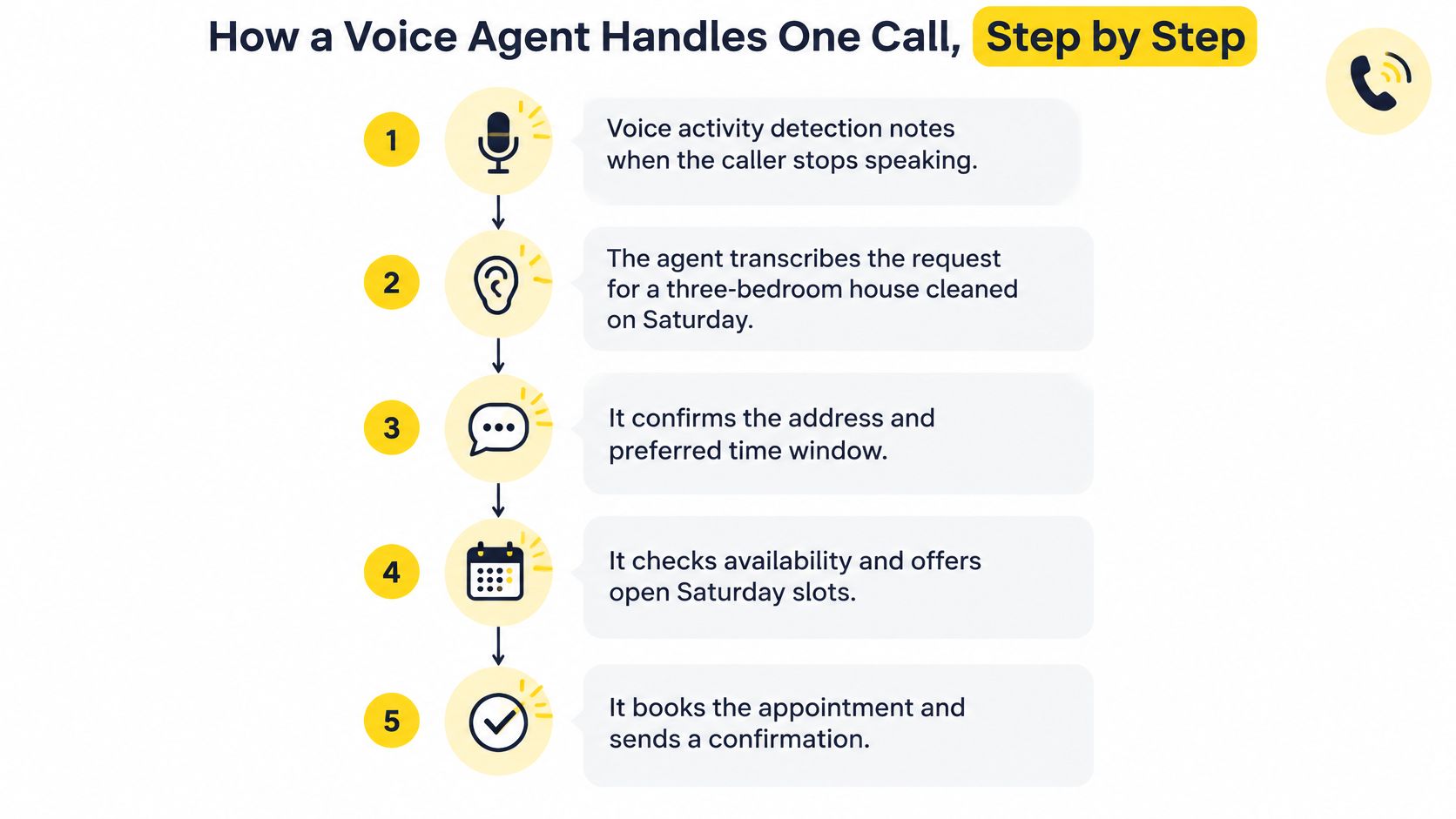
Voice activity detection notices the turn. The system detects speech and silence so it can tell when the caller has probably finished. If it cuts in too early, it talks over a natural pause. If it waits too long, every reply feels slow.
Streaming speech-to-text creates partial text. Words appear while the caller is still speaking, rather than after a completed recording is uploaded. This gives the rest of the system a head start. It also means a misheard number can enter the workflow early, so critical fields need confirmation later.
The language model extracts the job and chooses the next question. It identifies a three-bedroom home and a Saturday request, then asks for bathrooms, square footage, address, and preferred time window. It should remember what's already been said. Asking for bedrooms twice tells the caller it wasn't listening.
Tool calls check your business systems. The agent can apply pricing rules, check the calendar, create or update a CRM record, and prepare an SMS. Understanding how those records move matters, so review what a CRM integration does before connecting customer data to any call flow. A slow calendar or pricing lookup creates silence even when the speech model is fast.
Text-to-speech speaks the reply. The written response becomes audio, ideally starting with the first complete sentence while the rest is generated. If the caller interrupts, the agent should stop speaking and listen. Finishing a scripted sentence after a correction makes the system feel stubborn, not intelligent.
This short video gives you a useful listening test. Pay attention to the gaps between turns, not just whether the voice sounds pleasant.
Latency is the total of every stage, not a single model score. One technical implementation described in a streaming voice-agent paper measured a median time-to-first-audio of 947 ms, with best-case results below 730 ms, using streaming speech-to-text, function-calling inference, and streaming text-to-speech. Sequential batch processing produces longer pauses because each stage waits for the previous one to finish completely.
| Stage | What it does | What breaks for the caller |
|---|---|---|
| End-of-speech detection | Decides the caller has finished | Long pauses or interruptions |
| Speech-to-text | Turns speech into text | Wrong address, number, or service |
| Language model | Extracts fields and plans the reply | Wrong bedrooms, date, or add-ons |
| Tool calls | Checks pricing, calendar, CRM, and SMS | Silence while systems respond |
| Text-to-speech | Speaks the answer | Delayed first audio and lost trust |
Time each stage separately before launch. Log end-of-speech detection time, tool-call duration, and final-answer latency on test calls. Good performance feels plain. The caller hears a reply in about a second, gets a brief acknowledgment while a price is checked, and never sits in unexplained silence.
A homeowner calls at 9 p.m. about a move-out clean. She is handing back keys in two days, the kitchen needs degreasing, and she wants the inside of the oven cleaned. She doesn't want to complete a long form on her phone. She wants someone to answer, understand the deadline, and tell her the likely price range.
The agent answers in your business name and identifies the job as a move-out clean. It collects square footage, bedrooms, bathrooms, surfaces, condition, urgency, and add-ons in a natural order. Then it explains the standard price range, sends the estimate by SMS and email, and alerts your team that a time-sensitive lead is ready for review. If she asks whether Saturday morning is open, it checks availability instead of promising a slot nobody has confirmed.
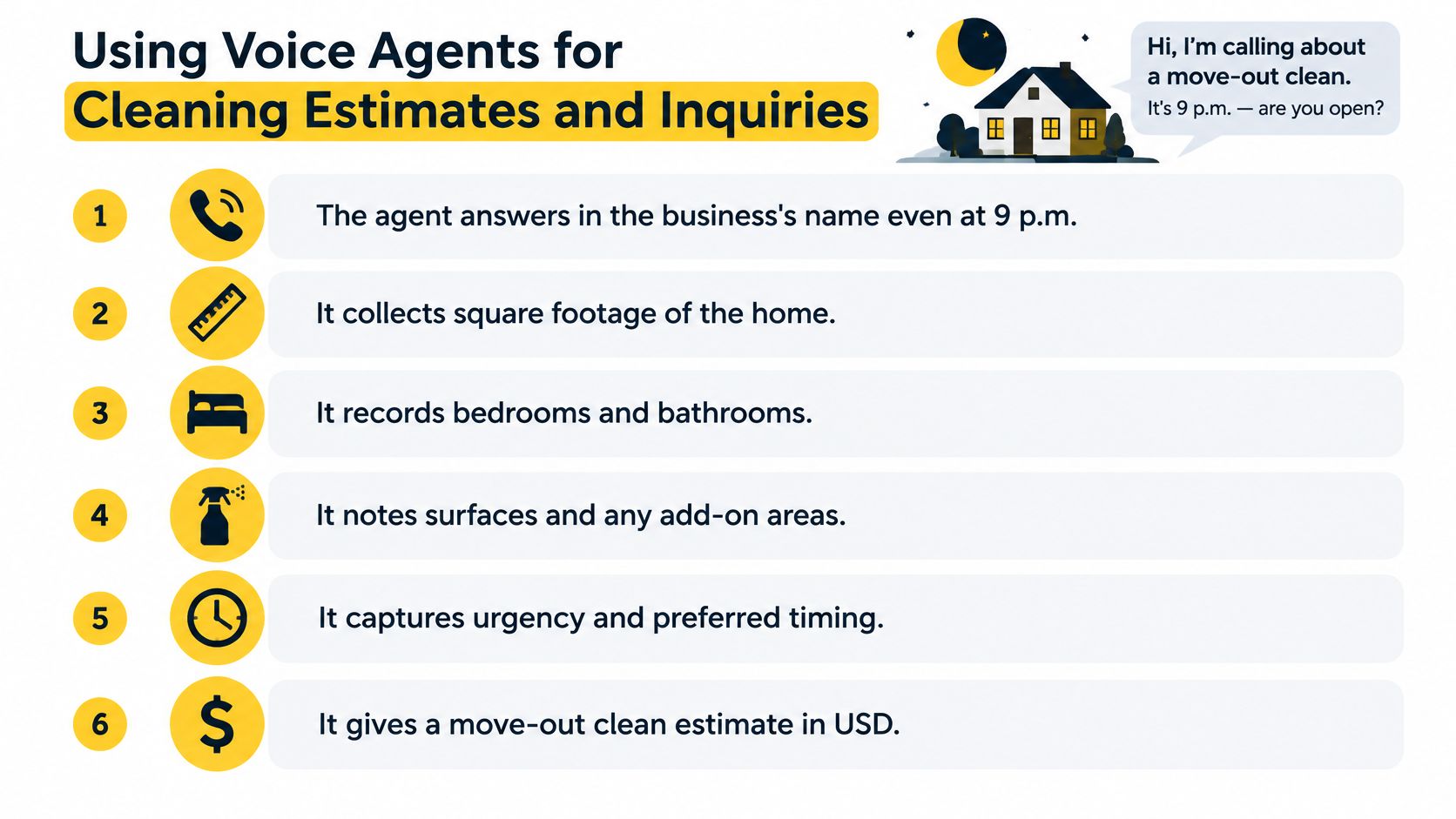
| Intake field | Why it matters | Example |
|---|---|---|
| Home size in square feet | Sets labor hours and base scope | 1,800 square feet |
| Bedrooms and bathrooms | Sets the standard cleaning scope | 3 bedrooms, 2 bathrooms |
| Surfaces and condition | Changes time per room | Pet hair, carpet, heavy grease |
| Urgency and date | Sets scheduling priority | Saturday move-out, 48-hour deadline |
| Add-on requests | Adds set-price extras | Inside oven, blinds, AC vents |
| Contact details and address | Lets the team confirm and book | Name, mobile, street address |
Don't let the agent improvise around missing fields. If square footage is unknown, it can ask for bedrooms, bathrooms, and property type, then send a clearly labeled preliminary estimate range. If condition could change labor hours sharply, it should flag the job for human review. Owners comparing intake designs can also use Magnitude Marketing's front desk automation guide to check which front-desk tasks they're trying to remove from staff.
The labor math is not abstract. The U.S. Bureau of Labor Statistics Occupational Employment and Wage Statistics profile put the median U.S. wage for janitors and building cleaners at $17.71 per hour, or $36,840 annually, in May 2025. The same profile put the 10th percentile at $13.77 per hour and the 90th percentile at $24.17 per hour. When a crew member stops cleaning to collect square footage or an owner spends evenings returning calls, that time has a measurable cost. A few missed or slow estimates each week can outweigh the cost of automation, especially when the lost job would have become recurring work.
That staffing pressure is separate from finding cleaners. If hiring is the bottleneck, pipehirehrm.com is the place to think about cleaning employee hiring, and get.pipehirehrm.com/blog covers that side of operations. Voice automation solves intake. It doesn't create available labor for jobs you cannot staff.
Before any estimate is sent, require the agent to capture these items.
For the software side of that workflow, see how AI estimates software for cleaning connects intake fields to a consistent price. Consistency is the point. Two callers with the same home and scope shouldn't receive different estimates because different people answered the phone.
Stop asking how many calls the AI can contain. Ask which calls it should never try to finish. That is the buying question because one mishandled complaint, inaccessible property, or wrong estimate can erase the savings from many routine calls.
Consumer trust has a clear boundary. In consumer research reported by Startup Beat, 70% of surveyed consumers were comfortable with AI handling business hours, services, and pricing, but only 16% were comfortable with AI taking payments. The same reporting says 80% wanted an AI receptionist to identify itself at the start of a call and 78% reported buying from a competitor after a business failed to answer or return a call. A separate survey cited there found 52% of consumers considered the option to transfer to a human at any time an acceptance condition.
Read those numbers together. Callers will accept automation for straightforward information and scheduling. They also want honesty at the start and a visible exit. Maximum automation can reduce conversion if a caller feels trapped by a system that keeps asking questions after confidence is gone.
| Request | Who handles it | Why |
|---|---|---|
| Standard service, hours, and standard pricing | AI agent | Consumers accept AI for these topics |
| Square footage, bedrooms, bathrooms, and urgency | AI agent | Structured fields that feed the estimate |
| Unusual property or hard-to-price home | Human | Standard pricing does not fit |
| Accessibility or special care needs | Human | Needs judgment and a confirmed plan |
| Complaint or disputed charge | Human | Trust and retention are at stake |
| Payment question or payment taking | Human | Only 16% of consumers were comfortable with AI taking payments |
| Cancellation or reschedule | Human | Changes to booked work need confirmation |
| Large commercial opportunity | Human | High value justifies a closer conversation |
| Caller asks for a person | Human, transferred at once | Consent to automation depends on this exit |
This routing works when the agent first qualifies the job properly. The principles behind AI lead qualification help you decide which details prove a caller is ready for an estimate and which details signal a human conversation. Qualification is not interrogation. Three useful answers can be enough to route the call correctly.
A transfer that drops context is barely better than hanging up. The person taking over needs the caller's name, contact details, address, fields already collected, estimate status, and the exact reason for transfer. The caller should hear, "I'll connect you now, and I've passed along the details you've given me." Then the human should prove it by using those details immediately.
Practical rule: If the AI cannot answer confidently, it should say so and transfer. It should never guess a price to keep the conversation going.
Build the exit into ordinary language. "Person," "human," "someone real," and "transfer me" should all work. Don't require a magic phrase and don't make the caller fail twice before offering help. An agent with no clear exit traps callers, damages trust, and can cost more than the missed call you bought it to prevent.
A polished voice can make weak understanding sound competent. That's dangerous. The caller hears confidence, assumes the details were captured correctly, and only discovers the error when the estimate, address, or arrival time is wrong.
A 2025 study available through arXiv found performance disparities across five regional English accents in synthetic AI voice services. Another usability study described there, involving blind and low-vision participants in China and the UK, identified higher task-error rates, weak recognition of diverse accents, inconsistent auditory feedback, and interfaces that depend on visual elements. For a cleaning business, this isn't a technical footnote. A misheard street name, home size, gate code, surface type, or service can produce a wrong estimate and a wasted trip.
Background noise creates the same risk in ordinary homes. Callers speak from cars, kitchens, job sites, and rooms with children or televisions. They correct themselves mid-sentence. They say "fifteen, no, fifty" when giving square footage or change the date after checking a calendar. Your test calls need that messiness. A quiet office demo with one familiar accent proves very little.
Owners comparing vendors can use the checks in judging AI receptionist reliability from Truespeak as a starting point, then replace generic test scripts with their own addresses, service names, and add-ons. Local street names matter. So do words your customers use, such as move-out, deep clean, blinds, baseboards, and AC vents.
Segment test outcomes by accent, language variety, background noise, disability-related needs, and call type. Track correction rate, abandoned calls, estimate revisions, and booking conversion for each group of test scenarios. If one group needs more corrections and books less often, don't blame the callers. Fix the prompts, confirmation path, or escalation rule. Accessibility is estimate quality and customer acquisition, not a compliance box you check after launch.
Containment rate is the share of calls finished without a human. Vendors like it because it is easy to make look good. Owners shouldn't lead with it. An agent can contain a call by sending a wrong estimate, failing to offer a transfer, or wearing the caller down until they accept an answer they didn't want.
Measure outcomes that connect to revenue and trust instead.
Say one setup books 20 jobs in a week but produces six abandoned calls after transfer and five estimate revisions. Another books 16 jobs, transfers cleanly, and needs one revision. The second system is stronger, even though its raw booking count is lower. It creates less rework, fewer angry callbacks, and a better chance that the commercial lead or unusual home reaches the right person.
Set your baseline before launch. Record missed calls per week, average response time to a new inquiry, and booking rate from web forms. Without that starting point, you'll argue from impressions after the first difficult call. Owners comparing operating costs should put those baseline numbers beside AI receptionist pricing rather than judging a monthly fee in isolation.
Review a sample of recorded calls every week. Segment them by call type, accent, and noise level, and listen for repeated questions, long silences, missed corrections, and transfers that arrive without context. Don't only review failed calls. A booked job with three corrections may reveal the same weak prompt as an abandoned call.
Keep the agent when revenue per call rises and transfers succeed. Change the handoff rules when abandonment or estimate revisions rise.
That decision rule keeps the system honest. You're not buying automation for its own sake. You're buying more qualified bookings with less owner time and fewer damaged first impressions.
Write the policy before the first real caller reaches the agent. Don't tune it from complaints.
For owners planning the wider service workflow around the agent, how to automate customer service is a useful next read. Keep reading at estimatty.com/blog for more on estimates, intake, and booking operations.
Estimatty fits this path as an AI voice and web estimator built for residential and commercial cleaning companies. Our AI or human agents answer calls under your business's brand name, handle questions, and book the job. When a caller asks for a human, the AI transfers the call instantly. When a conversation goes beyond what the AI can answer, we don't guess. We hand the lead to our human team, while standard inquiries can receive instant estimates by SMS and email. Setup is no-code, so your team can set pricing, choose a voice, and add FAQs without rebuilding your phone process from scratch.
Stop losing ready buyers to voicemail while your crew is on a job. Estimatty answers cleaning calls 24/7/365, captures the details that drive an accurate estimate, sends that estimate by SMS and email, and transfers callers to a human when the conversation needs one. Visit Estimatty to set up your pricing, choose your voice, and launch with a handoff policy that protects both bookings and trust.