
October 17, 2026
8 House Cleaner Quotes and Estimate Templates for 2026
Eight house cleaner quotes examples and templates, from flat-rate SMS estimates to add-on line items, that cut callbacks and lift average job value.

Sunday, October 18, 2026
What Is a CRM Integration. Learn what a CRM integration is, how it works for cleaning businesses, the methods behind it, and the security and data rules you
You're loading supplies for the next house when your phone buzzes. Someone wants an estimate, another prospect left a voicemail, and you can't remember whether the customer texting about next week ever made it into your schedule. You don't need another place to store information. You need the places you already use to agree.
Before lunch on Monday, a cleaning owner might have a website inquiry in an inbox, a missed call on the phone, a text conversation about a deep clean, and an estimate in a spreadsheet. Each contains something useful. None tells the whole story.
Now suppose those messages came from the same homeowner. They submitted a form, called to ask about pet hair, then texted their address. Without a connected record, you could send another estimate instead of answering their actual question.
What is a CRM integration? It's a structured connection that lets your customer relationship management system exchange information automatically with other business applications. Think of it as an office runner who carries the right details between your website, phone, estimating tool, and schedule without asking you to copy everything.
A CRM holds customer relationships and sales activity. An integration moves selected customer, lead, appointment, communication, and transaction information between that CRM and connected tools. Installing both applications doesn't create that connection, just as putting two filing cabinets beside each other doesn't organize their contents.
The contrast is easier to see when the scattered inquiries become a connected workflow.
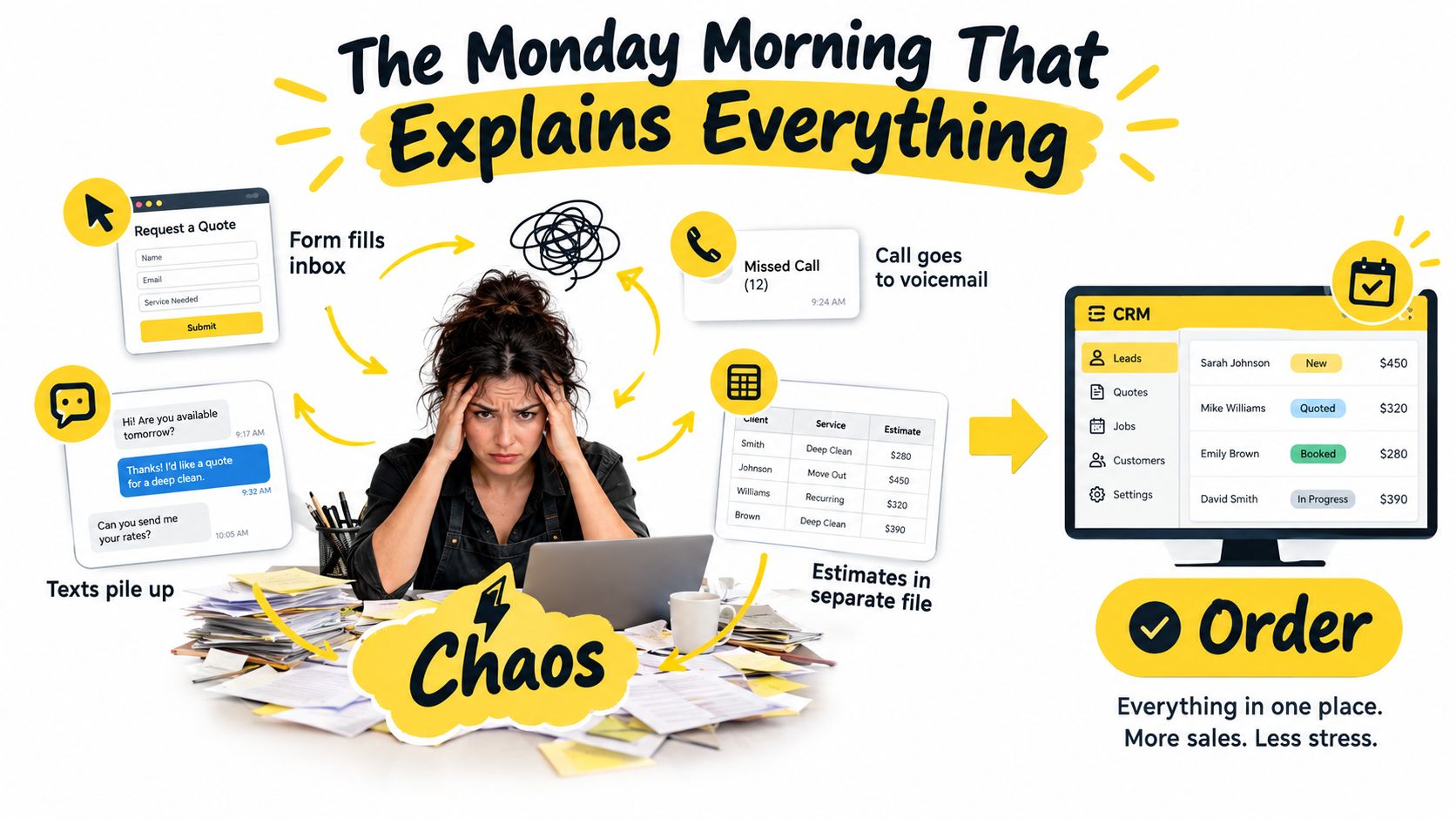
Look at where you currently keep these details:
CRM use is substantial, but it isn't universal. Eurostat's enterprise technology data reports that 28.51% of European Union enterprises used CRM software in 2025, up 2.68 percentage points from 2023, with adoption ranging from 63.14% in information and communication to 16.43% in construction.
For your shop, the useful definition is simpler: CRM integration passes customer information between your tools so your team can act without rebuilding the story. Its value depends on which information moves and what happens afterward.
A call handler, website, and scheduler may all touch the same customer record. They need an agreed way to read and update it. Before any information moves, decide which system owns the estimate, the contact details, and the booking. That ownership rule is data governance, the operating agreement behind the connection.
An application programming interface, or API, lets one application request information from another or submit an update. An endpoint is a specific route for a specific action, such as creating a lead, finding a contact, or changing a deal's status.
REST and SOAP are approaches applications use to exchange information. Many CRM APIs send records in JSON, a structured format that pairs field names with values, and use API keys or OAuth tokens to confirm access. OutrightCRM's API integration overview describes these common API components.
You don't need to write JSON to understand the work. Your website may label a value “mobile number,” while the CRM calls the matching field “phone.” Field mapping specifies where each value belongs. Decide, for example, whether the CRM or estimating tool controls the estimate status, so a later update does not overwrite the version your team relies on.
The diagram shows business tools exchanging information through a central database.
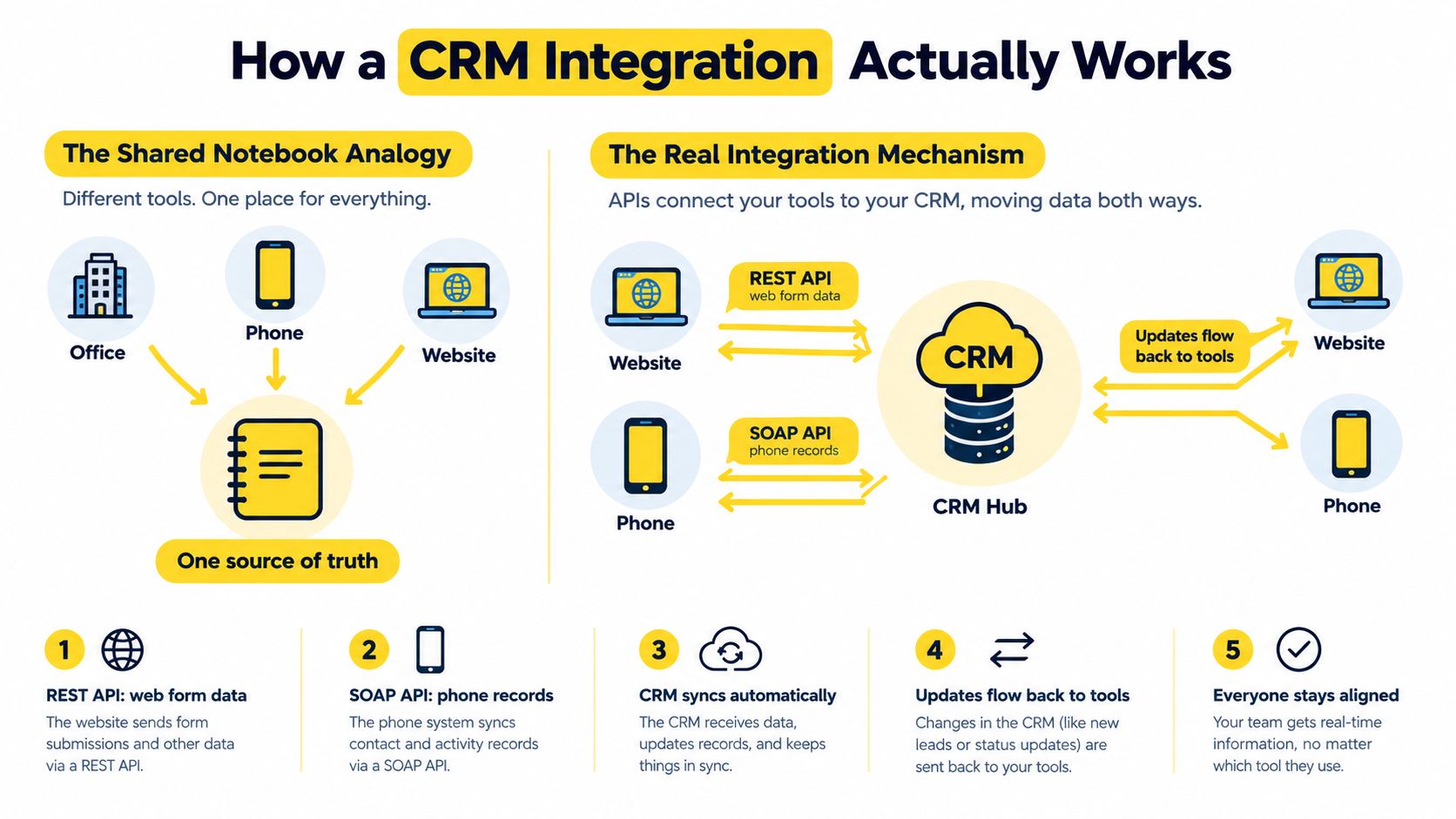
The connection needs a rule for when data moves:
A connection does not automatically mean updates happen immediately or travel both ways. Ask which events trigger a transfer, how delays are handled, and whether the destination can return changes. Then agree which record wins if systems disagree.
If your website also exchanges content with business applications, the CMS integration guide for businesses covers that related setup. Keep website content requirements distinct from the rules for customer records.
For cleaning operations, map an origin field so your team can tell whether an inquiry came from the website, a phone call, or a referral. This lead-source tracking resource is a useful reference for organizing those sources.
Practical rule: Every transfer should make clear where a value goes and who can change it.
If the CRM marks an estimate accepted while the scheduling tool shows no appointment, your team needs a rule for what each status means and which system owns the booking. That decision belongs in your operating rules before launch, not in an assumption about what the connector will do.
On Monday morning, a web inquiry may be waiting in the inbox while you are already planning the day's jobs. A well-designed integration can put that inquiry in front of the right person with enough context to act. The useful outcome isn't fewer apps. It's fewer unfinished handoffs.
For a cleaning business, that takes more than connecting two tools. Decide which system owns each important record before information starts moving: the CRM can own the customer contact, the estimating tool can own the estimate, and the scheduling system can own the booking. This prevents a changed status in one place from contradicting another.
Consider a homeowner who submits a service form after your route is finished. A configured workflow can create a CRM lead and assign it to the person responsible for that service area. The lead should carry useful details, such as the service address and requested cleaning, so the next conversation can pick up where the form left off.
Estimates follow the same principle. If a form feeds the details into an estimating workflow, the result can sit beside the prospect's contact record. Agree on the pricing inputs first, and send exceptions for review instead of letting unclear information produce a misleading estimate.
A returning customer should not have to repeat every intake answer. Match the new inquiry to the correct contact, then keep a new service address distinct from an existing property. That context helps the person answering the phone ask about what is missing rather than start from scratch.
Measure the connection by whether your team can handle the next customer interaction without searching another screen.
For recurring work, choose a CRM for service-industry businesses based on how it handles customer relationships, multiple properties, and new requests, not only how it stores contact details.
Start with the handoff that causes the most trouble in your week. Perhaps inquiries wait for an owner, estimate details differ between channels, or the person answering the phone cannot see whether a booking is confirmed. Pick one outcome and decide which system is responsible for it.
A flow that only adds notifications may leave the underlying confusion untouched. Clear ownership and useful context let your team act with fewer searches and fewer repeated questions.
A customer asks for a cleaning estimate, accepts it, then books a visit. Before choosing software, decide which system owns each step: where the estimate is authoritative, which record holds the customer's contact details, and where a booking becomes confirmed. Integration is the handoff between those systems. If ownership is unclear, a connection can copy conflicting information faster.
The simplest method depends on what happens when the workflow fails. A delayed reminder may be manageable; a missing booking update can leave a crew without the right schedule. Match the method to that consequence, and to the fields your team needs.
| Method | Best for | Setup effort | Limits to watch |
|---|---|---|---|
| Zapier or similar no-code middleware | Narrow workflows with supported triggers and actions | Usually configuration-led, subject to connector support | Task allowances, polling delays, field coverage, and plan costs |
| Vendor-built native connector | Supported connections between applications you already use | Depends on the vendor's configuration requirements | Missing fields, fixed behavior, and limited troubleshooting access |
| Direct API integration | Custom field rules and business-critical exchanges | Requires technical implementation and maintenance | Authentication, API allocations, error handling, and version changes |
| Webhook-led integration | Events that need prompt attention | Requires an event receiver or compatible middleware | Repeated deliveries, processing failures, and unsupported event types |
These methods can work together. A webhook can announce that an estimate was sent, middleware can prepare the details, and an API can update the CRM. HubSpot's webhook documentation describes subscriptions for events involving contacts, deals, conversations, and other records. This approach can suit immediate lead routing or starting follow-up after an estimate, if the application provides the event you need.
For a small operation without technical staff, start with a supported no-code workflow when the action and fields fit. For example, it might create a CRM task after an estimate is delivered. Check the actual triggers and fields before relying on it. A connector that handles reminders may not cover booking changes.
Also check how often information transfers, how task use and costs may change as activity grows, and what happens after a failed action. The setup screen shows how to start, not how to recover.
For a revenue-critical handoff, choose a method that makes processing and failures visible. A direct API connection can follow custom ownership rules, but someone must maintain it. Webhooks can send the event signal; they do not take responsibility for handling errors.
Managed middleware sits between a ready-made connector and custom software. Before choosing a provider, ask who will map property and estimate fields, investigate failed transfers, and safely retry a missed event. Those answers matter more than a promise to connect every tool. For broader marketing context, see how Machine Marketing explains it. Keep the decision tied to the cleaning workflow and the system that owns each record.
Set ownership rules before granting write access. Otherwise, you're allowing software to make business decisions nobody has agreed on.
Treat ownership as a field-level agreement, not a declaration that the CRM owns everything. A practical design might assign customer status to the CRM, property measurements and estimate calculations to the estimating system, and confirmed appointments to the scheduling application.
Write down what happens when values disagree. An office correction to a service address shouldn't be overwritten by an older inquiry, and an estimate shouldn't become a confirmed booking merely because someone opened a message.
The checklist below captures the controls to settle before launch.
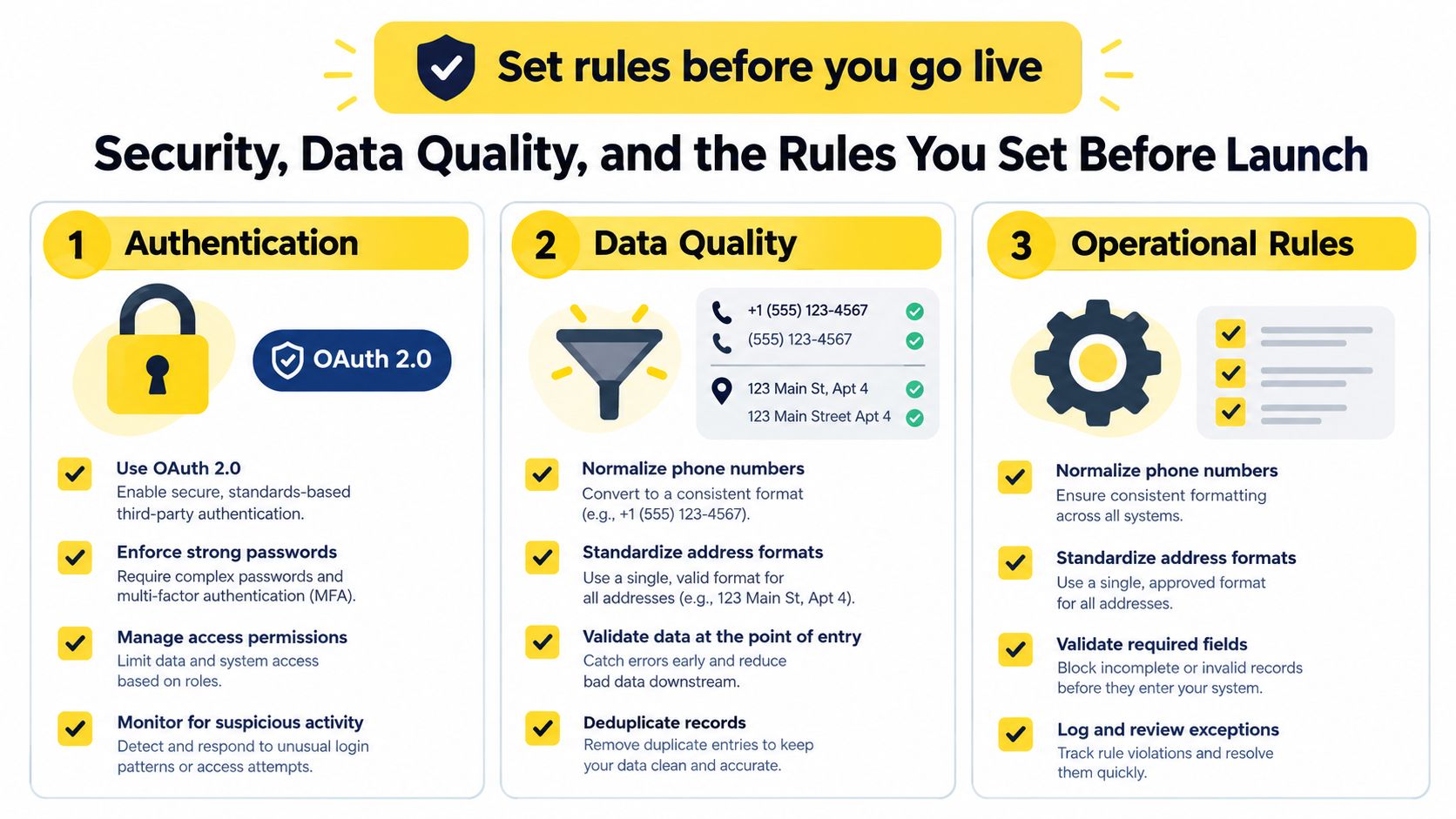
OAuth 2.0 provides delegated access without handing the connected application your password. Permissions can be limited through scopes, so request only the access your workflow needs; Radware's API security guidance also addresses authentication, access controls, validation, and secure communication.
Use that access carefully:
Idempotency means a repeated delivery updates the intended record rather than creating another one. Give each event a source-system ID, timestamp, schema version, and correlation ID, a tracking label that follows the event through processing.
Log the request, response, retry count, and final outcome. Use queues and retry policies so temporary failures don't ignore leads; Salesforce's API limits documentation explains allocations and timeouts that integrations must account for.
An AI conversation can transfer incomplete or mistaken information just as efficiently as correct information. Flag uncertain property details, preserve relevant evidence, and provide a human-review route before questionable inputs affect pricing or customer communication.
Validity's 2025 CRM data research found that 76% of CRM users and administrators said less than half their data was accurate and complete, while 37% reported revenue loss from poor data quality.
Launch checkpoint: Fast synchronization isn't proof that the information deserves to be trusted.
For a proposed connection, review the relevant provider's practices, including the Estimatty privacy policy. A policy review doesn't replace your own decisions about access, retention, or consent-sensitive information.
Consider a proposed workflow using Estimatty, an AI-powered web and voice estimator for cleaning businesses, alongside your existing CRM. The aim is to create a traceable handoff, not to assume every destination supports every field automatically.
The illustration shows how lead capture and scheduling can fit into the same operating process.
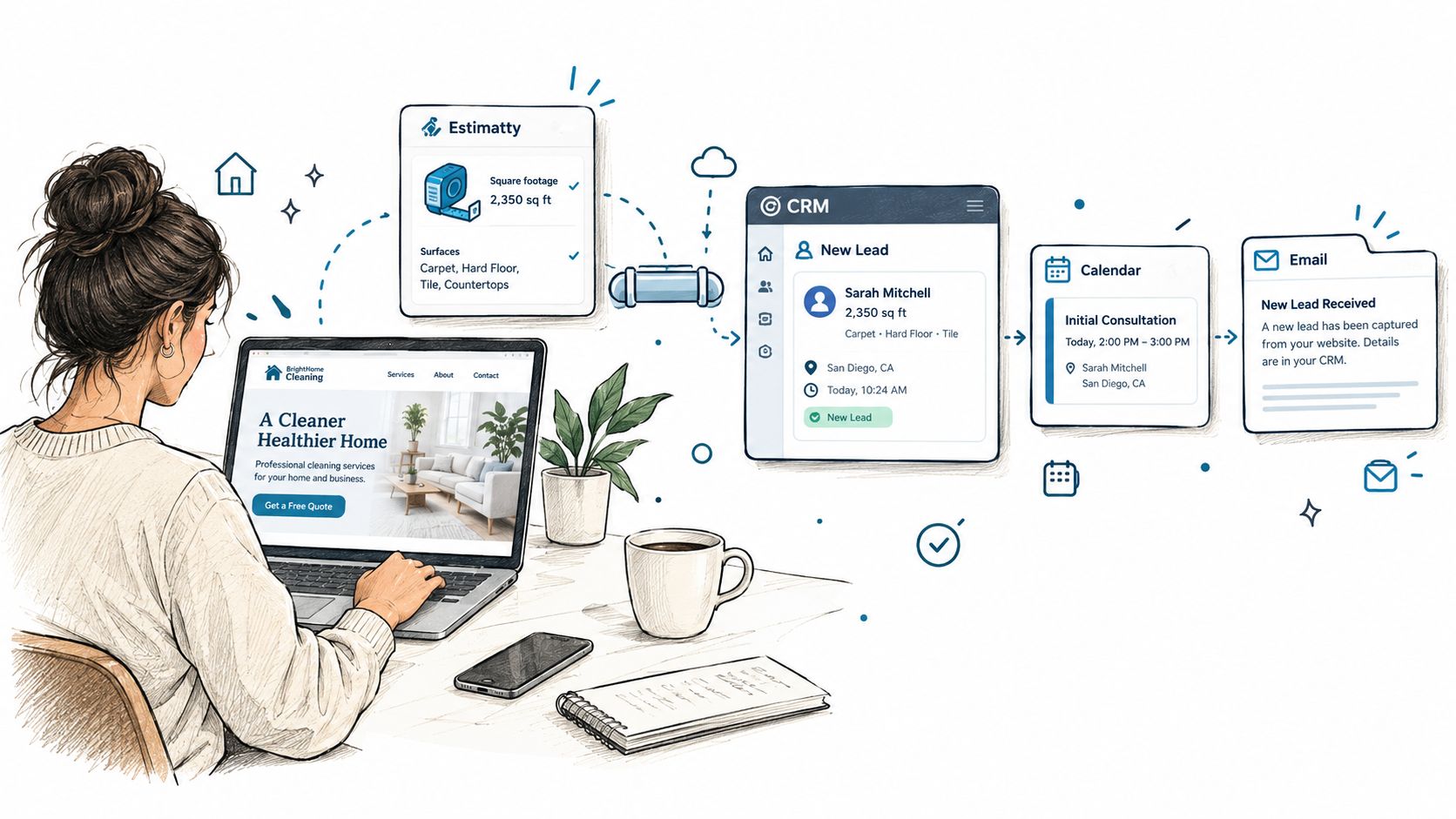
A prospect visits your website and uses the widget to discuss a cleaning request. It captures square footage, surfaces, and urgency, then generates an estimate using your configured pricing. Your integration should create or update the CRM contact, record the estimate outcome, and notify the responsible team member.
Map decision-useful information into structured fields:
If the prospect doesn't book, configure a follow-up task against that opportunity. Once scheduling confirms a booking, the task should no longer prompt an unnecessary sales call.
Don't copy payment credentials, unrelated personal disclosures, or unrestricted conversation transcripts into the CRM by default. Retain relevant evidence in an access-controlled location and reference it when your team needs to resolve an exception.
If Jobber is your destination, use the Jobber integration page to assess the proposed connection and verify the available actions. For further workflow reading, visit the cleaning sales and estimating blog.
The accompanying video provides another way to review the workflow.
The same design discipline applies to a proposed Pipehire hiring flow: keep applicant status and hiring permissions separate from customer sales data. The cleaning hiring operations blog is a deeper reference for that side of the business.
A CRM integration is a small operating project, not a feature toggle. Give it an owner, a narrow scope, and a definition of done.
Bain's 2025 survey of more than 1,200 commercial executives found that 70% of companies weren't effectively integrating sales plays into CRM and revenue-technology tools, while more than half cited incomplete or low-quality data as an obstacle. Connecting tools without agreeing on the process isn't enough.
Use a short project checklist:
Monitor write-success rate, duplicate rate, and event-to-CRM latency during your initial month. Define acceptable results before launch, then investigate exceptions instead of counting transferred records as success.
Use sales pipeline automation to consider the next action your workflow should support. For today, choose the inquiry you're most likely to lose track of and write down where it should go, who should act, and how you'll know they did.
Estimatty offers web and voice intake that captures cleaning requirements, produces estimates, and supports a handoff to your business tools. Visit Estimatty with your current CRM and a sample inquiry in mind, then check how that workflow can carry the contact details, estimate outcome, and follow-up into the record your team uses.