
November 6, 2026
Residential Deep Cleaning Services: What's Included
Compare residential deep cleaning services by scope, price and provider, with a room-by-room checklist and tips for getting fair, instant estimates.

Wednesday, September 9, 2026
Learn how sales pipeline automation helps cleaning businesses streamline leads, close more deals, and grow revenue efficiently in 2026.
A lead comes in while you're cleaning a property, driving between jobs, or asleep. By the time you see it, the prospect has already contacted two other companies. The problem usually isn't your estimating skill. It's the gap between lead arrival and structured response.
Sales pipeline automation closes that gap. For a cleaning business, it connects inquiries, qualification, estimates, callbacks, scheduling, and follow-up into one operating process. The right setup doesn't try to replace every human conversation. It makes sure your team spends those conversations on qualified prospects instead of hunting through Gmail, spreadsheets, voicemail, and text threads.
Monday starts with three unanswered opportunities. A commercial estimate request arrived through the website on Sunday night. A homeowner left an after-hours voicemail at 6:40 AM. A property manager emailed on Saturday asking for a callback about recurring service.
The owner opens Gmail first. Then the phone system. Then the spreadsheet where last week's estimates are supposed to be tracked. One lead has a company name but no square footage. Another has a phone number but no service details. The property manager's message is buried below newsletters and vendor notifications.
By midmorning, the owner is guessing which prospect deserves attention first. The commercial request might be valuable, but the residential caller may be ready to book immediately. Nobody knows whether the previous week's estimates were opened, whether anyone promised a callback, or whether a sales rep already contacted the property manager.

That's the exact situation sales pipeline automation is designed to fix. Every website form, call, chat, and email should create one lead record with an owner, service type, timestamp, and next action. The system should acknowledge the inquiry immediately, collect missing information, and route the opportunity to the right person.
Operator's rule: Monday morning should be triage, not detective work.
For cleaning companies, an after-hours answering process can protect the first response without forcing the owner to stay beside the phone. The workflow described in this 24-hour phone answering service guide matters because answering is only useful when the caller's information reaches estimating and booking without being re-entered.
A practical pipeline sends the homeowner an acknowledgment, alerts the residential estimator, and starts a callback sequence. It sends the commercial inquiry to the account manager with fields for facility type, square footage, frequency, location, and decision timeline. It gives the property manager a clear status instead of leaving the message in an inbox.
The bottleneck is rarely a lack of effort. Cleaning owners work hard. The leak comes from unassigned leads, inconsistent intake, and follow-up that depends on memory. Automation turns those loose ends into a visible queue, so the team can respond quickly and the owner can see what needs attention without reconstructing the weekend.
A manual cleaning pipeline breaks at handoffs. A website quote request sits beside voicemail, text messages, and inbox alerts. The owner remembers one callback, an estimator sees another, and nobody has a dependable record of what was promised. By the time someone reviews the spreadsheet, an after-hours lead may already be comparing another cleaner.
Sales pipeline automation replaces memory-based coordination with rules that move each opportunity through estimating and booking. A form, call, or chat creates one contact record with its source, service category, location, and owner. A stage change can create a task, notify the right employee, update missing fields, or start the next customer message.
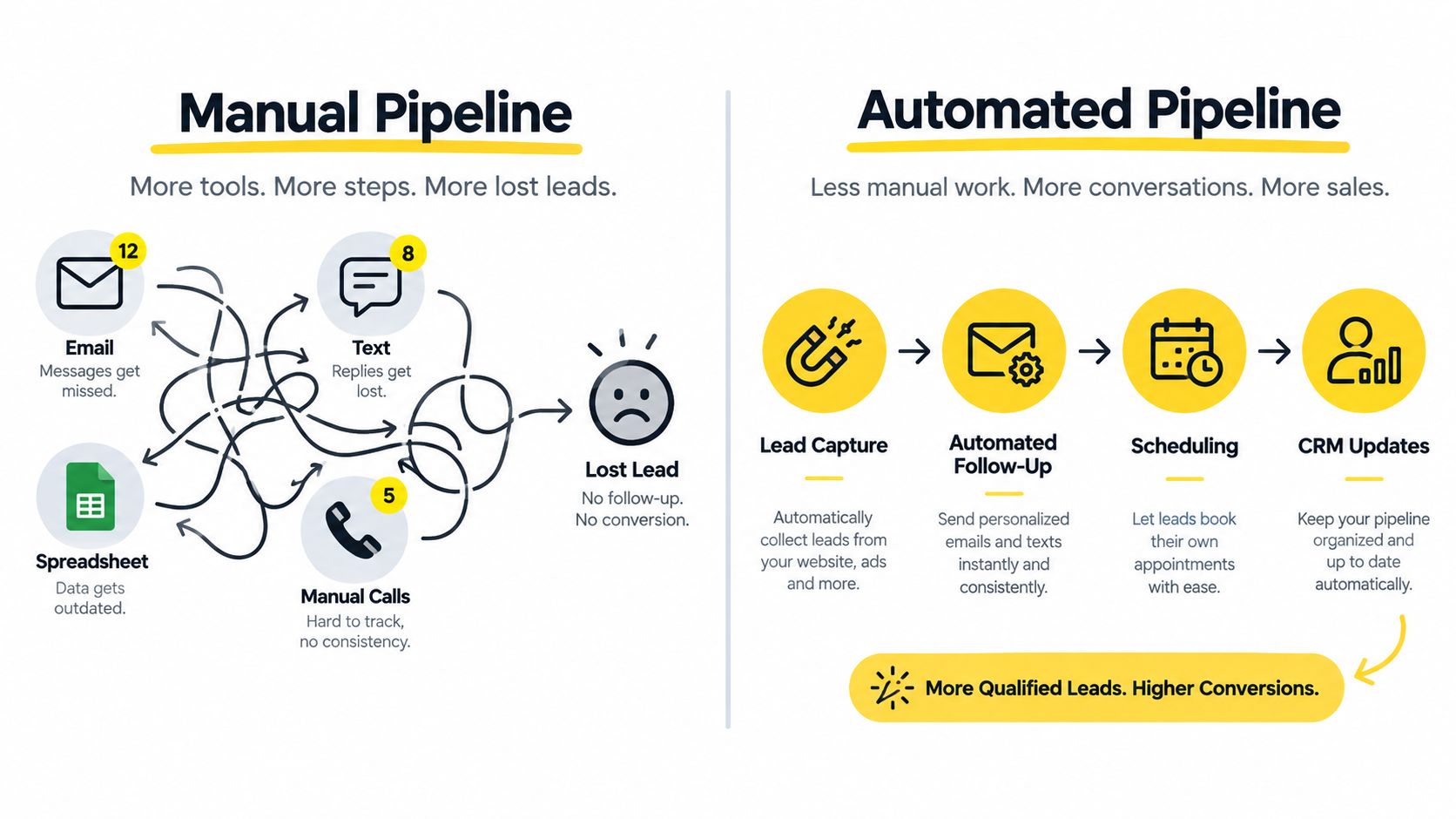
A pipeline stage should mark a customer milestone, not an estimator's vague impression. A cleaning company can use:
A workflow trigger starts an automated action. A new quote form can send an SMS and assign an estimator. Sending an estimate can create a follow-up task. A customer reply should stop reminder messages and alert the person handling the quote.
Lead routing determines ownership. Send residential requests by service area or estimator availability, commercial inquiries to the commercial seller, and urgent requests to the on-call employee. A cadence defines the planned touches, such as an immediate acknowledgment, a reminder, and a human callback task.
The system does not sell every contract without staff involvement. It connects rules and integrations across capture, qualification, estimating, follow-up, and booking, so employees stop copying details between tools. For a cleaning-specific example, review this guide to AI sales automation for cleaning services.
For trigger-based process design, these RealEstateCRM workflow automation tips offer a useful operating pattern. Define the event, assign responsibility, set the next action, and document the exception when a customer does not follow the expected path.
A CRM can forecast from stage, expected value, and probability, but the forecast depends on accurate updates. If an estimator leaves stale quotes in “follow up,” the dashboard shows activity while bookings remain flat. The right automation keeps the queue visible and the responsibility human, especially when a quote needs judgment, a property requires clarification, or a customer expects a personal callback.
A cleaning pipeline works as a chain. If capture is strong but routing is weak, leads wait. If routing works but qualification is incomplete, estimators waste time. If estimates go out but follow-up isn't assigned, revenue disappears after the most important customer decision.
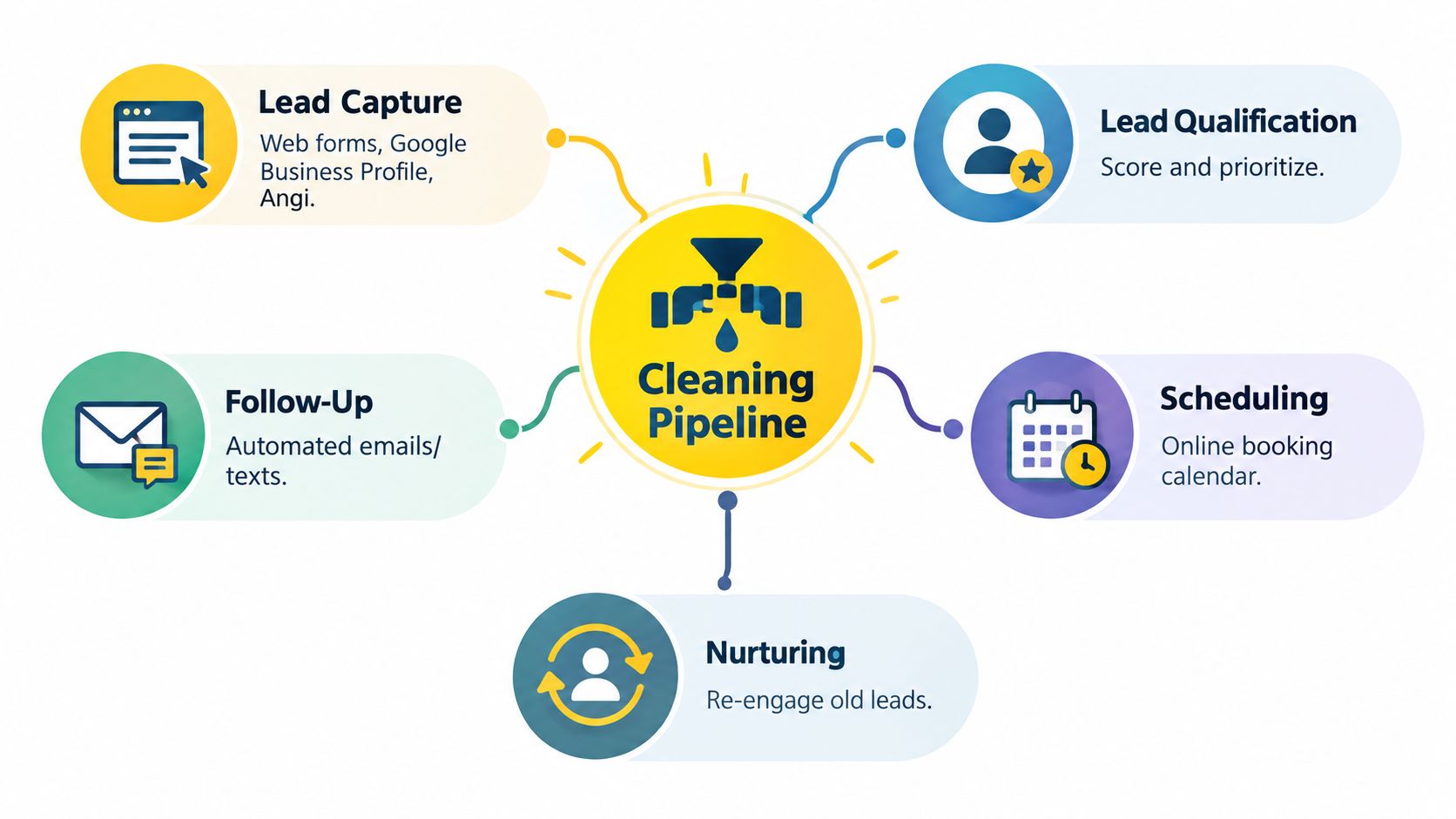
Lead capture brings website forms, Google Business Profile calls, Angi inquiries, chat conversations, and walk-ins into a unified record. The record should retain the original source and the details needed for the next step. Don't make an estimator search five systems to discover how someone contacted you.
Lead routing assigns ownership based on business rules. A 20,000 square foot office inquiry should reach the commercial representative within the company's defined response window, rather than landing in the same queue as a small residential request. Emergency calls should go to whoever is on rotation, with an internal alert that makes the urgency obvious.
Qualification should collect the information that changes the estimate or booking decision. For residential work, that can include home size, bedrooms, bathrooms, service frequency, add-on surfaces, location, and timing. For commercial work, include facility type, square footage, cleaning frequency, access requirements, and decision-maker involvement.
A residential estimate over $400 can trigger a same-day callback task. That isn't a universal pricing rule. It's an example of how an owner can create a threshold that matches the company's economics and gives higher-value opportunities more attention.
Follow-up automation should stop relying on a single email. Use an immediate acknowledgment, a scheduled check-in, and an estimate-expiry or decision reminder. The workflow must also recognize a reply, booking, or opt-out and remove the prospect from irrelevant messages.
Forecasting pulls stage, expected contract value, service category, and next action into a weekly revenue view. It helps an owner distinguish new inquiries from qualified opportunities, estimates awaiting a decision, and jobs that are booked.
An independent benchmark associates sales automation across lead management, pipeline tracking, and activity logging with 10% to 15% higher win rates compared with manual processes. The sales automation benchmark connects that outcome to standardized fields, activity records, and clearer pipeline stages.
The practical lesson is simple. Capture creates visibility, routing creates ownership, qualification protects estimator time, follow-up creates momentum, and forecasting exposes leakage. A cleaning CRM that contains only contact names isn't a pipeline. It's an address book with extra screens.
For broader context on how CRM systems support service businesses, this service industry CRM guide is useful when deciding which customer and job details belong in the central record.
Cleaning buyers rarely reward the company that responds last. They're often comparing providers while they're at work, moving house, preparing for an inspection, or trying to solve an urgent mess. Speed to estimate and speed to booking affect whether your team gets a real conversation at all.
The response-time evidence is strong enough to design around. A lead contacted within 5 minutes can be 21 times more likely to qualify than one contacted after 30 minutes, according to lead-response-time benchmark summaries. The same source reports that a 1-minute response has been associated with a 391% lift in conversion compared with slower follow-up.
Those figures should become workflow rules, not motivational posters:

Track lead response time, estimate-to-win rate, days from inquiry to first clean, no-show estimate rate, revenue by lead source, and pipeline coverage. These measures show whether the process is creating booked work, not just activity.
B2B benchmark reporting places average lead response time at 47 hours, with 23% of companies responding within 5 minutes. It also reports a 32% close rate for leads contacted in under 5 minutes, compared with 12% when contact happens after 24 or more hours, as summarized by lead response time benchmarks.
A separate analysis of 55 million sales activities across 5.7 million inbound leads at more than 400 companies found that 57.1% of first call attempts happened after more than a week. The InsideSales response-time research shows why a task sitting unassigned isn't a harmless administrative issue.
On Monday, I want four numbers visible: new leads by source, median response time, estimates awaiting action, and booked revenue from the active pipeline. Website visits, email opens, and total tasks can be useful diagnostics, but they're not proof that the pipeline is healthy. Use this response-time improvement guide to turn the dashboard into operating rules rather than a report nobody uses.
Don't begin with software selection. Begin with the path a real cleaning lead takes from inquiry to scheduled job. Write down every source, handoff, required detail, and customer decision. If you skip that mapping exercise, the CRM will preserve confusion in a more expensive interface.
During weeks one and two, centralize lead capture. Connect website forms, call tracking, chat, social inquiries, and marketplace leads to one inbox or CRM. Stop treating the spreadsheet as the system of record. Keep an export for historical reference, but make new opportunities enter the same structured process.
During weeks three and four, standardize stages and required fields. Define what “qualified,” “estimate sent,” “follow-up,” and “booked” mean. Require the fields that affect pricing and routing, such as property type, location, size, frequency, urgency, and requested service.
A stage should answer three questions:
In the second month, automate routing, estimate triggers, acknowledgment messages, and follow-up sequences. Start with the repetitive paths that create the most delay. Don't automate complex exceptions until the basic residential and commercial flows work reliably.
In the third month, connect scheduling, estimating, dispatch, and payroll. A won deal should pass the accepted scope and customer details to operations without an employee retyping the same information into another system.
Owners usually stall in predictable places. They choose a CRM before defining stages, over-customize the launch, or assume staff will learn the process without training. Avoid all three.
Momentum beats polish: Ship a working, slightly ugly pipeline in 30 days instead of waiting 90 days for a perfect system nobody has tested.
Train the team with real leads, including after-hours requests, incomplete forms, duplicate contacts, revisions, cancellations, and unqualified properties. Review failures weekly. Fix the rule that caused the mistake instead of blaming the person who had to work around it.
The most expensive automation failures don't always look like failures. The forms submit, notifications fire, and the dashboard contains plenty of records. Yet the business still loses estimates because the process underneath the automation was never clear.
Automating a broken process multiplies bad intake. If estimators don't agree on how to price an occupied home, a commercial facility, or an add-on surface, the system can distribute inconsistent information faster. The margin leak appears later as rework, discounting, and avoidable callbacks.
Over-segmenting lead sources creates attribution noise. If every campaign, landing page, referral, and marketplace variation receives a separate pipeline path, nobody can quickly tell which source produces booked jobs. Keep source tracking detailed enough for decisions, but don't build a maze that requires an analyst to interpret.
Using email-only follow-up misses residential behavior. Many homeowners respond to texts while ignoring inboxes. If your system sends an estimate by email but never creates a two-way SMS path, the prospect may not see your work at the moment they're ready to decide.
Leaving stale estimates in “Follow Up” inflates expected revenue. Every open opportunity needs an owner, a deadline, and a defined next action. If the prospect has gone quiet, move the record to nurture or closed-lost with a reason. Don't let dead estimates make the forecast look healthy.
Buying disconnected tools brings manual work back through the side door. A form tool, estimator, CRM, scheduler, and messaging platform can each work perfectly while still forcing someone to copy a customer from one tab to another.
The same evaluation discipline applies beyond sales software. When reviewing operational platforms, this guide to common telematics platform pitfalls is a useful reminder to inspect integrations, ownership, data flow, and exception handling before buying based on a polished demo.
Cleaning companies often assemble software one emergency at a time. A form tool handles inquiries, a separate texting app handles replies, estimating lives somewhere else, the CRM contains partial records, scheduling runs in another calendar, and reviews come from a final platform. Each purchase solves a local problem while creating another handoff.
A consolidated stack of 4 to 6 integrated systems is the direction highlighted in recent sales-technology coverage, which describes platform consolidation and integrated workflows as increasingly important. The sales trends coverage from Outreach also emphasizes that buyer-facing AI workflows need governance, context, approvals, and exception handling.
| Function | Recommended Tool Category | Sprawl Alternative |
|---|---|---|
| Lead capture | Website forms, call tracking, chat, and unified inbox | Separate form, voicemail, marketplace, and social inboxes |
| Pipeline management | CRM with defined stages, owners, fields, and tasks | Spreadsheet plus personal email folders |
| Estimating | Automated cleaning estimator connected to the CRM | Manual calculator or estimate document rebuilt for every lead |
| Messaging | Two-way SMS and email automation | Email-only follow-up and disconnected texting |
| Scheduling and dispatch | Shared booking calendar or field-service platform | Individual calendars and phone-based scheduling |
| Reviews | Review-request automation tied to completed jobs | Manual requests sent when someone remembers |
The integration map should be straightforward:
Use native integrations where they're reliable. Use middleware such as Zapier when the systems don't connect directly, but document every trigger and field mapping. If a phone number changes format or a service type arrives under an unexpected label, the workflow should flag the exception instead of creating a broken record.
The best stack is not the one with the most features. It's the one where a lead can move from inquiry to accepted estimate without a person becoming the integration layer.
A homeowner submits a cleaning request on Tuesday evening after work. The CRM captures the contact, records the service details, and routes the lead by zip code to the right estimator. The estimating workflow collects the property information needed for pricing, including square footage, surfaces, service type, and urgency.
Estimatty handles web and voice interactions, gathers property details, creates estimates, sends them by SMS or email, and passes lead information into connected CRM or booking workflows. It fits cleaning companies whose main constraint is slow, inconsistent pricing rather than a lack of inquiries. Owners can also use pipehirehrm.com when additional booked work creates pressure to recruit cleaning employees.
The estimate should reach the homeowner while the request is still active. The CRM records whether it was sent, opened, revised, accepted, or declined, then schedules the appropriate follow-up. If the prospect opens the estimate without replying, the workflow sends a reminder after the defined interval. If the homeowner requests a revision, the estimator sees the activity, adjusts the scope, and keeps the revised estimate tied to the original conversation.
That connection matters after hours, when a lead can easily move to another cleaning company. The customer's information stays attached to the job instead of being rebuilt from a text thread, voicemail, or scattered notes.
Start with the leak costing the most booked work. Delayed or inconsistent estimates call for automated estimating connected to the CRM. After-hours inquiries that sit untouched require lead routing and a prompt first response. A team sending estimates without clear next steps needs stage ownership, follow-up deadlines, and a defined handoff to booking.
The right setup gives each inquiry a visible next action, from property details through accepted estimate and scheduled cleaning. Automation should remove repetitive data entry while leaving staff responsible for exceptions, unusual scopes, and customer conversations.