October 7, 2026
A Quote on Consistency and Success for Cleaning Businesses
Discover a powerful quote on consistency and success tailored for cleaning professionals, with practical tips to apply it to marketing and teams.

Monday, October 5, 2026
Find the best Jobber alternative for your cleaning business. Compare top field service tools, AI estimating, pricing, and features to scale your operations.

Most advice about choosing a Jobber alternative starts with the wrong question. Owners are told to compare dispatch boards, invoice templates, mobile apps, and integrations, then pick the platform with the longest feature list. That approach makes sense for businesses built around irregular, high-value repair calls. It misses how cleaning companies make money.
Cleaning operations depend on recurring visits, dense routes, consistent pricing, and fast lead conversion. A prospect who submits a request at night doesn't care whether your scheduler has another reporting view. They want a clear price and a simple path to booking. The right platform should match that operating rhythm first, then handle scheduling and billing without creating more administrative work.
| Business situation | Strongest software direction | Why |
|---|---|---|
| Solo residential cleaner | Lightweight scheduler plus instant estimating | Keeps overhead low while capturing leads outside working hours |
| Small recurring cleaning team | Cleaning-focused workflow with recurring billing and route discipline | Supports repeat visits without forcing complex enterprise processes |
| Marketing-led residential company | Housecall Pro or a similar platform | Combines field operations with built-in marketing tools |
| Large janitorial or franchise operation | ServiceTitan or another enterprise platform | Provides deeper dispatch, analytics, and multi-team controls |
| Cleaning company losing website and phone leads | AI estimating and booking layer | Addresses the conversion gap before adding heavier dispatch software |
The best Jobber alternative for cleaning businesses isn't automatically the most powerful field-service platform. It's the stack that removes the bottleneck costing you the most money.
The assumption that a highly rated field-service management platform will work equally well for every service company is outdated. Cleaning businesses don't operate like HVAC, plumbing, or electrical contractors. A maid service may visit the same home every week, a turnover team may repeat similar jobs across a concentrated area, and a janitorial company may manage recurring commercial accounts with defined checklists.
Those patterns place different demands on software. Route density and repeat scheduling often matter more than equipment history or emergency dispatch logic. A cleaning owner needs to see which crews can complete nearby jobs efficiently, which clients are due for service, and which new inquiries can be priced without a phone tag cycle.
The market context supports this specialization. One 2026 industry summary estimated the global cleaning services market at roughly $482 billion, with a projection of $859 billion by 2030 and an annual growth rate of 7.5%. The same source estimated the U.S. janitorial services market at $112 billion, with more than 1 million cleaning businesses operating in the country and 41% of households using recurring cleaning services. Those figures are reported in Jobber's cleaning industry trends overview.
Recurring service creates a different operational priority. The system must preserve the client's preferred day, frequency, crew notes, access instructions, and pricing rules without making staff rebuild the job every time. It must also handle exceptions, such as skipped visits, holiday changes, deep cleans, and add-ons.
Generic FSM tools can perform many of these tasks, but that doesn't mean they make them easy. Owners often end up adapting trade-oriented workflows to cleaning terminology and processes. The software may technically support recurring jobs while still failing to make recurring work fast for the office team.
Practical rule: Choose software around the job pattern you repeat most often, not the feature list shown in the sales demo.
Lead generation deserves equal weight. Cleaning prospects frequently compare providers quickly, and many inquiries arrive when the owner is driving, cleaning, or unavailable. A business that wants to promote your cleaning business should connect marketing activity to an immediate estimating and booking process, not just collect another form submission.
Before switching platforms, document the handoff from inquiry to completed visit. The workflow described in this guide to service business software is useful for identifying where a generic system adds friction. If the first response, pricing decision, and booking confirmation still depend on manual callbacks, a better dispatch board won't solve the main problem.
Cleaning owners usually start looking for a Jobber alternative after the software becomes a daily workaround. The issue may appear as a scheduling complaint, but the underlying problem is often a mismatch between the platform's design assumptions and the business's service model.
A system built for one-off repair work typically treats each job as a separate event. Cleaning companies treat many jobs as part of an ongoing client relationship. That distinction affects billing, reminders, crew notes, rescheduling, and customer communication.
Consider a recurring residential account. The office needs to maintain a service cadence, assign the visit to the right crew, account for travel time, send reminders, record completion details, and invoice according to the agreed arrangement. A general tool may support each task in isolation, but staff can still spend too much time connecting them manually.
The same issue appears in commercial janitorial work. A manager may need location-specific checklists, recurring shifts, supply notes, attendance visibility, and exception reporting. A platform designed around high-ticket calls can introduce unnecessary objects, statuses, and approval steps for work that should move through a repeatable operating lane.
Route density creates another dividing line. A cleaner's profitability depends on productive travel and predictable crew capacity. A scheduling system that only places jobs on a calendar isn't enough if it doesn't help the owner understand whether appointments cluster efficiently or force avoidable cross-town movement.
Clients judge cleaning companies through communication as much as through the final result. They expect confirmations, arrival updates, rescheduling responses, and clear explanations when the scope changes. If the office must manually copy information between a phone, inbox, calendar, and FSM platform, response quality declines as volume grows.
A cleaning-specific evaluation should therefore ask:
If the answer to several of these questions is “only with a workaround,” the problem isn't necessarily poor implementation. The platform may be aimed at a different industry. The mobile workflow described in this field-service mobile software guide provides a useful standard for judging whether field staff can complete work without returning to the office for basic information.
No single platform wins for every cleaning company. The right choice depends on whether your biggest constraint is marketing, enterprise dispatch, simplicity, or cleaning-specific repeat work.
Housecall Pro is the clearest alternative for an established residential team that wants marketing inside the same operating system. An independent comparison lists it at $59 per month for one user when billed annually. The same comparison notes that Jobber's comparable additional-user add-on is $29 per month, while Housecall Pro's is $35 per month. Those figures appear in this Jobber alternatives comparison.
The trade-off is straightforward. Housecall Pro can make sense when automated marketing, review generation, and follow-up reduce the need for separate tools. Jobber may remain more economical for a small office that mainly needs dispatching and invoicing. Don't choose Housecall Pro just because it has more growth features. Choose it when your team will actively use those features to generate and retain business.
ServiceTitan belongs on the shortlist for large commercial janitorial companies, franchises, and multi-location brands with complex operational controls. One independent guide positions it as the stronger fit at 20 or more technicians, citing dispatch optimization across skill, location, and revenue per job, along with analytics designed for larger operations. That comparison places Jobber as the better fit for teams under 20 technicians, largely because of faster onboarding and simpler drag-and-drop scheduling. See the field-service scheduling comparison for that positioning.
ServiceTitan is not a sensible default for a small residential cleaner. Enterprise depth brings implementation effort, training requirements, and a cost structure that only makes sense when dispatch complexity and reporting needs justify it.
Cleaning-native platforms often make more sense for solo operators and small residential teams because they prioritize recurring schedules, client communication, maid-service workflows, and turnover jobs. Their weakness may be narrower integrations or less advanced enterprise reporting.
Lighter general tools can still work well when the owner needs a clean calendar, invoices, and basic client records. The question is whether the software supports the business's next stage. A solo cleaner shouldn't pay for a complex dispatch engine that won't improve route decisions. A growing team shouldn't choose a simple calendar that breaks once multiple crews share overlapping service territories.
For a more detailed comparison of common options, use this Housecall Pro, Jobber, and ZenMaid analysis. The decisive test is operational: can the tool move a lead from inquiry to correctly priced recurring service without unnecessary staff intervention?
Cleaning software should be evaluated against four connected workflows: estimating, scheduling, invoicing, and CRM. A platform can be excellent at one and still create a leak between the others.
Start by separating an estimate from a quote. An estimate is a rough, educated price that leaves room for refinement when the scope isn't fully known. A quote is a firm price for a defined scope of work. The distinction is explained in Jobber's guide to quotes, estimates, proposals, and bids.
For cleaning companies, the pricing workflow needs both. A prospect may want an initial estimate based on home size and service level, while the business may issue a firm quote after confirming condition, surfaces, access, or specialty requirements.
| Platform Type | Best For | Pricing Model | Estimating Workflow |
|---|---|---|---|
| Lightweight general FSM | Solo cleaners and very small teams | Lower-cost plans or limited user tiers | Manual estimate templates, then staff follow-up |
| Marketing-led FSM | Established residential teams | Subscription with bundled growth tools and user add-ons | Estimate connected to lead capture and follow-up |
| Enterprise FSM | Large janitorial, franchise, and multi-location operations | Custom or premium pricing | Structured pricebooks, rules, approvals, and analytics |
| Cleaning-native software | Recurring residential and turnover operators | Usually designed around cleaning workflows | Service-specific inputs and repeat-job pricing |
| AI estimating layer with FSM | Businesses losing leads after hours | Separate operational stack or add-on approach | Automated intake, instant estimate delivery, and human handoff |
Pricing complexity matters because cleaning jobs vary materially by scope. A 2026 pricing guide reports typical U.S. ranges of $120 to $280 per standard house-cleaning visit, $200 to $500 or more for deep cleaning, and $120 to $420 for move-out cleaning. It also lists common hourly rates of $35 to $75 per cleaner, per-square-foot pricing of $0.10 to $0.30, and per-room pricing from $25 to $100. These ranges are documented in this house-cleaning pricing guide.
That variability makes consistent intake more important than a generic “create estimate” button. A pricing system should capture the inputs that change labor and scope, then apply the same rules every time.
A small residential business shouldn't buy enterprise routing features it won't use. A multi-crew operation shouldn't save on subscriptions while losing profitable jobs because the office can't price inquiries quickly or maintain clean recurring schedules.
Review the total workflow cost, not only the monthly subscription. Include user expansion, payment processing, marketing add-ons, migration labor, training, and the staff time required to maintain manual steps. The cheapest platform on the plan page can become expensive if it forces the owner to answer every inquiry personally.
For many residential cleaning companies, speed to lead is now a more urgent problem than dispatch depth. A perfect route plan can't recover a prospect who chose another provider because nobody responded while the office was closed.
One 2026 industry report claims 62% of cleaning bookings are made online, while a separate Jobber trends report says 80% of service businesses are fully booked or close to it. Those figures are presented in this cleaning business software report. Taken together, they point to a practical conclusion: when capacity is limited, every qualified inquiry deserves an immediate, structured response.
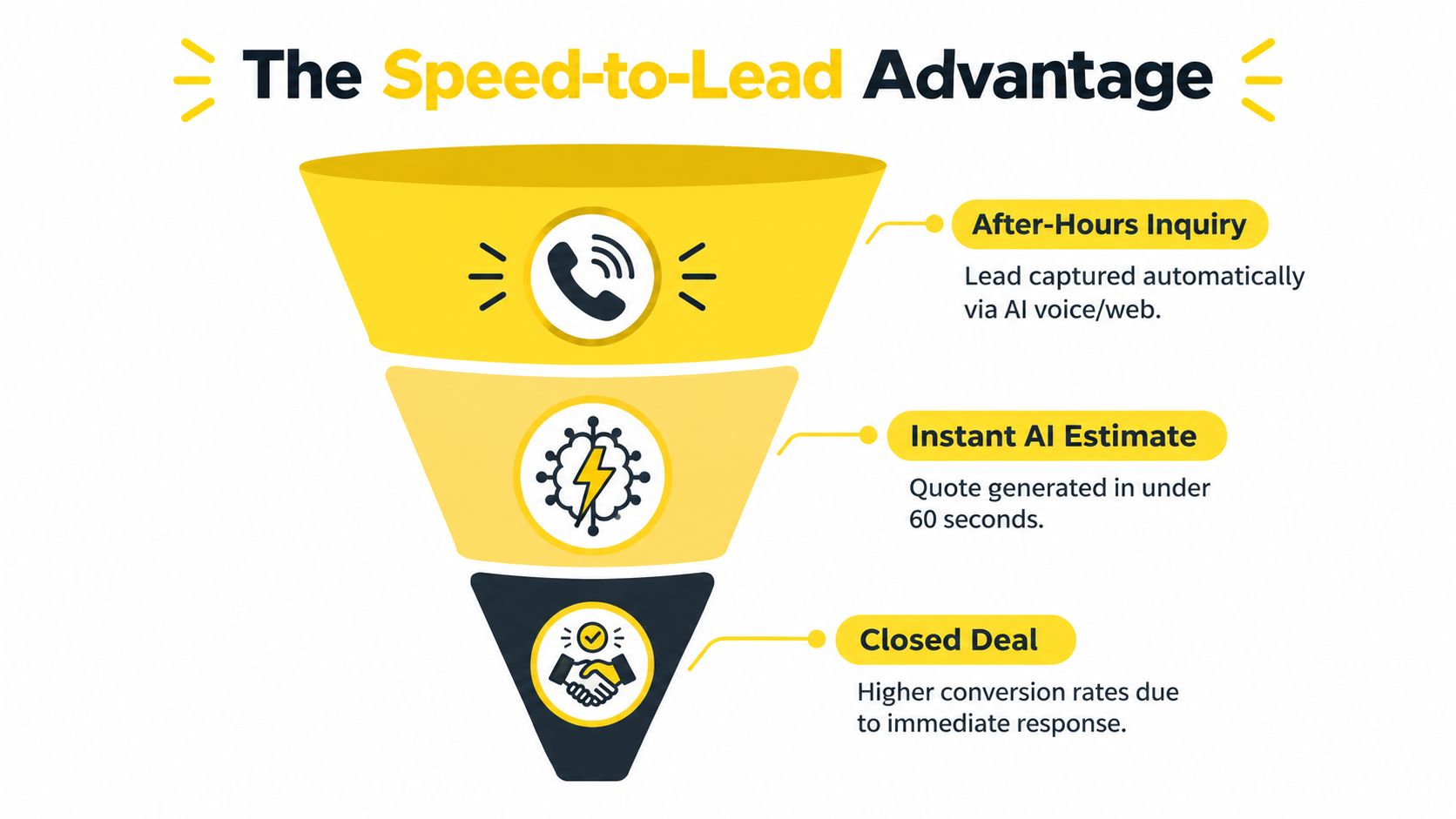
A system such as Estimatty can act as a specialized web and voice sales estimator for cleaning businesses. It collects details such as square footage, surfaces, service urgency, and job type, then sends an estimate through SMS or email in under a minute. Because it operates 24/7/365, the owner doesn't need to add a receptionist just to cover evenings, nights, weekends, and holidays.
Cleaning prices commonly change with home size and service level. A 2,000-square-foot home may cost approximately $110 to $320, or about $0.06 to $0.16 per square foot, while standard home cleaning more broadly falls between $100 and $300 per visit. Deep cleaning and specialty work cost more because they require additional labor, equipment, or disposal. These figures come from HomeGuide's house-cleaning price guide.
That spread makes vague intake risky. If a prospect receives a slow or inconsistent response, the company can lose the opportunity before an estimator confirms the details. Standardized questions and pricing rules reduce callbacks, give the prospect a clear next action, and alert the team when a human should take over.
The underlying calculation should still reflect business economics. One estimating guide recommends accounting for labor hours, crew size, home condition, visit frequency, supplies, travel, overhead, and profit margin. Its formula is estimated labor hours multiplied by hourly labor cost, plus supplies and travel, overhead allocation, and desired profit margin. That method is outlined in this house-cleaning estimate form guide.
The practical case for an AI estimating layer is strongest when the existing FSM already handles calendars and invoices adequately. Instead of replacing every workflow with a heavier platform, the owner can fix the revenue leak at the top of the funnel. The implementation principles in this guide to AI estimating software for cleaning focus on that lead-to-booking connection.
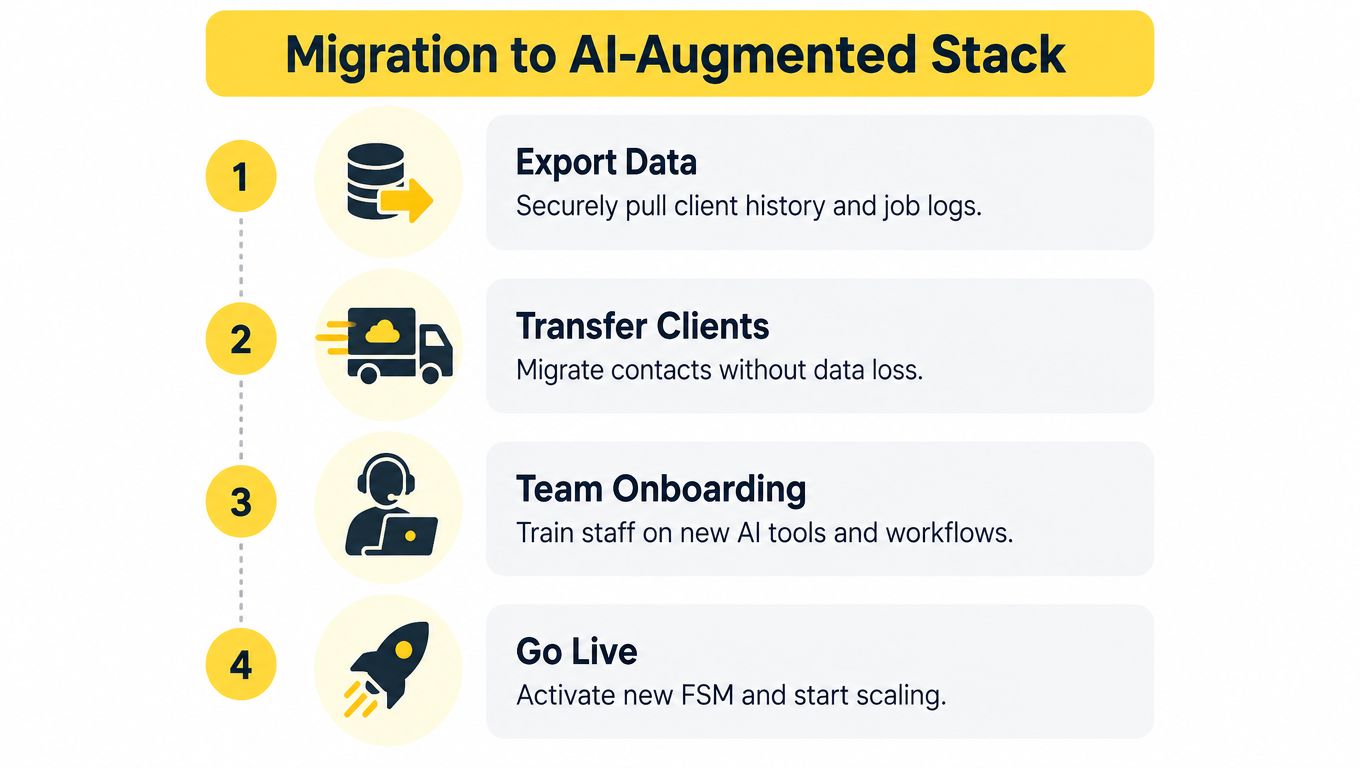
A software migration should improve operations without interrupting service. Treat it as a controlled rollout, not a weekend settings change.
Pull client records, contact details, recurring schedules, job history, notes, invoices, pricing rules, and crew assignments from Jobber. Remove duplicates and obsolete records before importing anything. Keep a secure copy of the original export so the office can verify disputed client history later.
Write down the path from inquiry to completed visit. Decide where estimates are created, how quotes become scheduled jobs, how recurring services are modified, and where payment status lives. Build the new process around real cleaning scenarios, including a first-time deep clean, a weekly recurring client, a skipped visit, and a move-out job.
Don't migrate every account blindly. Start with a manageable group that represents your main service types and route patterns. Compare client details, notes, pricing, and upcoming visits between the old and new systems before expanding the transfer.
Office training won't be enough. Show cleaners how to view access instructions, update job status, record exceptions, and communicate completion from the mobile app. Give managers a clear escalation path for missing information and run the old and new workflows in parallel long enough to catch practical errors.
Hiring must scale alongside the software. More booked work is a liability if crews arrive late, miss instructions, or deliver inconsistent quality. For cleaning employee hiring and HR management, owners can review pipehirehrm.com, then use the get.pipehirehrm.com/blog resource for retention and team-management guidance.
Use this service business scaling guide to connect system changes with staffing, quality control, and management capacity. Go live only after the office can explain the workflow and the field team can complete the essential tasks without constant support.
Solo residential cleaners should choose a lightweight scheduler and an instant estimating tool rather than paying for enterprise dispatch. Keep the calendar simple, automate the first response, and protect your personal time from after-hours inquiries.
Small and mid-sized teams need recurring billing, clear crew availability, and route density controls. Choose the platform that makes repeat visits easy to manage, then add automated estimating if website and phone leads are arriving faster than the office can answer them.
Large commercial janitorial companies and franchise brands should consider ServiceTitan or another enterprise-grade system when multi-team dispatch, analytics, locations, and operational governance justify the complexity. Don't buy that depth merely to appear overly advanced. Buy it when your territory structure and reporting requirements demand it.
The strongest stack often combines a focused FSM with a focused conversion layer. Use scheduling and invoicing software to run the work, and use instant estimates to capture demand before a competitor answers.
Estimatty gives cleaning businesses a 24/7 web and voice estimating system that collects job details, sends consistent estimates by SMS and email, and alerts your team when a prospect is ready to book. Visit Estimatty to see how instant lead capture can complement your Jobber alternative and turn more inquiries into scheduled cleaning work.