October 24, 2026
Area of Service for Cleaning Businesses: How to Map Yours
Learn how to define and map your area of service for a cleaning business using drive time, travel fees and job minimums that protect profit.

Saturday, April 25, 2026
A complete Housecall Pro vs Jobber vs ZenMaid comparison for cleaning businesses. See features, pricing, and find the best fit for your company size.
.png)
If you're comparing housecall pro vs jobber vs zenmaid, you're probably already feeling the problem these platforms are supposed to fix.
A lead comes in while you're cleaning, driving, or asleep. You call back late. The customer books someone else. Then your afternoon gets eaten up by schedule changes, team texts, invoice follow-up, and the usual mess of trying to run a service business from your phone. Most owners don't have a software problem first. They have a lost-time and lost-sales problem.
I've seen the same pattern over and over with residential cleaning companies. They start with spreadsheets, shared calendars, and too many text threads. Then they hit a wall. Recurring jobs get harder to manage. Team communication gets sloppy. Billing drags. The owner becomes the dispatcher, bookkeeper, and sales desk.
That’s where these three platforms come in. Jobber, Housecall Pro, and ZenMaid all help bring order to the back end of the business. But they do it in very different ways, and cleaning owners make bad software decisions when they lump them together.
One is a polished generalist. One is a broad all-in-one field service machine. One is clearly built for maid service workflows.
The key decision isn't which one has the prettiest demo. It's which one fits how your cleaning company runs today, and what kind of business you're trying to build next.
A typical owner gets to this search after a few painful weeks.
You miss two calls on a Saturday. A recurring client wants to reschedule. A cleaner calls out. An invoice is still unpaid. Someone on the team is asking where the gate code is for a job they should already have full details for. By Sunday night, you're not thinking about growth. You're just trying to stop the business from feeling chaotic.
That’s why cleaning owners end up looking at housecall pro vs jobber vs zenmaid. They want one system to stop the daily scramble.
Most residential cleaning companies aren't asking for flashy software. They want basic business control.
The problem is that all three tools promise some version of this. Their sales pages blur together. In practice, they are not built the same way.
Software affects hiring, scheduling, customer experience, and cash flow. If you pick the wrong platform, your team works around it every day. That creates friction you pay for in admin time, mistakes, and missed opportunities.
Practical rule: Pick software for the workflow you run most often, not the feature list that sounds impressive in a demo.
A residential maid service with recurring routes doesn't need the same architecture as a multi-service home business. That’s the mistake many owners make with Jobber and Housecall Pro. They buy a broad field service system, then realize they’re forcing maid workflows into software built for many trades.
Here’s the straight version.
That distinction matters. These aren't just feature sets. They're operating models.
A cleaning company can survive with imperfect scheduling software. It struggles to grow when the owner is still chasing leads, building quotes by hand, and patching together follow-up outside the system. That is the frame for this comparison.
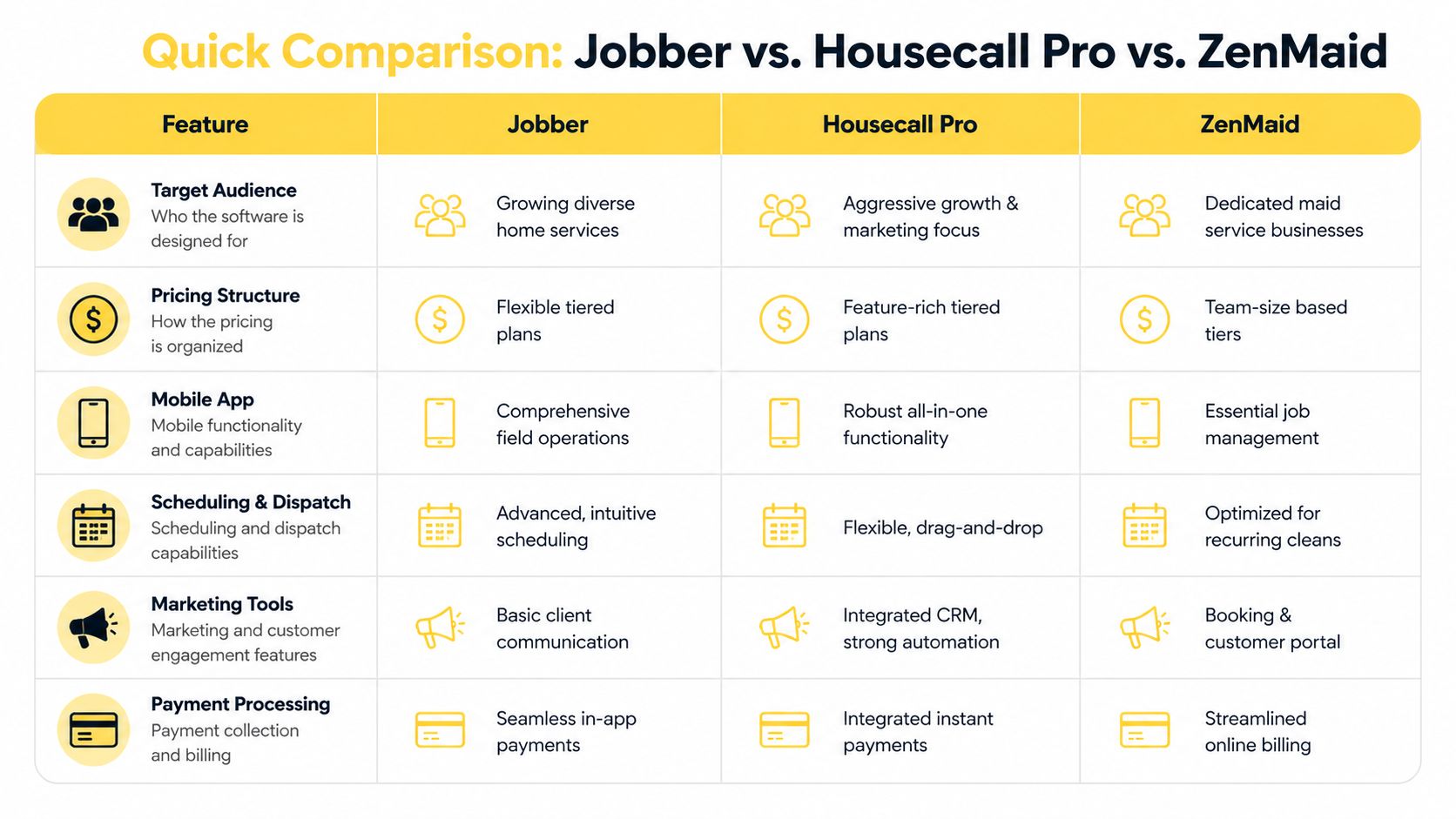
These three platforms are job management systems first. They help you schedule work, manage staff, invoice clients, and keep the calendar under control. None of them fixes the front end of the sales process well enough on its own. If you want a complete system, pair your operations platform with a sales capture and estimating layer such as Estimatty's Jobber integration for cleaning quotes and lead capture.
| Feature | Jobber | Housecall Pro | ZenMaid |
|---|---|---|---|
| Best fit | Growing cleaning companies that want a polished generalist platform | Owners who want a broader FSM system with more built-in business layers | Residential maid services that want cleaning-specific scheduling |
| Platform type | Generalist field service management | Generalist field service management | Residential cleaning scheduler |
| Pricing structure | Mid-range tiered pricing | Higher tiered pricing with broader feature packaging | Lower starting price with scaling based on team size |
| Core strength | UX, invoicing, dispatch, mobile usability | Broader all-in-one service business approach | Recurring residential cleaning workflows |
| Recurring maid service fit | Good, but not purpose-built | Usable, but broader than many maid services need | Strongest fit |
| Trade flexibility | Works across many home service categories | Works across many home service categories | Built for maid service, not broad trade use |
| Overall position | Best balance for many growing operators | Best for owners who want more system depth | Best fit for dedicated maid service workflows |
Pick ZenMaid if you run a straightforward residential maid service and your money is made on recurring cleans, not operational complexity.
Pick Jobber if you want the safest operational choice for growth. It handles the day-to-day well, the interface is easier on office staff, and it gives you room to expand without feeling heavy.
Pick Housecall Pro if you want more built-in business layers and can handle a busier system. Some owners like that. Plenty of cleaning companies end up paying for complexity they do not use.
The bigger point is this. None of these tools should be treated as your full growth system.
Start with the workflow that makes you money, not the feature count in a demo.
Ask these questions:
That third question gets ignored all the time. It is also where revenue leaks. Jobber, Housecall Pro, and ZenMaid are strong enough once a job is in the system. The gap is what happens before that. Leads come in from your website, ads, or referrals. Prospects want a fast estimate. Your team needs follow-up. If that process lives in email, texts, and manual quote building, growth slows down even if your operations software is solid.
So read this table for what it is. It is a comparison of three ways to run the work after the sale. The business that grows fastest usually adds a separate sales capture and estimate process on top.

Your office gets busy fast once you have enough recurring work to matter. Calls come in, cleaners need schedule changes, invoices have to go out, and somebody has to keep the day from slipping off the rails. That is where Jobber usually wins. It brings order to the operating side of the business without forcing your team into a bloated field service setup.
For a growing cleaning company, that matters. Owners do not need more software theater. They need a system the office can run every day without constant workarounds.
Jobber is a strong fit for companies that need a reliable job management system first.
Scheduling is clear. Invoicing is clean. The customer experience feels professional. The mobile app is good enough that field staff can use it instead of calling the office for every update. If you run a cleaning company with a mix of residential, commercial, move-in/move-out, or one-time jobs, Jobber handles that mix better than niche maid software.
It also trains faster than heavier platforms. That has direct cost impact. Less staff confusion means fewer scheduling mistakes, fewer missed follow-ups after completed jobs, and less owner involvement in routine admin.
Choose Jobber if your business looks like this:
Jobber is the safest recommendation here for owners who want operational control without buying a system built for ten different trades and all their extra baggage.
Jobber still thinks like a general service business platform. That is the tradeoff.
If your company is built around recurring residential cleans, fixed team assignments, and maid-specific workflows, you will feel the mismatch over time. It is not a dealbreaker. It is daily friction. Small things take an extra step. Some workflows feel adapted instead of native. Office teams notice that first.
That is why I do not position Jobber as a full growth system. I position it as a strong operating system.
The gap shows up before the job is booked. Jobber helps once work is in the pipeline, but it does not solve lead capture, instant estimate flow, or sales follow-up the way a cleaning company needs if it wants to grow fast. If you want to connect that missing front-end piece, Estimatty's Jobber integration for cleaning estimate workflows is the practical add-on to review.
Jobber runs the work well. It does not replace a real sales capture and estimate process.
That distinction matters because many owners buy operations software expecting it to drive revenue on its own. It will not. It will help you fulfill jobs better. To grow, you still need a system that captures leads, turns them into estimates quickly, and feeds sold work into Jobber without manual chasing.
Here’s a closer look at the platform in action:
Jobber is the practical pick for cleaning businesses that want better operations without unnecessary complexity. It is especially strong for companies in the messy middle. Too large for basic tools, not specialized enough to need maid-only software.
If your business has mixed job types and you want a dependable system the team will use, pick Jobber.
If your revenue is heavily recurring residential maid service, Jobber can still work. Just go in clear-eyed. You are buying strong job management, not a maid-specific workflow engine, and not a complete sales system.

Your office gets a new lead at 2:17 p.m. The customer wants a quote today. Your team can schedule, dispatch, invoice, and collect just fine inside Housecall Pro. But getting that lead priced fast and converted cleanly is where many cleaning companies still stall.
That is the story with Housecall Pro. It is a strong job management platform with a lot of operational coverage. It is not a complete sales capture and estimate system on its own.
For owners who want one big operating hub, Housecall Pro is attractive. It gives you scheduling, dispatching, invoicing, payments, and customer communication in one place. If you run the business with layers of process and admin control, that breadth can help.
For a residential cleaning company, the tradeoff is obvious. You get a broad field service system built to serve many kinds of service businesses, so your team often has to adapt to the software instead of the software matching the way a maid service naturally runs.
Housecall Pro is strongest on the operations side.
It works well for companies that need structure across the full job cycle. Office staff can manage schedules, track work, send invoices, and keep technicians moving without bouncing between disconnected tools. Owners who are adding managers, standardizing workflows, or expanding service lines usually appreciate that.
It also fits better when your business is starting to act less like a small maid service and more like a larger service company with more moving parts.
The problem is not capability. The problem is fit.
Many cleaning owners buy Housecall Pro expecting an all-in-one growth system. What they get is an operations engine. That helps fulfillment. It does not solve the front end of growth, especially if your team needs to capture web leads, turn them into estimates quickly, and push won jobs into the schedule without manual follow-up.
That gap shows up in real money. Slow quote response hurts close rates. Manual handoffs create admin drag. Sales gets treated like an office task instead of a system.
If you want Housecall Pro to run operations while another tool handles lead capture and estimate flow, the practical setup is Estimatty's Housecall Pro integration for cleaning estimate automation.
Housecall Pro makes sense for cleaning businesses in three situations:
Housecall Pro is a good choice for running jobs. It becomes a better choice when you pair it with a real sales capture and estimating layer.
I recommend Housecall Pro to owners who want operational control and can handle a heavier system.
I do not recommend it as a stand-alone growth engine for most residential maid services. If your revenue depends on fast lead response, clean estimate flow, and easy conversion, Housecall Pro only covers the back half of that process. The smart move is to treat it as your job management core, then bolt on the sales system it lacks.
Your office manager gets a new recurring client booked. The next question is not how to build a sales funnel. It is who can clean the home next Tuesday, how to fit the route, how to handle notes, and how to keep the recurring schedule from turning into calendar chaos. That is the kind of work ZenMaid handles well.
ZenMaid fits residential maid service better than Jobber or Housecall Pro because it was built around recurring home cleaning, cleaner scheduling, and office workflows that small cleaning teams use every day. You feel that fast. The system has less clutter, less setup friction, and fewer trade-service features that a maid company will never touch.
ZenMaid is narrow on purpose.
That is a strength if you run a residential cleaning company. The scheduling flow matches recurring service. Cleaner management features match how maid teams work. Office admins usually need fewer workarounds because the platform is shaped around repeat cleans instead of broad field service scenarios.
That practical fit matters more than feature count. A system that matches your real workflow cuts admin time, reduces scheduling mistakes, and makes training easier for office staff.
ZenMaid is strongest when your business depends on repeat residential work and a tight operating rhythm.
If your company runs on recurring cleans, team availability, and efficient office coordination, ZenMaid will usually feel like the fastest operational fit of the three. If you want your front-end lead capture and estimate process connected to that setup, use ZenMaid with Estimatty for cleaning estimate automation.
ZenMaid is not the best pick for every service business.
If you run multiple trades, sell a wider set of home services, or want a broader field service platform with more cross-industry flexibility, Jobber or Housecall Pro will give you more room. ZenMaid stays focused on maid service. That focus is exactly why it works so well for the right company and feels limiting for the wrong one.
The bigger limitation is growth on the sales side. ZenMaid is strong at running the work once the customer is in the system. It is not built to be your full lead capture and estimate engine. That gap matters if you want faster response, cleaner quote flow, and more booked jobs without extra office follow-up.
If you own a residential maid service, ZenMaid is my top recommendation for operations.
I would not choose it because it promises to do everything. I would choose it because it handles the core job management work of a maid business with less friction than the broader platforms. Then I would add a separate sales capture and estimating layer so the business does not stall before the job ever hits the schedule.

Here’s the part most comparison articles miss.
Jobber, Housecall Pro, and ZenMaid are job management systems first. They help after work is in motion. They help organize booked jobs, teams, schedules, records, and billing. That matters. But it doesn't solve the front-end sales problem that costs cleaning owners real money every week.
Most residential cleaning companies don't lose growth because they can't dispatch a job. They lose growth because they don't respond fast enough, price consistently enough, or capture leads cleanly enough.
A prospect lands on your website at night. Or calls while your team is on jobs. Or wants a fast answer before contacting three competitors. That person isn't looking for your dispatch board. They want an estimate, now.
This is the gap.
Your management platform is built to manage work. It isn't built to act like a dedicated front-end estimate and lead capture engine.
The proof-of-service comparison from LeadDuo's platform analysis makes the broader architectural issue obvious. It states that Housecall Pro provides photos and job records but lacks client-ready proof packaging, Jobber offers job forms and checklists without client-facing proof layers, and ZenMaid has no structured proof-of-service layer at all. The same analysis explains that these gaps create workflow bottlenecks for residential cleaning businesses that need clear accountability after service.
That matters because it shows the same pattern on both ends. These tools aren't complete customer-journey systems. They're operational systems with gaps around sales capture and client-facing service verification.
A cleaning company needs a separate front-end process that handles inbound demand properly.
That process should:
That’s where a dedicated estimate layer belongs. This article on AI estimate software for cleaning businesses is the relevant reference if you want to evaluate that workflow category more closely.
Operational truth: Scheduling software doesn't fix a weak intake process. It just organizes the jobs you already managed to win.
The cleaner way to think about software is this:
That stack matches how the business works. Sales first. Operations second. Documentation after service.
Mentioning one practical option once, Estimatty fits that front-end layer because it handles AI-powered web and voice estimates for cleaning companies, sends estimates by SMS and email, captures prospect details, and connects into downstream workflows. That’s a different job than dispatching or recurring schedule management.
If you're choosing between housecall pro vs jobber vs zenmaid, don't expect any of them to solve every growth bottleneck by themselves.
They won't.
Choose one to run the work. Then fix the sales intake gap separately. Owners who understand that build cleaner systems and waste less time trying to force one platform to do a job it wasn't built for.
The right answer depends less on features and more on business shape. Team size, service mix, and owner style matter more than software hype.
Here’s the direct recommendation.
Pick ZenMaid as your operating system.
If you're small, residential, and recurring-service focused, ZenMaid gives you the most natural workflow without dragging you into unnecessary complexity. It aligns better with how maid services schedule, communicate, and manage cleaner activity.
Your real priority at this stage is simplicity. You don't need a giant platform. You need a system you'll use consistently.
For more options in this category, this guide to cleaning business software is a useful next read.
Pick Jobber if you're building a more structured company and want a polished platform that can support growth without feeling bloated.
This is the sweet spot for owners with office help, multiple crews, mixed job types, or a stronger focus on professionalizing the business. Jobber gives you a more scalable operating environment while still staying practical.
I like Jobber most for owners who want better organization and cleaner execution, but don't want the extra weight of a larger FSM stack.
If your business is outgrowing spreadsheets but doesn't need enterprise-style complexity, Jobber is usually the right middle ground.
Choose Housecall Pro if you're intentionally building a broader management system and you're ready to live with more complexity.
This fits the owner who wants a bigger operational platform and doesn't mind adapting the team around the software. It can work well when the company is less of a straightforward maid service and more of a structured service organization.
I wouldn't pick it just because it sounds more complete. I'd pick it only if you know you'll use that wider FSM approach.
No matter which of the three you pick, the decision only solves the operations side cleanly.
You still need a way to capture leads quickly, respond after hours, and send consistent estimates without office delay. That front-end layer matters most when your team is busy, your phones are missed, or your website traffic isn't converting the way it should.
That’s why the best stack is rarely one tool. It's an operating platform plus a sales intake system that does its own job well.
The practical route is usually Zapier.
A common setup is simple. A prospect requests an estimate, the system captures their details, and that information is pushed into your operations platform so your office can review, follow up, and schedule the work. The key is keeping the handoff clean so your team isn't retyping lead information.
If you're mapping that workflow, test it with real scenarios first. One-time deep clean. Recurring clean. Move-out. Make sure the intake fields match how your office books work.
Software won't fix staffing by itself. If hiring is the bottleneck, use a dedicated recruiting and hiring resource for cleaning businesses.
A good place to start is PipehireHRM, and their content at the PipehireHRM blog is useful if you're building cleaner recruiting workflows, interview systems, or onboarding processes.
That happens a lot.
Owners compare CRMs when the actual issue is that their website doesn't guide visitors toward booking or estimate requests clearly enough. If your site is slow, confusing, or built like an online brochure, software behind the scenes won't fix the leak. In that case, a resource on Website Development can help you think through the front-end side properly.
Two good places to keep reading are the Estimatty blog for estimate and sales process topics, and the PipehireHRM blog for hiring topics.
Keep your learning practical. Focus on intake, scheduling, staffing, and follow-up. Those are the areas that move the business.
If you want to add a front-end estimate system to whichever platform you choose, Estimatty gives cleaning companies a way to capture leads, send estimates by SMS and email, and hand cleaner intake data into their workflow.