
November 4, 2026
Booking Conversion Rate: How Cleaning Firms Can Raise It
Learn how to calculate booking conversion rate for cleaning businesses, compare it with real benchmarks, and fix the drop-off points that cost you jobs.

Tuesday, August 4, 2026
Discover how work order software helps cleaning businesses streamline jobs, dispatch teams, and boost ROI. Features, rollout steps, and tool tips inside.

Monday morning in a cleaning office can go sideways before coffee is finished. The phones are ringing, a client text about a reschedule got buried under voicemails, a recurring account still hasn't been assigned to a crew, and someone is trying to decode a color-coded spreadsheet that only the owner understands. That's the point where work order software stops being a nice-to-have and becomes the system that keeps jobs, crews, client notes, and billing from drifting apart.
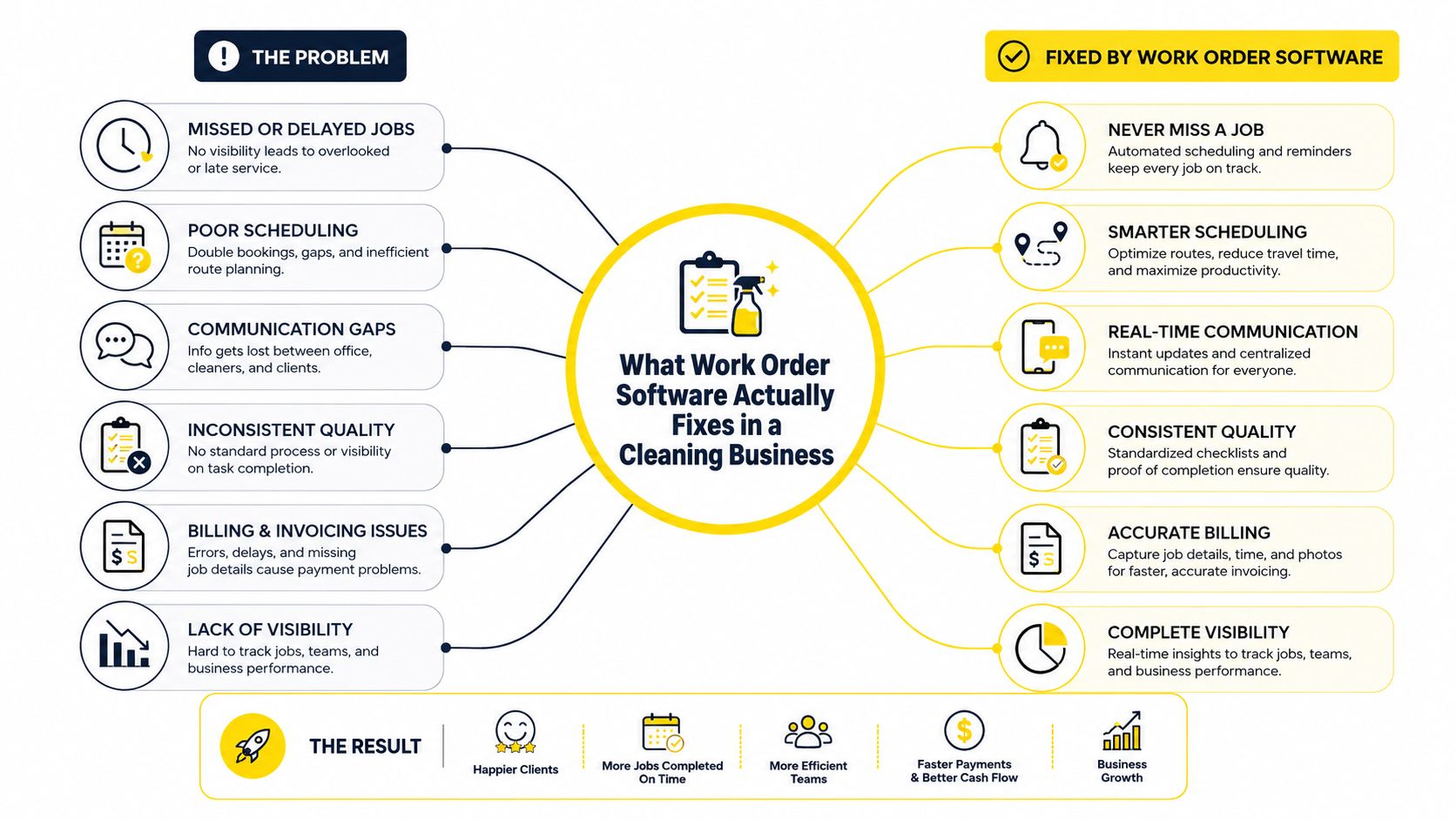
A lot of cleaning businesses hit the same wall once they grow past the point where the owner can keep every crew, recurring account, and special instruction in their head. I've seen it happen with solo cleaners who picked up too many recurring homes, and with small teams that added day porter routes, post-construction jobs, and commercial accounts in the same month. The problem isn't effort, it's that the business outgrows memory and scattered messages.
Work order software fixes that by turning the request into a tracked job that can move from inquiry to schedule to dispatch to completion without disappearing in someone's inbox. In market terms, the category is already sizable and still expanding, with the work order management market estimated at USD 0.98 billion in 2026 and projected to reach USD 1.41 billion by 2031 at a 7.52% CAGR, while software accounted for 66.10% of the market in 2025. Those numbers point to one thing, the software layer is where the operational value sits. Mordor Intelligence's market outlook makes that pretty clear.
Solo cleaners feel it when a client changes the day, adds a room, or wants the same team every time. Multi-location franchises feel it when one manager uses one process and another manager uses a different one. Operations managers feel it when they need to see what's open, what's assigned, and what's been closed without chasing people for updates.
Practical rule: if a job can be lost between the estimate and the invoice, the business needs a work order system.
For cleaning teams, this isn't abstract field-service software. A recurring residential clean needs reminders, preferences, and route logic. A post-construction job needs scope clarity and photo documentation. A day porter route needs repeatable assignment, proof of completion, and a clean handoff between office and field.
If you want a technical side note on how browser-level preloading can improve site behavior around these workflows, how the Speculation Rules API works is a useful reference from MAJC. It's not about cleaning operations directly, but it's a solid example of how modern software tries to reduce friction before a user even asks for the next step.
Work order software is a centralized workflow for service jobs. In plain English, it replaces paper, spreadsheets, and scattered messages with one record that the office and field team can both trust. That matters in cleaning because jobs do not stay static, especially when access, scope, or timing changes after the first booking.
A simple residential job shows the lifecycle clearly. The client reaches out, the scope gets confirmed, the visit gets scheduled, the crew is assigned, the work is completed, and the office records notes or photos before invoicing. If that process lives in separate texts and calendars, someone has to stitch the job back together later, and details get lost fast.
Solo cleaners feel it when a client changes the day, adds a room, or wants the same team every time. Multi-location franchises feel it when one manager follows one process and another manager runs jobs a different way. Operations managers feel it when they need to see what is open, what is assigned, and what is closed without chasing people for updates.
Practical rule: if a job can be lost between the estimate and the invoice, the business needs a work order system.
For cleaning teams, this is not abstract field-service software. A recurring residential clean needs reminders, preferences, and route logic. A post-construction job needs scope clarity and photo documentation. A day porter route needs repeatable assignment, proof of completion, and a clean handoff between office and field.
A job-management platform can sit beside that workflow before the work order exists. Estimatty's job management overview fits that pattern because it treats the job as a workflow, not just a line item.
A standard work order workflow typically moves through Open, Assigned, In Progress, On Hold, Completed, and Closed. That sequence takes a job from submission to documented approval, which is why it fits cleaning operations that need clear handoffs. The vocabulary is common across tools, and it matches how field teams already think about work. eWorkOrders' status tracking guide lays out that six-stage flow.
A job is not the same thing as a quote. A quote is the proposed price or scope before the client accepts. A CRM record is the relationship history, who the customer is, what they bought, and how the business has communicated with them over time. A work order is the execution record, what was supposed to happen, who did it, what changed, and whether it got finished.
A good work order record should answer one question fast, what happened on site, and who is accountable for it?
In cleaning, that answer matters because the same account can repeat every week. If the crew saw a locked gate, a dog in the house, missing supplies, or a changed scope, the next visit should reflect that history immediately. The software becomes more than a scheduler, it becomes the memory of the business.
The easiest way to judge work order software is to ignore the marketing page and look at what it does on an actual cleaning day. A residential route, a commercial evening shift, and a post-construction punch list all stress the software in different ways. If the tool fails under one of those conditions, it's not ready.
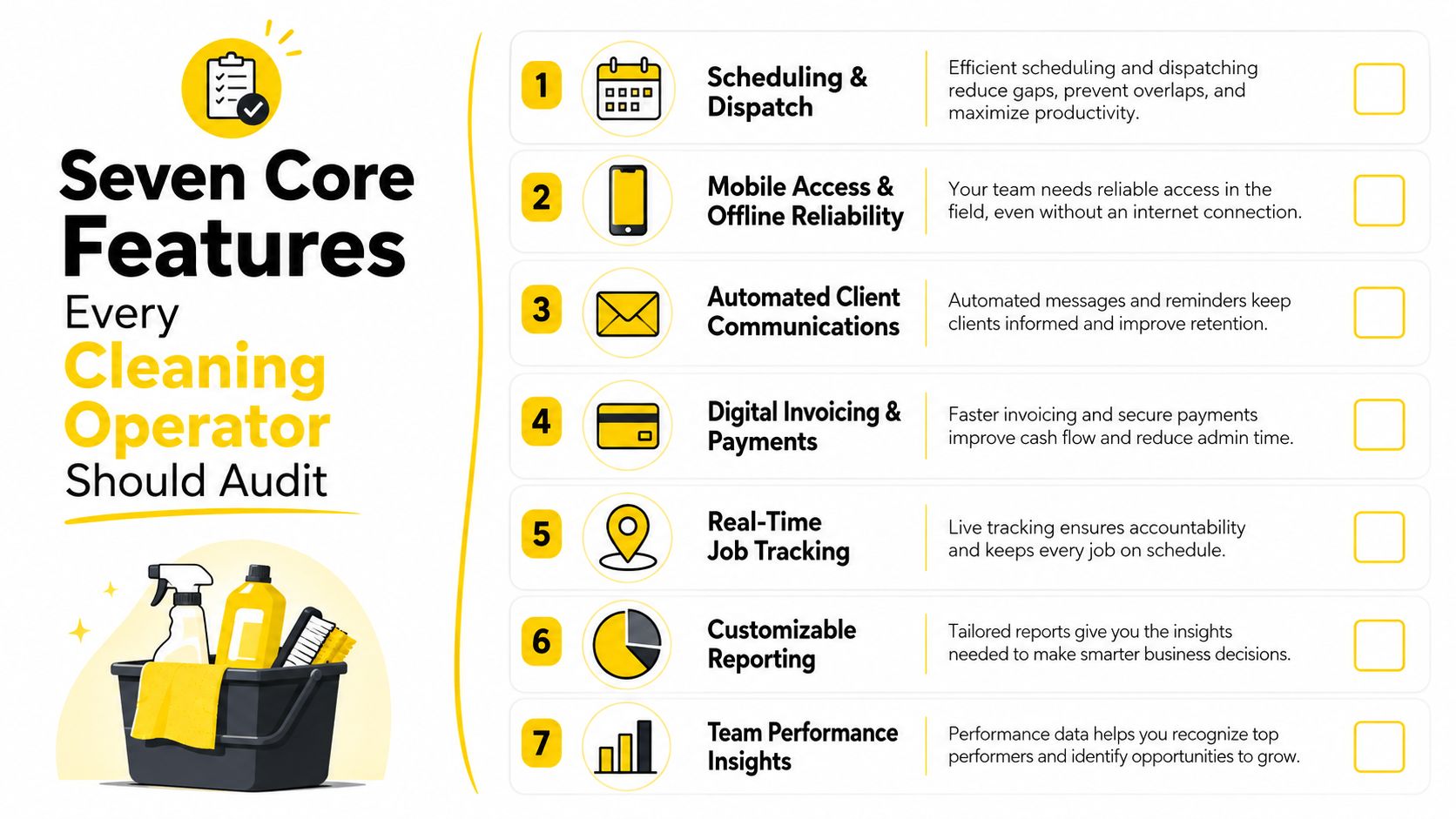
Recurring residential cleans need flexible schedules, while commercial day porter routes need shift-based assignment. If a tool can't make it obvious who goes where and when, the office ends up managing the day manually.
A cleaner on-site shouldn't have to wait until the end of the shift to enter notes or mark a job complete. Offline reliability matters because the field doesn't always have perfect connectivity, and the work still has to move forward. That's especially true when access instructions, photos, or checklist items need to be captured immediately.
Client notes should be easy to find, not buried in a separate system. For cleaning, that means pets, alarm codes, preferred products, gate instructions, and unit-level details need to sit inside the job record where the crew can use them.
Modern guides list asset tracking, preventive maintenance scheduling, inventory management, reporting and analytics, mobile access, ERP integrations, user permissions, compliance tracking, and cost tracking as core capabilities. ManWinWin's work order software guide reflects that broader feature set. In cleaning, the practical version is simpler, equipment notes, supply issues, entry procedures, and site-specific constraints all need to travel with the job.
Photo proof and checklists are useful on post-construction work, turnover cleans, and commercial inspections. Invoicing needs to connect back to the completed job so the office isn't retyping the same scope twice. Reporting should help the owner see which account types run smoothly and which ones keep creating exceptions.
Operational filter: if a feature doesn't reduce retyping, missed handoffs, or callback risk, it's probably not a day-one priority.
If your team already has a platform, compare it against Estimatty's service business software resource. Not because every cleaning business needs the same stack, but because the best tools support the actual sequence of work instead of just making a prettier calendar.
The seven categories that matter most are simple, scheduling and dispatch, mobile reliability, client records, access notes, photos and checklists, invoicing, and reporting. If your current platform is strong in one area but weak in three of those, you're probably compensating with texts and spreadsheets behind the scenes. That's a sign the system is helping less than it looks like it is.
The same work order backbone can run a solo house-cleaning operation or a multi-site janitorial contract, but the configuration should look completely different. Residential work is built around repeat visits, customer preferences, and route efficiency. Commercial work is built around shifts, site rules, documentation, and service expectations that are usually stricter.
A recurring home clean lives or dies on the details. The crew needs to know whether the family has pets, whether the side gate is left open, and whether they should use a specific product on certain surfaces. If those notes aren't attached to the work order, the cleaner ends up guessing or calling the office.
Route efficiency matters more in residential work because jobs are often scattered across the city. One missed update can throw off the rest of the day, especially when a client wants to move an appointment or add a deep-clean task at the last minute. This commercial estimate calculator resource is useful as a contrast, because residential pricing tends to be simpler and more relationship-driven.
Commercial jobs usually involve shift timing, compliance expectations, and site-specific service levels. A day porter route might have a fixed window, a specific checklist, and multiple areas that need verification before closeout. If the work order doesn't capture scope clearly, disputes show up later as “that wasn't included.”
Commercial teams also need better documentation when scopes change. A square-footage change, a new restroom count, or an added common area can alter the workload immediately, so the work order has to reflect the revised reality, not last month's assumptions. That's why managers lean on status tracking, checklists, and clean closeout records.
| Dimension | Residential Cleaning | Commercial Cleaning |
|---|---|---|
| Scheduling | Recurring visits, reschedules, route clustering | Shifts, site windows, route coverage |
| Job notes | Pets, alarms, preferred products, access instructions | SLAs, compliance steps, scope boundaries |
| Verification | Photos, checklist completion, client preferences | Sign-off, inspection records, service proof |
| Pricing trigger | Frequency, add-ons, special requests | Scope changes, site size, service level |
| Dispatch style | One crew per home or route | Assigned team by site or shift |
The backbone is the same, but the rules aren't. Residential cleaning rewards speed and memory. Commercial cleaning rewards consistency and documentation. If you force both into one generic template, the software will feel clunky even if the platform itself is solid.
The cleanest workflow starts before the work order exists. A prospect asks for pricing, the estimate gets captured, the accepted scope turns into a scheduled job, and the office doesn't have to retype the same details three times. That handoff matters because every rekeyed field is a chance to lose square footage, add-ons, or access notes.
Estimatty fits at the front of that chain because it delivers estimates quickly, captures job details like square footage, urgency, and add-ons, and sends the result through web or voice. When a prospect accepts, the confirmed scope becomes the seed for the work order, so the site, scope, price, and access notes can move forward instead of being rebuilt from scratch. For operators who want to keep the sales side connected to the dispatch side, Estimatty's Zapier and CRM integration page is the relevant place to look.
The estimate should define the job clearly enough that scheduling doesn't start from zero. If the prospect wants recurring residential service, the accepted estimate should already point toward recurring work orders. If it's a post-construction clean, the scope should already reflect the rooms, surfaces, and urgency the crew needs.
Pipehirehrm.com belongs on the staffing side of that conversation, especially when a cleaning business is adding routes and needs to hire accordingly. The hiring problem and the work-order problem often arrive together. Once the sales pipeline starts filling up, the company needs enough trained people to deliver the jobs it sold.
Keep the estimate, job order, and hiring workflow connected, or the office ends up rebuilding the same information in three different places.
For ongoing reading, estimatty.com/blog and get.pipehirehrm.com/blog are useful if you're mapping sales, scheduling, and staffing into one operating system. The point isn't to stack tools for the sake of it. The point is to make sure the estimate creates a clean operational path before the first crew ever leaves the office.
A small cleaning business does not need a giant implementation project to get value from work order software. It needs a clean rollout, a small pilot, and a clear definition of what success looks like. The goal is fewer clicks per job, not a fancier dashboard.
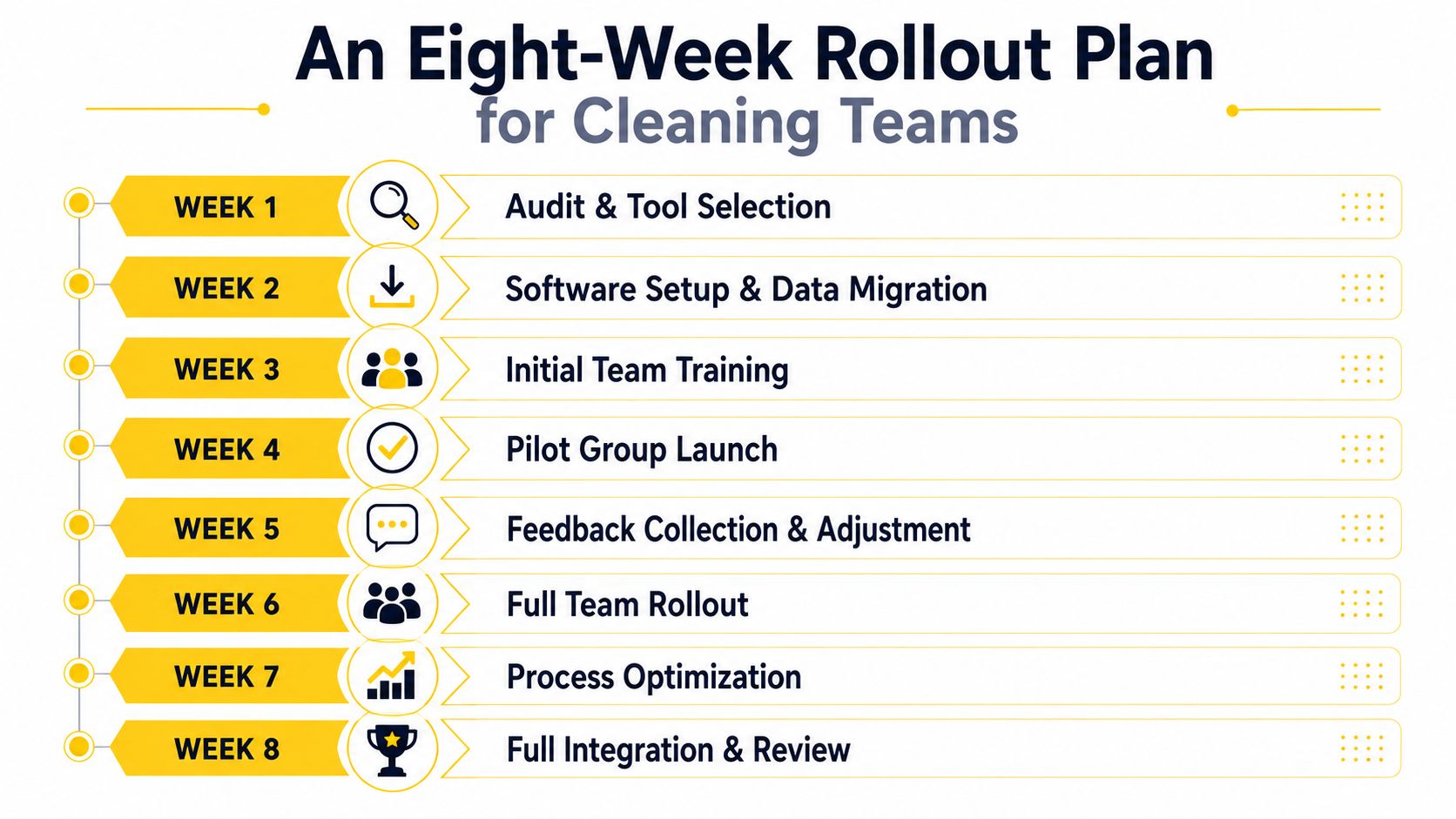
Week 1 is audit and tool selection. List the jobs you run, recurring homes, commercial routes, post-construction cleans, and one-off add-ons, then mark what your current process misses. Exit criterion, you know which job types the software must support on day one.
Week 2 is data import. Bring in clients, sites, recurring schedules, and the job notes your crew already relies on. Exit criterion, the imported records are accurate enough that a dispatcher can assign work without checking a spreadsheet on the side.
Week 3 covers user setup and permissions. Crews shouldn't see what they don't need, but they should see every field that helps them complete the job correctly. Exit criterion, each role has access to the right jobs, right notes, and right status actions.
Week 4 is for accounting or CRM integration. Don't overbuild this part, just connect the system that eliminates the most manual reentry. Estimatty's policies and procedures manual guide is a good reminder that process documentation matters as much as software setup. Exit criterion, a completed job can move into billing without duplicate typing.
Week 5 is mobile configuration and offline QA. Test it with the actual crew, not just the office. Exit criterion, a technician can open, update, and close a job on a phone even when signal quality drops.
Week 6 is a pilot route with two or three crews. Watch for missing fields, confusing labels, and steps that slow people down. Exit criterion, the pilot teams can complete the day without reverting to texts and calls.
Week 7 is checklist and notification refinement. Tighten the job flow so customers get the right update at the right time and crews only see what they need to act on. Exit criterion, the office is fielding fewer “what's next?” calls.
Week 8 is full rollout and dashboard review. At this point the system should feel like part of the operation, not a side project. Exit criterion, the owner or ops manager can see open, assigned, in progress, and closed work without asking for a status meeting.
The same eight-week structure works whether the team has five cleaners or fifty. The pace changes, but the discipline doesn't. Start with a narrow use case, prove the workflow, then expand once the field has validated the setup.
The quickest way to waste a good work order system is to treat implementation like a settings exercise instead of an operations change. The software can be solid and still fail in practice if the team avoids the hard parts. Most of the damage shows up gradually, one missed handoff at a time.
Over-customizing fields on day one turns setup into a project. A cleaner doesn't need fifteen custom fields to start, they need the access note, the checklist, and the status flow. Keep the first version tight, then add fields only when a real job keeps failing without them.
Ignoring offline reliability hurts the moment a technician loses signal in a garage, a basement, or a commercial stairwell. Content in 2026 increasingly highlights mobile-first execution, real-time sync, and offline reliability because the software's value can collapse when updates don't sync instantly. That's not a theoretical issue, it's a field issue. Upper Inc.’s work order management discussion makes that concern very clear.
Skipping mobile QA with real crews usually means the office thinks the app works while the field finds the broken steps. A crew can't close a job quickly if the buttons are confusing or the checklist is too long. Test it in the truck, at the site, and with gloves on if that's how the work happens.
Weak customer notifications create avoidable calls, especially when a client wants to know whether the team is on the way or whether a reschedule was received. Sloppy closeout is the last leak, because the job isn't really done until the record is complete, the photos are attached, and the office can invoice without chasing missing details.
Corrective action: simplify the launch, test on real jobs, and make closeout mandatory, not optional.
A lot of ROI disappears in places owners don't see on a dashboard. The crew waited at a locked site because access notes were never attached. The invoice went out late because someone forgot to mark the job complete. The manager spent half an hour rebuilding the status of a route that should've been obvious.
The return on good work order software usually shows up in ordinary places first. Fewer callbacks happen because the crew sees the right notes. Invoicing moves faster because completion and billing live in the same flow. No-shows and missed handoffs drop because the office can see what is open, assigned, and closed without depending on memory.
The financial case is already visible in the wider market. As noted earlier in this article, analysts expect the category to keep growing, and hosted systems have become the default delivery model in many markets. That shift matters because cleaning operators rarely win on software features alone. They win when the system removes one more missed step on a recurring residential clean, a post-construction turnover, or a day porter route that changes by the hour.
That is where ROI becomes practical. If a cleaner arrives with the wrong access note, the office eats the delay. If a supervisor can see completion photos before the crew leaves the site, billing moves faster and fewer disputes reach the inbox. If a missed task is logged inside the same work order that created it, the next visit starts with context instead of guesswork.
Pick one improvement and ship it. Attach access notes to every recurring home, move one commercial route into a digital work order flow, or make closeout required before invoicing. Keep the scope small enough that the office and field crew can stick with it.
If your business is still working from texts, spreadsheets, and sticky notes, you do not need a massive transformation. You need one clean workflow that your office, field team, and customers can all live with. In practice, that means standardizing the job before the job starts, then keeping the record intact until payment is done.
For more operational thinking around estimates, staffing, and process design, keep an eye on Estimatty. If you want to tighten the handoff between pricing and execution, Estimatty is built to capture cleaning job details fast and turn them into a consistent starting point for the next work order.