
September 29, 2026
Commercial and Residential Cleaning in 2026
Compare commercial and residential cleaning markets in 2026. Explore pricing, staffing, compliance, and how AI estimators streamline operations.

Wednesday, August 5, 2026
Master time card approval in your cleaning business with step-by-step workflows, exception handling, and compliance tips to save hours weekly.
Friday afternoon always looks the same in a cleaning business. Crews are still texting about one last punch, a supervisor is trying to close the books, and payroll is waiting on time cards that should've been approved hours ago. That's when owners realize the problem isn't the software, it's the approval process holding their payroll, overtime, and billing together.
Time Card Approval: Streamline Your Workforce
A cleaning business can lose money long before anyone notices a bad time card. A supervisor means to review it later, a cleaner leaves one punch uncorrected, and payroll closes with hours that no longer match the route that was worked. That drift shows up in payroll accuracy, labor-cost visibility, and client billing, and each one gets harder to fix once the card is sitting in payroll instead of in review.
Oracle's workflow logic shows the control point clearly. Its default routing auto-approves payroll time at or under 40 hours, sends time above 40 hours to a line manager, and treats the card as Approved only after every approver signs off, while a rejection changes it to Rejected. That is not a clerical step. It decides whether time moves into payroll or stays blocked for review Oracle time and labor workflow details.
Practical rule: if your approval process does not separate routine hours from exceptions, managers end up reviewing too much and still miss the risky cards.
The hidden cost is usually timing. Miss a payroll cutoff, and someone has to estimate, re-open, or carry hours forward. Let overtime sit unreviewed, and it can slip through at a rate that looks routine on paper but hurts margin in the job cost report. If a cleaner splits time between a residential route and a commercial deep-clean, the labor record has to be clean before it reaches payroll or the invoice, or both numbers start lying in different directions.
That is why approval belongs in the same discipline as billing and labor forecasting. Clean inputs keep the books honest, and the same mindset shows up in a cleaning business accounting guide. The same control logic also matters in other payroll systems, as the team at calculate instructor pay correctly explains, payment accuracy depends on checking hours before money moves. In a cleaning operation, time card approval is the gate that keeps bad labor data from becoming payroll, overtime, and billing problems at the same time.
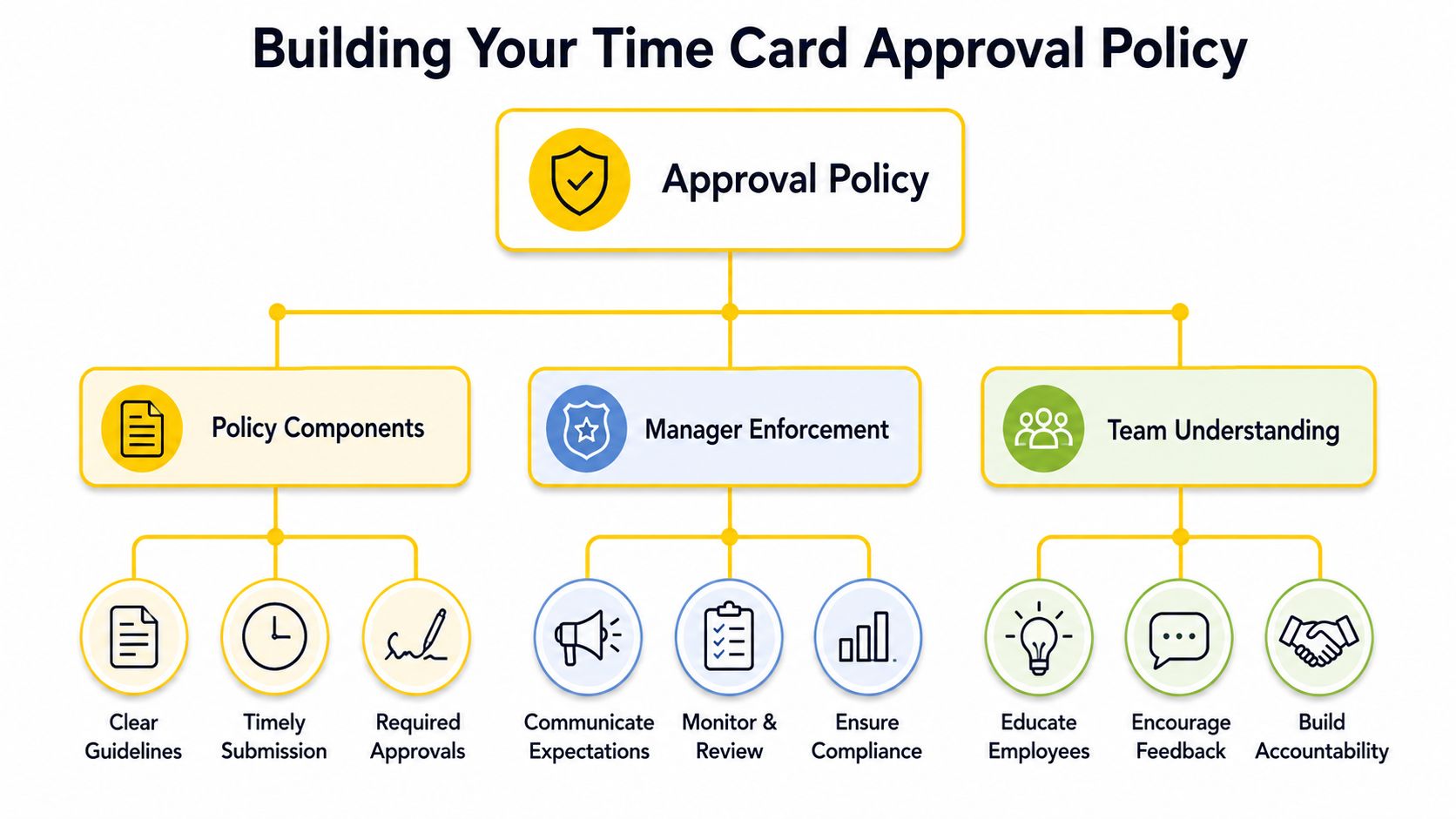
A good policy removes guesswork before the first time card hits a manager's inbox. It tells employees when to submit, tells supervisors what needs review, and tells payroll when a card is final. Without that written structure, every approval becomes a judgment call, and judgment calls are where delays, favoritism, and missed cutoffs creep in.
The cleanest threshold is the one your team can explain in one sentence. Oracle's default workflow uses a 40-hour threshold for payroll time, with hours at or below that level approved automatically and hours above it routed to a manager for review Oracle Time and Labor documentation. Even if you don't use Oracle, that logic is easy to mirror, standard hours move fast, exceptions get attention.
Put the threshold in writing, then train managers to treat it as a routing rule, not a suggestion.
A solid policy should also spell out what happens when a manager is unavailable. If a site lead is on vacation, who takes the approval? If a cleaner is assigned to multiple properties, which supervisor owns the final sign-off? If a card is rejected, who fixes it first, the employee or the manager? Those questions need answers before payroll week, not during it.
Deadlines should match your payroll calendar, not your hopes. The University of Minnesota requires all timecard approvals to be completed by Friday at the end of the pay period or Monday at the start of the next pay period, and all time-off requests in that period must also be approved or denied before timecards can be approved University of Minnesota timecard approval guide. That's a strong reminder that time-off and time worked can't be handled as separate silos when payroll is closing.
For cleaning crews, I'd add one more rule. If a crew works across multiple job sites, the policy should require job codes or location tags to be corrected before approval, not after export. That prevents client-billing confusion and keeps labor reports aligned with the right account.
The strongest policies are boring on purpose. They're short, predictable, and written so a new supervisor can apply them without asking for permission every Friday. If you need a starting point for turning those rules into a formal document, the structure in this policies and procedures manual guide is a useful model.
A clean approval rhythm starts the moment the first crew clocks in. By Friday, you should be reviewing exceptions, not trying to reconstruct the week from memory. On cleaning jobs, that difference shows up in missed payroll cutoffs, overtime leakage, and billing that no longer matches the work that was done.
The best managers I've worked with use a two-stage process. Employees review their own hours first, then supervisors only touch the cards that still need attention.
Daily review is about catching bad data while it is still fresh. If a cleaner misses a punch at a commercial building at 6 a.m., that is easier to correct before lunch than after the weekend. If a route changes and the wrong job code is selected, the correction should happen before the time card gets buried under the rest of the week.
Use the daily check for these items:
For teams that rely on consistent attendance tracking, pairing this workflow with an attendance tracker app can cut down the number of cards that need manual rescue. That matters because each unreviewed exception turns into a payroll risk later, and the longer it sits, the harder it is to verify.
The weekly pass is where managers stop looking at each punch and start looking at patterns. Time cards that show missing breaks, overlapping shifts, or repeated corrections need a manager's eyes before export. That is also the right time to compare scheduled hours against actual hours so you can spot routes that are running hot and catch billing distortions before they move into invoicing.
Best practice: employees should fix obvious errors first, managers should only approve the exceptions that remain.
There is a reason vendors and workflow guides keep treating approval as a control point instead of a checkbox. The time card approval workflow guide notes benchmark targets of approval time under 48 hours, submission compliance above 95%, and rejection rate below 5%, while also warning that spreadsheet mistakes and unapproved or miscategorized hours can create 10 to 20% annual payroll discrepancies. You do not need to chase those numbers blindly, but they explain why delayed approvals create real operational drag.
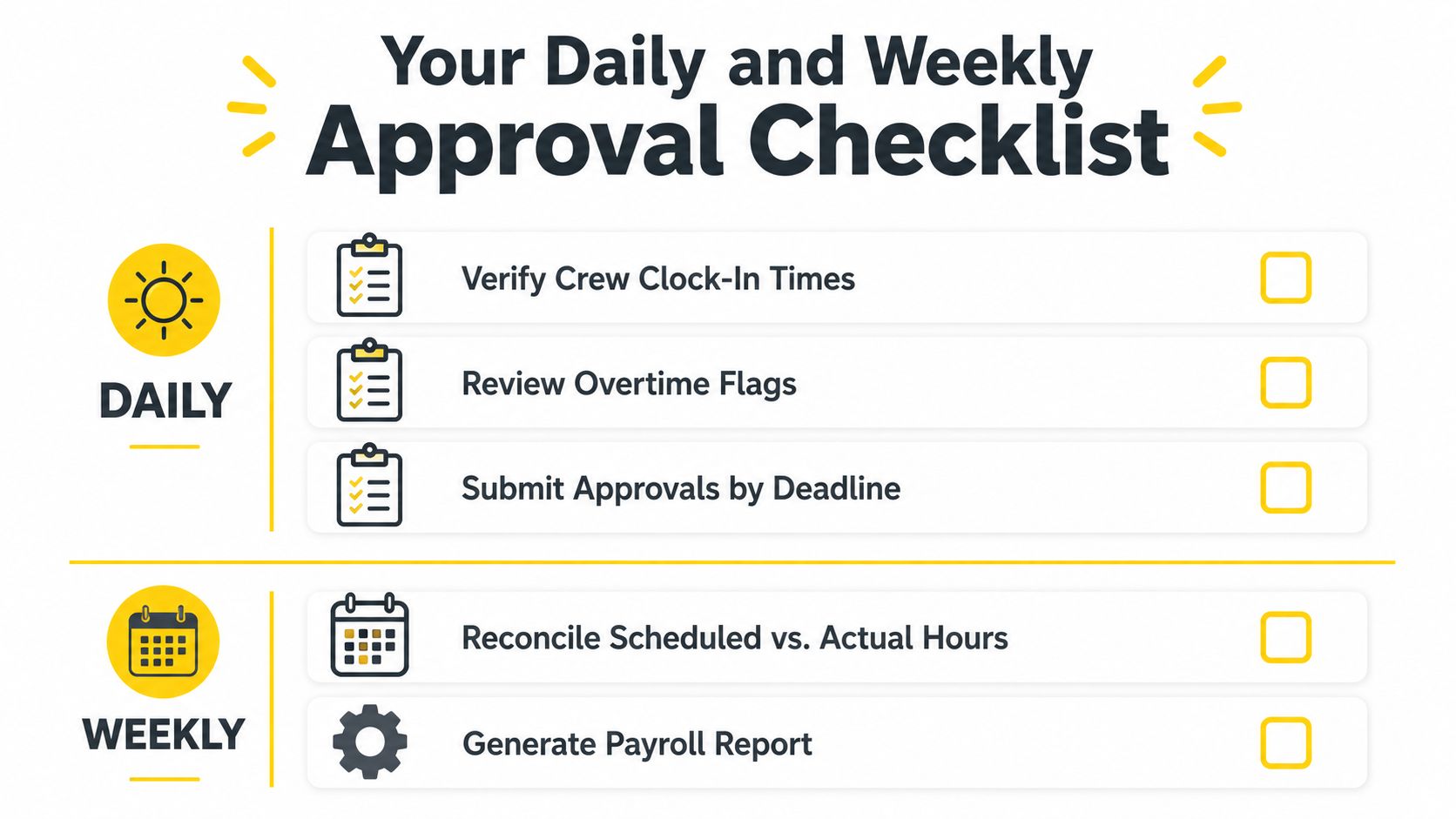
The weekly review should end with a clean export, not a long argument in the office. If a manager is still deciding whether to approve a card, the card needs a documented correction, not a half-finished decision.
Exceptions are where bad habits get expensive. A cleaner forgets to clock out, a supervisor approves a card before checking the break time, or a job code lands on the wrong client file because the crew moved from one site to another. You can't eliminate exceptions in field labor, but you can make sure every correction is visible, timestamped, and owned by the right person.
The most useful approval model is a two-stage exception-control process. First, employees review their own hours and fix obvious mistakes, then managers approve only what still needs review before payroll closes Clockspot time card approval guidance. That keeps payroll from becoming a cleanup desk.
The highest-signal exceptions are the ones that change pay, billing, or compliance:
A good correction workflow also protects your records. If a card is rejected, the employee fixes it, the manager comments on what needs to change, and the system keeps the trail. That's a much stronger posture than letting someone overwrite yesterday's entries with no explanation.
If you've ever had a labor overrun show up without warning, the logic behind cut overtime labor expenses is familiar, overtime gets expensive when the review happens too late to stop it. For cleaner labor-cost visibility, tie your exception review to the same discipline you'd use with boost profit cleaning labor cost calculator so managers can see where time is drifting before payroll locks.
There's a real tension between speed and verification. If you approve too early, you may miss an error that becomes a payroll correction or client dispute. If you hold every card until you've checked everything twice, payroll misses its cutoff and the whole operation feels it.
The right answer depends on risk. Routine residential routes with stable schedules can move faster. Crews working overtime, multiple sites, or post-shift corrections need a slower, more documented review. The approval system should reflect that difference instead of treating every card the same.
Manual approval works until your business gets busy enough that managers cannot keep up with texts, screenshots, and spreadsheets. Then the cost is not the approval click. It is the time spent cleaning up bad data after the fact, then explaining it to payroll or a client when the numbers do not line up.
The stronger setup connects scheduling, time capture, and payroll so the right job data lands in the right place from the start. When a crew clock-in matches the schedule, fewer cards need manual recoding, and the approval queue stays manageable. That matters in cleaning, where a recurring visit and a one-off deep clean can call for different review steps and different billing treatment.
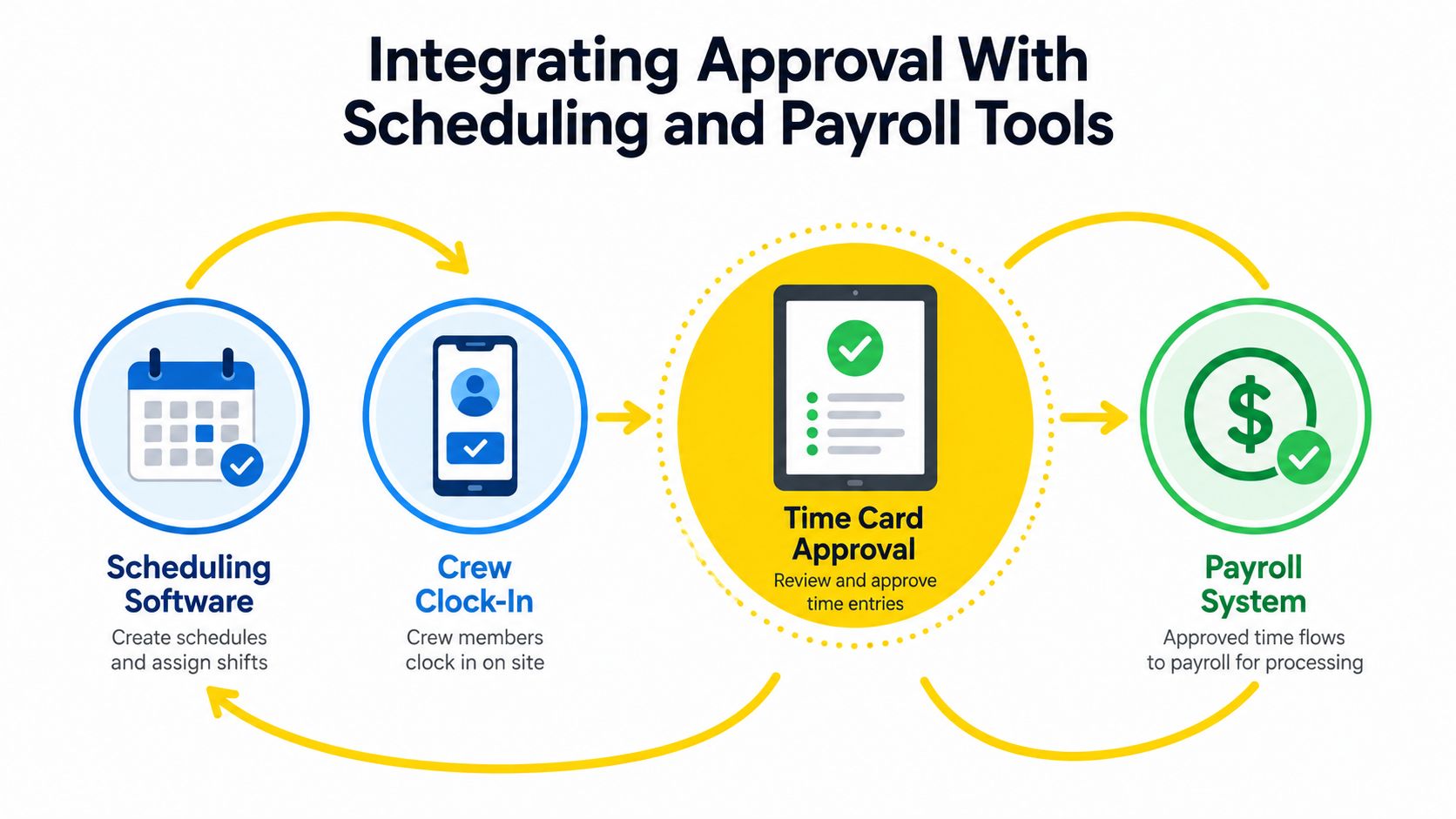
A practical workflow should clear the obvious cases fast and send the risky ones to a manager. As the Oracle workflow guide noted above, time can be routed by threshold or by role so routine cards do not sit in a manual queue while higher-risk hours get a closer look.
The goal is not to automate judgment. The goal is to stop asking managers to inspect every normal hour.
That also helps with wage-risk issues. If hours are reviewed too late, mistakes around time rounding and unpaid wages are harder to catch before they reach payroll. Cleaner front-end capture lowers the odds that a harmless-looking edit turns into a dispute later.
For teams standardizing the front end of the workflow, time and attendance software should be chosen for its routing rules, not just its punch clock. A system that cuts edits before approval is more valuable than one that only makes the final click look tidy.
Approval data should move into payroll with as little manual re-entry as possible. Every extra copy-paste step creates another chance to misclassify hours, especially when crews work different clients in the same week. The system should preserve who approved what, when it was approved, and what changed before export, so payroll is not rebuilding the story from scratch.
Good front-end discipline matters here too. The same structure that keeps estimates consistent should keep labor data consistent, because a messy approval handoff creates billing distortions as well as payroll errors. Good workflow design saves time, and it protects the numbers you rely on for both payroll and client invoicing.
A time card approval trail is what holds up when a paycheck is questioned or a client asks why a labor invoice changed. It shows who reviewed the hours, what was corrected, and whether approval landed before payroll closed. Without that record, even a small mismatch can turn into a long, expensive back-and-forth.
Document every correction before the card is finalized. If a cleaner missed a punch, the fix should be time-stamped in the system, not scribbled on paper and retyped later. If a manager rejects a card, the reason needs to stay attached to the record so Payroll can see what happened without chasing down three people for context.
A California community-college payroll procedure makes the same point in practical terms. Employees are expected to complete timecards accurately, in ink, and sign them themselves, and if they cannot sign because of illness or another extenuating circumstance, the manager or designee must attach a written explanation, the timecard is marked “not available for signature”, and Payroll approves it California community-college payroll procedure. The lesson is straightforward, exceptions need paperwork, not guesswork.
For multi-location operators, the approval record should also keep the site and client context intact. That makes labor-hour reporting usable when a commercial customer asks for proof of staffing or a branch manager has to explain why a route ran long. It also helps cut overtime labor expenses because the review trail shows where extra hours started, instead of letting them disappear into a vague weekly total.
Approval speed is a control signal. The workflow guide cited earlier uses under 48 hours for average approval time, above 95% for submission compliance, and below 5% for rejection rate as operational targets time card approval workflow guide. Those figures are not magic, but they do tell you quickly whether cards are moving or sitting untouched until the end of the week.
The same guide notes that 65.9% of tracked U.S. work hours were billable and 34.1% were non-billable, which is why late approvals can distort labor visibility and billing accuracy time card approval workflow guide. If your team approves late, the reports stop reflecting the work while the work is still affecting cash flow. That delay also makes it harder to spot overtime leakage before payroll goes out.
Keep the approval trail boring. If the audit trail reads like a mystery, the workflow needs work.
Payroll records can lock after sign-off, so fast approval and careful review have to work together. The right system gives managers a controlled way to close the books without losing evidence, and without creating panic when a correction shows up after the fact.
What if a manager doesn't approve on time and payroll still needs to run?
You need an escalation rule, not a scramble. If the primary manager is unavailable, the card should move to a delegated approver or the next person in the chain before cutoff.
Should I optimize for same-day approval or stronger exception review?
Neither by itself is enough. Stable, low-risk hours can move quickly, but overtime, missed breaks, and unusual job coding deserve a slower review because they're more likely to create payroll or billing errors.
What if an employee can't sign a card because of illness?
Use a documented exception process. The California procedure above shows the right pattern, the manager or designee attaches a written explanation, and Payroll approves the card with the exception noted.
What about distributed teams with multiple approvers?
Use routing rules that identify the right reviewer by job, site, or project, then define what happens when the system can't find the correct approver. The card should never sit in limbo without ownership.
If your cleaning crews are still living in spreadsheets, late texts, and Friday panic, Estimatty can help you bring more structure to the front end of the business so payroll has cleaner inputs to work with. Visit Estimatty to see how better operational flow can support faster approvals, fewer billing mistakes, and less end-of-week chaos.