October 31, 2026
Employee Confidentiality Agreement Template 2026
Copy this employee confidentiality agreement template for cleaning crews, with clauses for estimates, access codes, AI tools and lawful speech.

Sunday, November 1, 2026
Compare no code vs full code for cleaning businesses: speed, cost, scalability, maintenance and security, plus which build fits each case.

Stop asking which one wins. The popular advice on No Code vs Full Code tells you to pick a side, no-code if you're small, full code if you're serious, and that advice will cost you money either way. You'll either pay developers to build a simple estimate form you could've configured yourself, or you'll force a fragile workaround into a platform that was never built for crew routing.
Judge each workflow on its own. How often does it change? Who needs to change it? What breaks if it fails at 9 p.m. when a prospect is ready to book? Stable, repeatable work belongs in no-code. Risky, differentiated work belongs in code. Most cleaning companies need both, in different places, and AI-assisted coding is making that middle ground cheaper to build than it used to be.
| Criterion | No code | Full code |
|---|---|---|
| Time to first working version | Days to a few weeks for forms, pricing rules and alerts | Weeks to months, depending on scope |
| Who can change it | Owner or operations manager, without programming | Professional developers |
| Scalability ceiling | Set by platform limits and available connectors | Set by your architecture, which you can redesign |
| Custom logic | Configuration within supported rules | Unrestricted, including custom algorithms |
| Maintenance | Platform updates handled by the vendor; you manage configuration | Your team owns code, testing, refactoring and defect repair |
| Security control | Depends on the platform's access controls and audit logs | Full control over code, hosting and access |
| Vendor lock-in risk | Higher; verify data export before committing | Lower; you own the code |
| Upfront cost | Low, usually subscription-based | High, through developer salaries or agency fees |
No-code wins on speed and access for configuration-driven work, while full code wins on control and custom behavior.
Don't add up a score. Each row is a question about your situation. If you never need a custom algorithm, the custom logic row doesn't matter, even though full code wins it. If your operations manager tweaks pricing every month, the "who can change it" row decides almost everything.
No-code means configuring forms, pricing rules, workflows and notifications inside a platform with visual tools. Full code means writing, testing and maintaining software in programming languages and frameworks, with developers handling every release. If you're weighing custom builds against ready-made platforms more broadly, Up North Media's software comparison is a useful companion for the build versus buy side of that decision.
One shift explains why this choice exists at all. Gartner forecast that 70% of new applications developed by organizations would use low-code or no-code technologies by 2025, compared with fewer than 25% in 2020, according to Caspio's summary of Gartner's forecast. Software creation moved beyond IT departments. That doesn't make developers obsolete. It makes them too expensive to spend on routine forms.
Can this requirement be expressed through the platform's supported rules, data and connectors without workarounds? If yes, use no-code. If not, plan for code.
Apply that test workflow by workflow. The rows on speed, access and upfront cost decide most cleaning business builds. Scalability, security control and lock-in only dominate when volume, regulation or custom behavior enters the picture.
The skill gap is smaller than developers want you to believe, at least for small tools. In a University of Kassel empirical study, the median task-completion time was 23 minutes for inexperienced participants and 19 minutes for experienced participants, with comparable correctness. People without programming experience built small applications almost as fast as developers did. That finding covers small applications, not complex production systems, but most estimate widgets and intake forms are small applications.
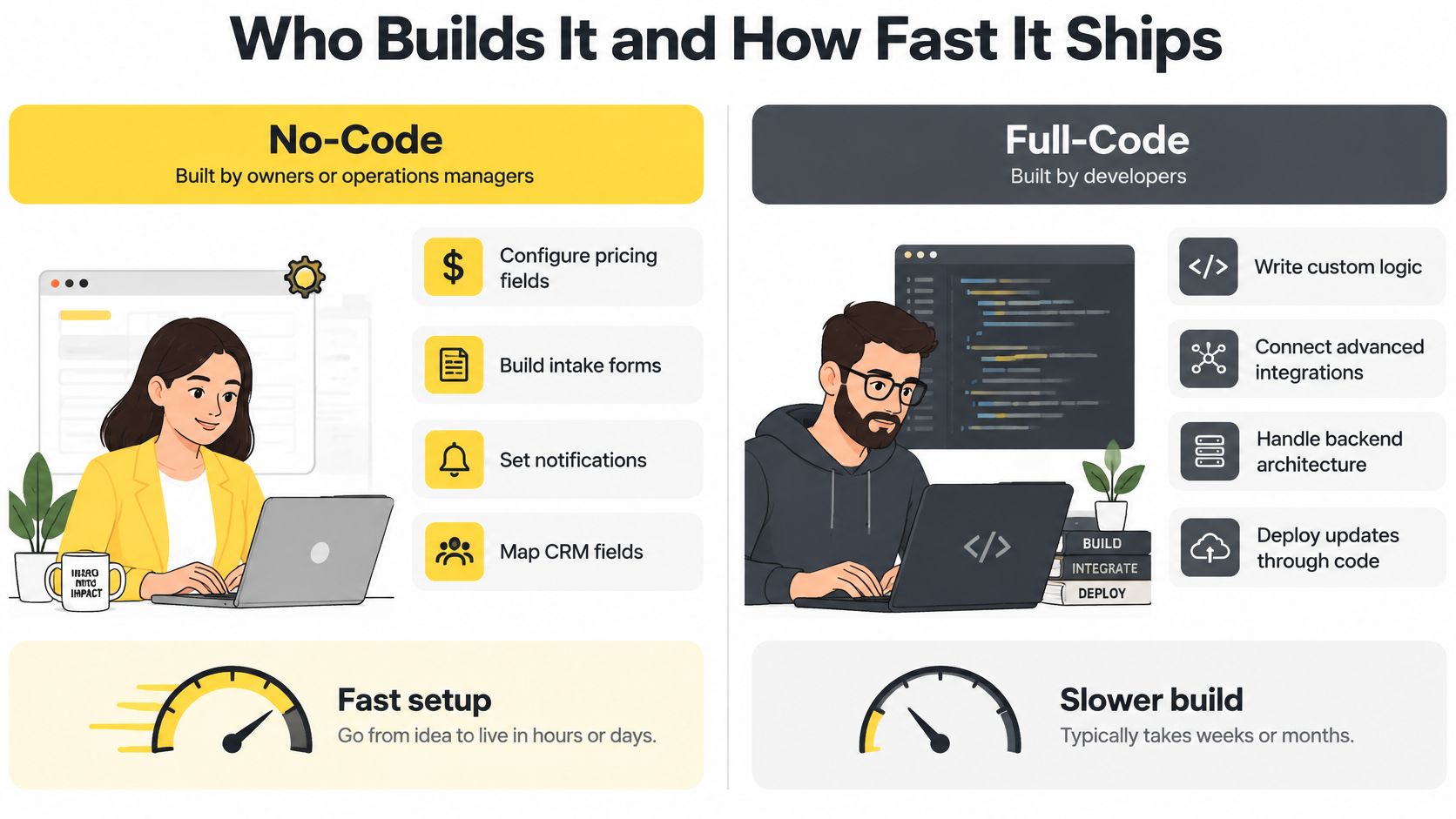
Say you add move-out cleans as a new service type. In a no-code tool, your operations manager adds the service, sets the per-bedroom rate, adds two qualifying questions and tests the form that afternoon. The change is live before dinner.
In full code, that same request becomes a ticket. A developer estimates it, writes the logic, submits it for review, fixes whatever review catches and deploys it in the next release window. You're measuring that in days or weeks, and you're paying developer rates for a pricing table edit. Our guide to no-code AI tools for cleaning businesses walks through which of these changes owners can safely make themselves.
Speed matters most when requirements are still moving. Your first month of leads will teach you that prospects ask about pet hair and inside-oven cleaning more than anything else. No-code lets you adjust fields and add-ons while that lesson is fresh. A development queue turns it into next quarter's project.
A fast launch isn't a fast scale-up. The moment a change needs logic the platform doesn't support, you start stacking workarounds, and each workaround eats the time you saved. Multi-step conditional pricing with exceptions on exceptions is a warning sign.
The initial version is the most affordable stage of any build. Owners budget for launch day but are surprised by year two, when unexpected costs appear as slow pages, broken automations, and invoices for fixes nobody recalls approving.
No-code output can consume more resources than hand-optimized code, and the platform sets your ceiling on concurrency, rate limits and integration depth. You can't tune a database you don't control. Full code lets your team tune caching, queries and failover, but only if you've hired people who know how.
The recurring constraints are predictable: restricted customization, integration limitations, vendor lock-in, and weaker suitability for performance-critical or security-critical workloads. None of those matter for a lead form handling dozens of inquiries a week. All of them matter for a franchise pushing simultaneous estimate requests across territories. Our breakdown of how to scale a service business covers the operational side of that growth pressure.
No-code moves platform updates to the vendor, which is a genuine relief, but you still own configuration. Pricing rules, notification templates and automation branches sprawl over time, and undocumented sprawl breaks just like undocumented code does.
Full code hands you the whole burden. Sonar's analysis of more than 200 real-world software projects estimated that code-level technical debt costs about $306,000 per year for a system containing one million lines of code, roughly 5,500 developer hours of remediation. Your system won't be a million lines, but the ratio is the lesson. Defect repair and refactoring are permanent line items, not launch expenses. If you're already carrying a custom system, AppJet's technical debt reduction guide gives you a practical sequence for paying that burden down.
If the platform hits your targets at expected peak volume, stay no-code. If one component becomes the bottleneck, replace only that component with a coded service. Rebuilding everything because one piece failed is how small companies burn a year.
The build-cost gap isn't subtle. No-code turns cost into a subscription. We start at $25/week, so a solo cleaner pays a predictable fee and takes bookings within days. Full code requires developer salaries or agency fees before the first estimate is ever served, and that meter runs whether leads come in or not.
First-month pricing lies. Compare 36 months of subscription against build cost plus an annual maintenance share for the coded option. Then add the costs both approaches hide: change requests, debugging generated logic, integration fees, downtime during fixes, and the hours you personally spend configuring rules at midnight.
Owners routinely price their own time at zero, which flatters whichever option dumps work on them. Charge your hours at the rate you'd pay an office manager and rerun the math. If you're comparing entry-level options, our review of a free estimating app and what free actually includes shows where free tiers stop and paid work begins.
With no-code, the platform controls access rules, audit logs and data hosting. That's fine if you verify it. Check who can see client records, whether you can export access logs, and how quickly you can revoke a former employee's login. Full code gives you control over hosting, encryption and permissions, and it also makes every security mistake yours. Control without expertise isn't safer. It's just unshared blame.
Before you commit: Export a sample of your customer and estimate records, read the API documentation yourself, confirm the rollback procedure in writing, and get the price after any trial ends.
That four-item check takes an hour and neutralizes most lock-in risk. A vendor who can't answer those questions clearly is telling you something. Budget for the build plus yearly upkeep on both sides, compare three-year totals, and the cheaper option is usually obvious within minutes.
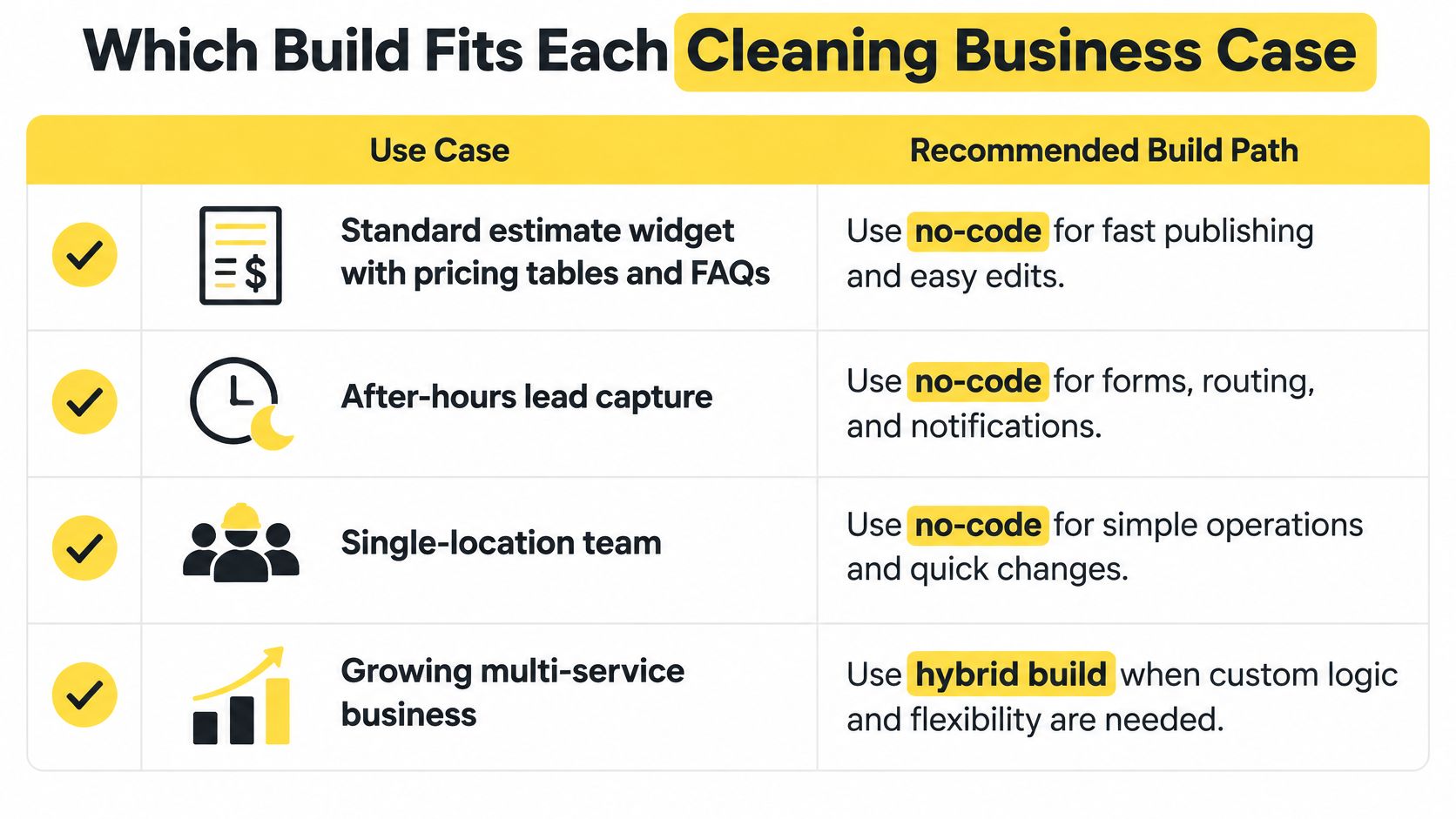
| Scenario | Best fit | Reason |
|---|---|---|
| Standard estimate widget with pricing tables and FAQs | No-code | Repeating rules that owners can configure and update |
| After-hours lead capture and instant SMS or email estimates | No-code | Standardized flows that run 24/7 without developer involvement |
| Single-location team with simple add-ons | No-code | Few rules and low integration complexity |
| Multi-location franchise with inherited pricing rules | Hybrid | Rules stay configurable while inheritance logic may need code |
| Custom crew-availability and routing engine | Full-code | Concurrency-sensitive logic that exceeds platform primitives |
| Regulated client-data workflow with strict audit trails | Full-code or hybrid | Control over storage, access and logging may require code |
We built for the no-code rows. Setup requires no coding. You enter your pricing rules, customize your preferences and embed a single snippet into your website, and the widget starts working immediately once it's live. Instant estimates go out by SMS and email, and you can be notified by SMS the moment a visitor engages, so your team can follow up while the prospect is still comparing competitors.
Keep the language straight with customers. The system produces estimates based on the details a prospect provides. Your staff finalize quotes when the job is confirmed and the scope is locked. Mixing those terms creates pricing disputes you don't need. The widget also needs a site worth embedding it on, and website design for cleaning companies from Operosus is worth reviewing if your pages aren't converting the traffic you already have.
The same logic extends past estimating. When booked jobs outgrow your crew, hiring becomes the next workflow to systematize, and pipehirehrm.com covers the cleaning employee hiring side. Start with the software options in our guide to the best cleaning business software before buying anything else.
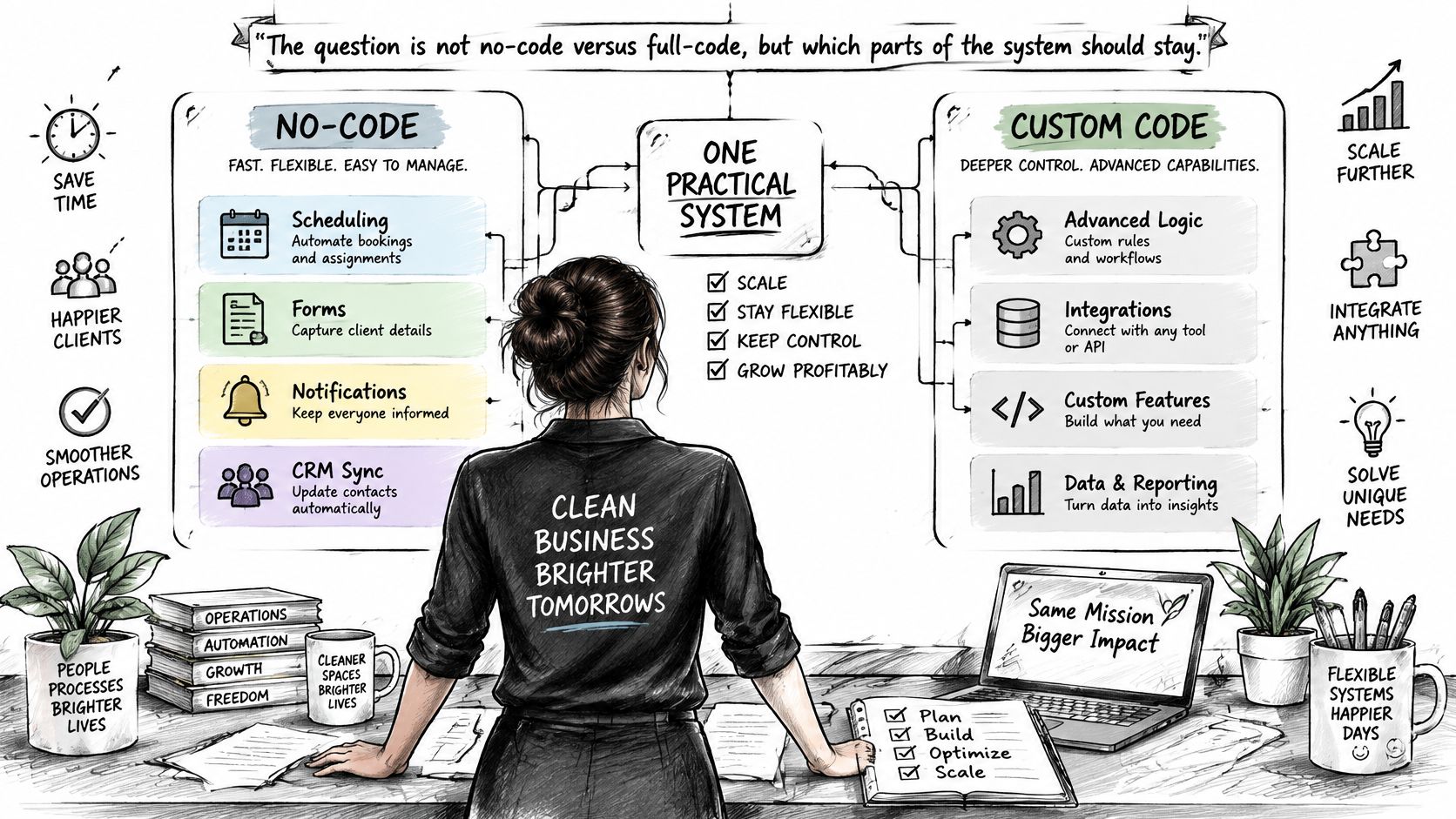
The question is not no-code versus full-code. The question is which parts of your system should stay configurable, and which parts earn custom code.
For a growing cleaning business, the hybrid is the default answer, not a compromise. Keep pricing tables, FAQs, notifications and CRM mappings in the configurable layer, where your office team can change them without a ticket. Reserve code for the pieces that differentiate you or carry real risk: a custom pricing engine, concurrency-safe scheduling, data normalization across franchise locations and failover when a provider goes down.
This visual maps where each layer belongs in a typical cleaning operation.
Launch the no-code layer first and start capturing leads this month, not after a development project. Measure where it strains. Replace only the constrained component with a coded service, and leave everything that's working alone. Most companies discover that one or two components ever need replacing. The rest stays configurable for years, connected through tools covered in our explainer on what Zapier integration does for your workflows.
AI-assisted coding strengthens this approach. According to the Stack Overflow 2025 Developer Survey, 84% of developers said they used or planned to use AI tools, up from 76% in 2024, while 45% said debugging AI-generated code was time-consuming. Developers build custom pieces faster now, but review, testing and debugging still cost real hours. Budget for them.
This walkthrough shows how the configurable layer handles a live estimate from first click to follow-up.
One warning. A hybrid creates integration seams, and seams can fail without notice. Assign one named owner to each seam, and document which system is the source of truth for prices, customer data and booking status. An unowned seam will eventually send a customer the wrong price, and nobody will know until she complains.
You can finish this decision this quarter. Don't let it drift into a research project.
Before you start, confirm the trial terms with us directly, including what the plan costs after the trial ends. Pricing-rule examples and setup guidance live on estimatty.com/blog, and hiring workflow ideas for when the leads turn into booked crews are on get.pipehirehrm.com/blog.
Here's my direct recommendation. Start with no-code for estimates and intake this week. Review the results in 90 days with your benchmark numbers in hand. Revisit full code only for the components that proved they need it. That's not hedging. That's spending development money after you have evidence, instead of before.
Estimatty gives your cleaning business instant, accurate estimates by SMS and email, day and night, without adding office staff or hiring developers to build and maintain a custom widget. Configure your pricing rules once, embed one snippet, and start converting after-hours visitors into booked jobs this week. Visit Estimatty to start your free trial and see your first automated estimate go out.