
September 29, 2026
Commercial and Residential Cleaning in 2026
Compare commercial and residential cleaning markets in 2026. Explore pricing, staffing, compliance, and how AI estimators streamline operations.

Tuesday, August 11, 2026
Discover how job scheduling software helps cleaning businesses book faster, cut no-shows, and grow. Features, ROI, and a 2026 buyer's guide inside.
You probably know the feeling already. It's Monday morning, the phones are lighting up, a client wants a deep clean moved up, one cleaner is stuck in traffic, and somebody is asking where the key is for a house that should've been serviced an hour ago. Meanwhile, you're still trying to turn yesterday's inquiry into today's booking, and the estimates are sitting in one system while the schedule lives in another.
That's the trap with job scheduling software for cleaning businesses. The software is supposed to reduce chaos, but if your lead capture, estimating, dispatch, and follow-up are disconnected, you just digitize the mess. The question isn't whether you need a scheduler. It's whether you're ready to treat the whole revenue pipeline as one operating system instead of a pile of spreadsheets and texts.
At 7:14 a.m., a small cleaning owner is already doing three jobs. She's texting two cleaners about a no-show, answering a voicemail from a repeat client who wants a last-minute move-out clean, and checking whether the right supplies made it into the van. The schedule says the team is full. The inbox says demand is growing. The business is leaking time in every direction.
That's why scheduling software matters, and why basic task assignment is the wrong lens. In cleaning, the expensive problem is not just “who goes where.” It's the gap between a prospect raising a hand and a booked visit making it onto the calendar without friction.
The owners who get crushed are usually the ones juggling leads, estimates, reschedules, and reminders in separate tools. They become the dispatcher, the call center, and the estimator at the same time, then wonder why the day feels unprofitable even when the calendar looks full.
Practical rule: if a lead can't move from inquiry to estimate to appointment without manual re-entry, you're paying for software and still running on memory.
The right scheduler should sit inside a tighter system, one where booking, assignment, communication, and reporting all point at the same job. For cleaning operators, that's the difference between a schedule that looks busy and a schedule that makes money.
Job scheduling software helps cleaning owners decide when work runs, which job comes first, and who gets assigned to it. For a residential cleaning company, that means one thing: a lead, an estimate, a booked visit, a cleaner assignment, and the follow-up all have to move through the same pipeline without gaps. If those steps live in separate places, the office spends the day stitching the business back together.
The mechanics matter because cleaning work changes fast. A new inquiry comes in, a recurring client shifts a time, a cleaner calls out, or a deep clean runs long. The system has to assign the job based on rules, send the work order, notify the cleaner, and update the office when the plan changes.
That distinction matters. A recurring-booking tool mostly handles repeat visits and simple calendar placement. A field-service dispatch system handles routing, crew assignment, and live changes in the field. Enterprise workload automation belongs to complex IT environments with interdependent workloads, not to a residential cleaning route.
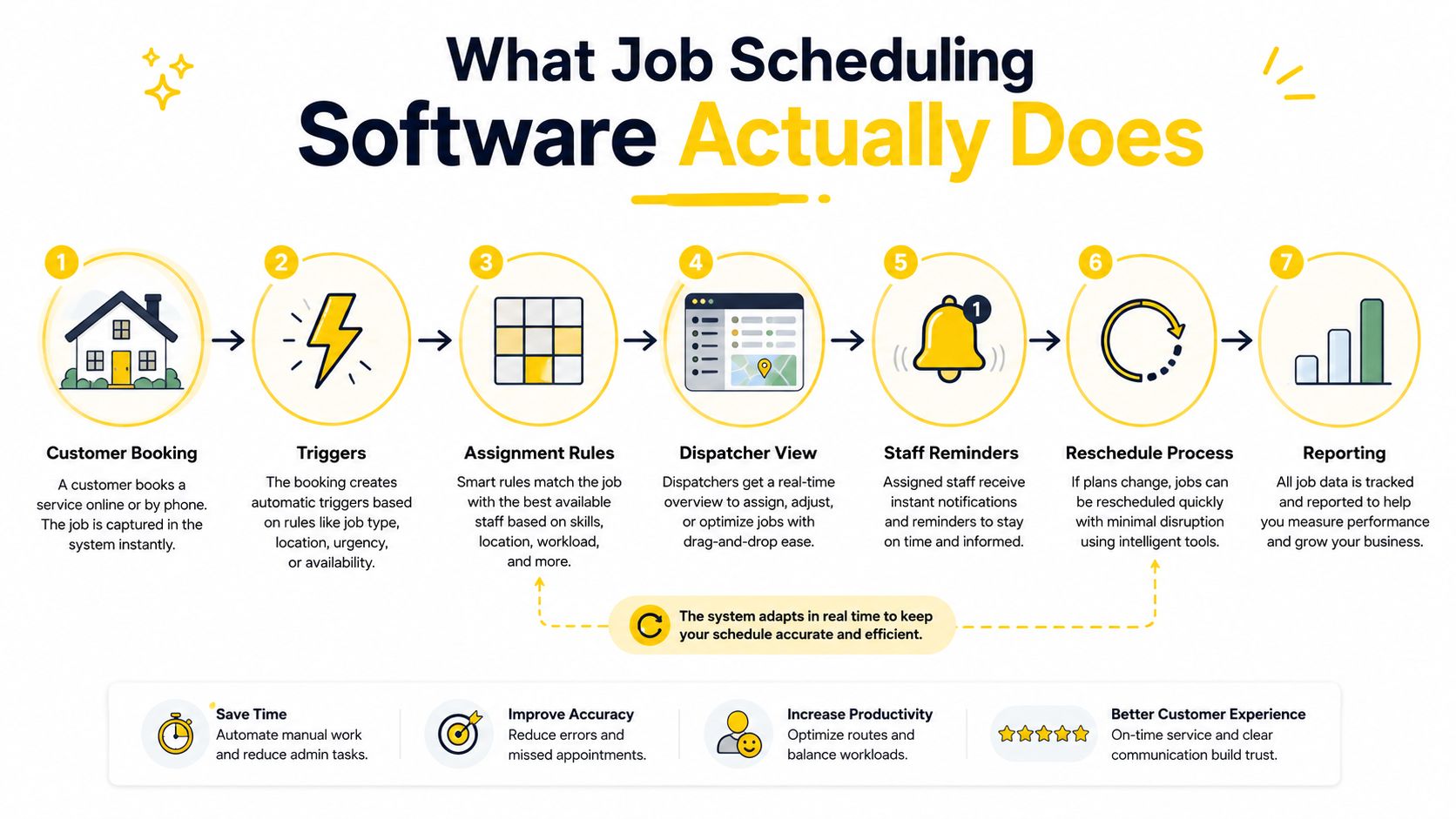
A good way to read the process is simple, booking is the front door, scheduling is the hallway, dispatch is the handoff, and reporting is the receipt. If any step breaks, the business pays for it in missed appointments, slow responses, or confused communication.
Solo cleaners usually need recurring booking and calendar control first. Small teams need assignment rules, rescheduling, and reminders. Multi-location brands need coordination across branches, standardization, and deeper reporting so the same service promise does not depend on one manager's memory.
The simplest test is straightforward. If a job can be handled entirely by one person with no route complexity, enterprise tooling is probably overkill. If the job has multiple steps, multiple people, or a sales handoff before the visit, you need a system that can manage those dependencies without Slack messages and sticky notes.
For a cleaning-specific booking flow that connects appointments more tightly to scheduling, see Estimatty's online booking guide.
The feature list gets noisy fast, so ignore the brochure language. In a cleaning operation, the features that matter are the ones that reduce handoffs, shorten the time from lead to visit, and keep the crew from showing up to the wrong job with the wrong gear.
Work orders need to be readable by the field team without a phone call back to the office. The address, service type, notes, access instructions, and timing all need to live in one place. Dispatching should let you move a job quickly when a cleaner calls out, a client changes the time, or a deep clean runs long.
Good dispatching feels boring. That is the point. If the office can reassign work in a couple of clicks and the crew sees the update immediately, you have removed a failure point.
Recurring jobs matter more in residential cleaning than many vendors admit. Weekly, biweekly, and monthly service patterns are where the calendar gets sticky, and the system should handle those repeats without rebuilding the job every time. The mobile experience matters just as much, because crews need to see updates, notes, and route changes in the field.
A scheduler that works only at a desk limits operations rather than enabling them.
Integrations are where many cleaning companies either save the day or create another mess. Your scheduler should connect cleanly to the tools you already use for estimating, CRM, and inbox management. That matters because the lead should not die in one system while the job lives in another. If you are using an AI-powered estimator such as Estimatty, the cleaner move is to have inquiries become estimates and booked visits without manual copy-and-paste. For teams that want to keep that flow tight from the start, online employee scheduling that fits residential cleaning routes should be part of the setup conversation.
For a broader workflow view of scheduling plus operations tools, the comparison in Estimatty's job management guide is worth a look.
Reporting should answer practical questions, not vanity ones. Which services get rescheduled most often? Where do dispatch delays start? Which crews absorb the most last-minute changes? If the dashboard cannot answer those, it is decoration.
For smaller cleaning teams, the priority order is simple.
If a vendor leads with advanced analytics before they show you how a real cleaning job moves from inquiry to completion, walk away. Small teams need fewer moving parts, not more dashboards.
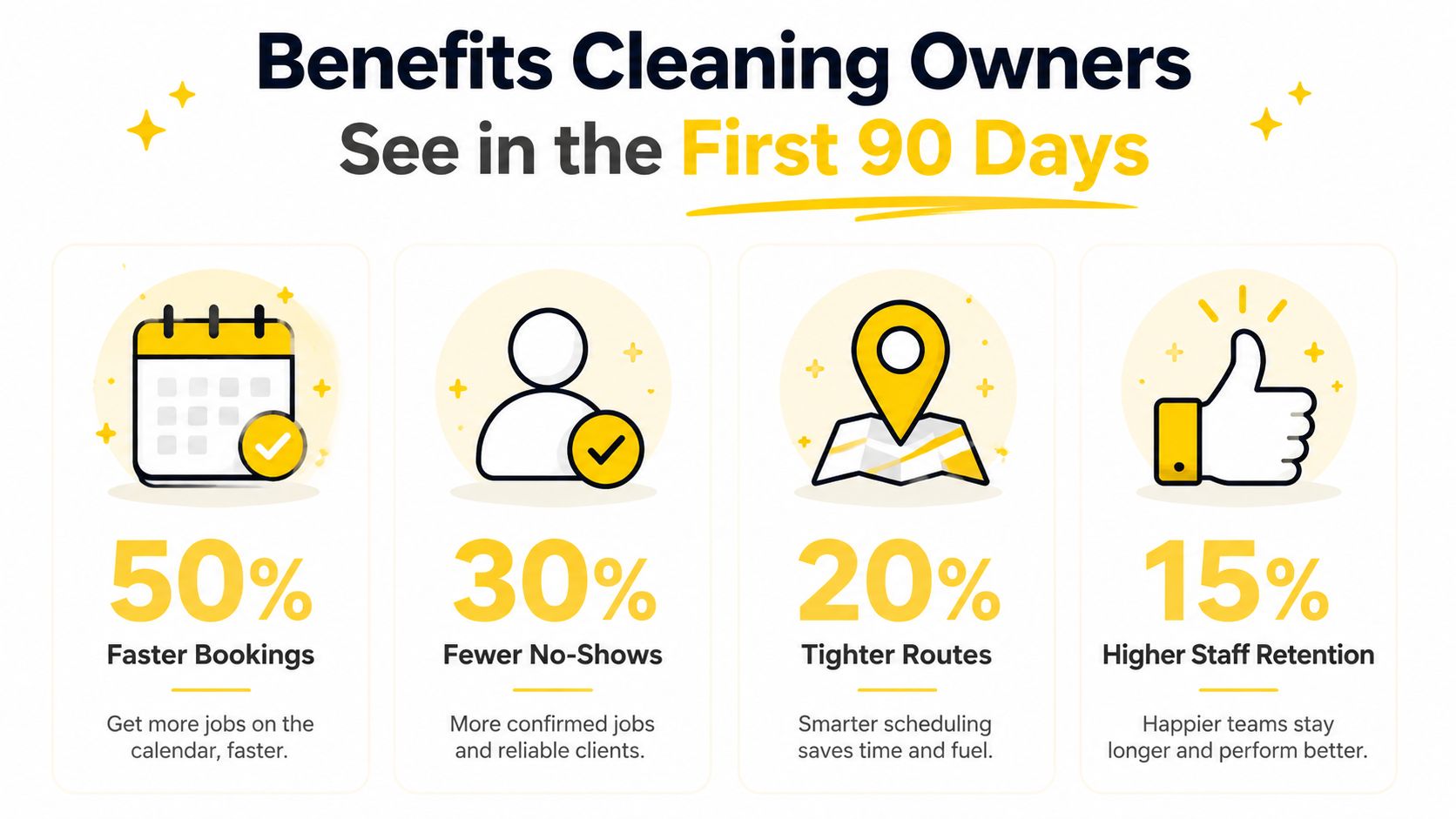
The first win is usually not glamorous. It is fewer schedule errors, fewer back-and-forth calls, and fewer jobs that fall through the cracks after the estimate is approved. That shows up fastest when reminders are automated and everyone can see the same schedule.
The broader labor data backs that up. One source reports that automated shift reminders and clearer schedule communication can reduce no-shows by 15% to 20%, and that moving from manual scheduling to a dedicated scheduling workflow can cut manager time by 50% to 70% employee scheduling statistics. For a cleaning owner, that is not abstract efficiency, it is reclaimed hours that were being spent fixing avoidable mistakes. It also means fewer interruptions in the office during the busiest part of the day.
A cleaner gets the reminder the night before, not when the owner remembers to text. The office sees a reschedule before the crew is already parked at the wrong address. A repeat job gets pushed onto the right route without rebuilding the whole day. Those changes do not need a strategy deck, they need discipline and a system that enforces the rules.
The most visible gains come from smoother handoffs. Sales no longer promises one thing while operations executes another. Customers get clearer communication, which cuts down the awkward “I thought someone was coming” conversation that kills repeat trust. That is where residential cleaning owners start to see the pipeline work as one flow, from inquiry to estimate to booked visit.
The software will not fix sloppy service catalogs. It will not rescue a team that ignores reminders. It will not create route discipline if the owner keeps bypassing the process for every special request. The first 90 days only work when the business commits to one scheduling path and stops treating exceptions as the default.
If you want a separate lens on operations automation in the cleaning space, this automation case study for operations directors is a useful reminder that process design matters as much as tooling. For owners who want a broader view of how scheduling ties into job flow, the job management software guide is worth a look.
The business outcome is fewer missed visits, better crew utilization, and more booked work surviving the handoff from inquiry to calendar. If your current process cannot do that, the software has already shown you where the leak is.
For teams that also need a practical internal reference on staffing and admin flow, the PEO Metrics HRIS guide is a useful comparison point for how back-office systems support cleaner scheduling discipline.
Most demos are built to impress, not to fit a residential cleaning operation. Skip the slide deck showmanship and judge the vendor by one thing, how well the system reduces office work while keeping leads, estimates, and scheduled jobs connected.
A solo cleaner usually needs a simple flat tier or something close to it. A five-person team can live with per-user pricing if the software saves real time in dispatch, confirmations, and schedule changes. Multi-location operators need to scrutinize location-based and tiered pricing, because the wrong model turns growth into a penalty.
The smarter question focuses on what becomes painful when you add another cleaner, another route, or another branch. If the answer is surprise bills or a messy admin process, the vendor is built for the wrong stage.
| Criterion | What to Look For | Red Flag |
|---|---|---|
| Scalability | Can the system handle more crews, more routes, and more locations without a rebuild | It works fine only while one person manages everything |
| Estimator and CRM depth | Leads, estimates, and booked visits stay connected | You need manual copy-paste between tools |
| Voice and web capture | Calls and website inquiries become usable jobs fast | After-hours leads still go to voicemail |
| Automation rules | Reminders, assignment logic, and reschedules run without constant babysitting | Every exception needs an admin to intervene |
| Reporting | Clear visibility into misses, delays, and repeat service patterns | Dashboards that look good but answer nothing |
| Seasonality handling | You can flex staffing and routes without breaking the system | The tool only works when volume is perfectly stable |
A cleaner vendor review also checks how the scheduling tool fits the rest of the revenue path. A lead comes in, gets estimated, becomes a booked visit, and then lands on the crew calendar without extra copying. If that chain breaks, the software is adding work, not removing it.
If you want a broader small-business systems comparison on data and admin stack choices, the PEO Metrics HRIS guide gives a useful frame for evaluating software as part of an operating system, not a one-off purchase.
A cleaning business usually needs five categories working together, scheduling, estimating, CRM, hiring, and automation. That is why the stack matters more than any single tool. The scheduler should accept booked work from the estimator and hand it off cleanly to the crew, while the CRM keeps the lead source, customer notes, and follow-up history tied to the same account.
For owners who want a practical reference point on how job flow should connect across tools, the job management software guide is useful because it shows the difference between isolated software and a system that moves work forward.
When a vendor demo cannot explain how an inquiry becomes a booked visit, end the meeting. That missing answer tells you how the product will behave after onboarding.
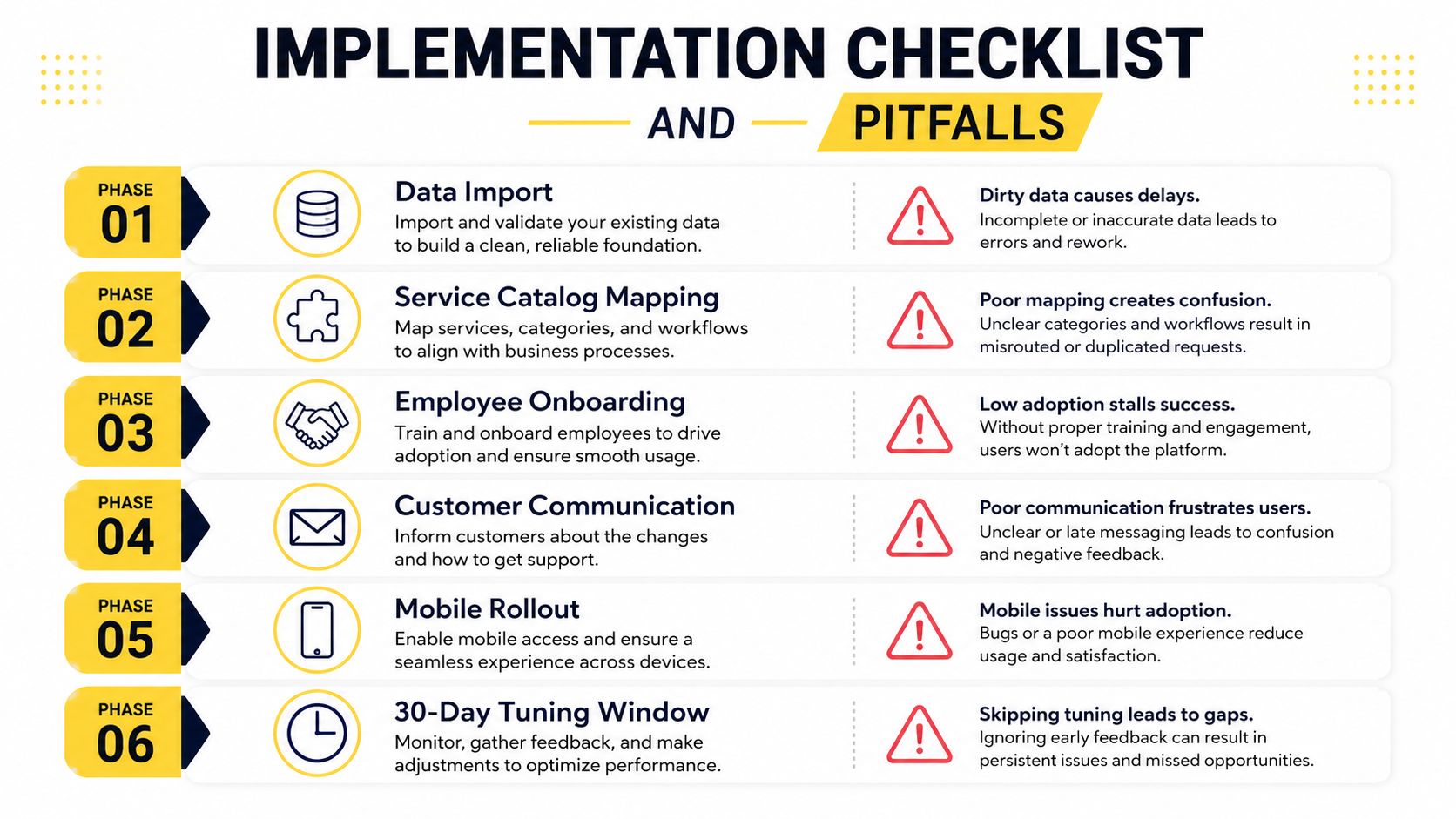
Implementation fails when owners try to make the software mirror every habit they've accumulated over the last five years. Start with clean data, a simple service catalog, and one booking path that everyone agrees to follow. Then add complexity only after the team proves it can use the basics.
The biggest mistake is trying to build the perfect workflow on day one. The second biggest mistake is skipping change management and assuming cleaners will “just figure it out.” They won't, and they shouldn't have to.
If the crew can't explain the schedule back to you after training, the rollout isn't done.
Don't disconnect the phone and web inquiry flow when you launch scheduling. If a call or website form still lands in a separate inbox, your team will re-enter the same job twice and create the kind of friction that kills adoption. AI and voice agents can capture those leads around the clock, so the scheduling tool needs to accept inbound estimates without a human typing everything again.
That's where a tool like Estimatty can sit in front of scheduling, capture the inquiry, and hand the lead off cleanly when the visit is booked. The point is not to add more software. The point is to stop losing jobs in the gap between interest and assignment.
For a cleaning-business transition example, the from inquiry to booked same-day case study is a good reference point for what tight handoffs look like in practice.
A solo cleaner doesn't need a giant platform to get value. If the system recovers even a little admin time and helps capture after-hours leads, the owner gets breathing room and a fuller calendar. The win comes from not having to answer every inquiry in real time.
A five-person team gets paid back through cleaner dispatch, fewer schedule mistakes, and less drive-time waste. The difference shows up in the office first, because the admin load falls before the field team even notices the change. That's where scheduling stops being a calendar and starts becoming an advantage.
For larger operators, the scheduling system should sit next to the hiring workflow instead of fighting it. If you're building the staffing side too, pipehirehrm.com belongs in the conversation because hiring and scheduling are linked whether owners admit it or not.
If you want a more operationally focused example of field-service coordination, the free field service management software guide gives a good sense of where lightweight tools stop and process discipline has to take over.
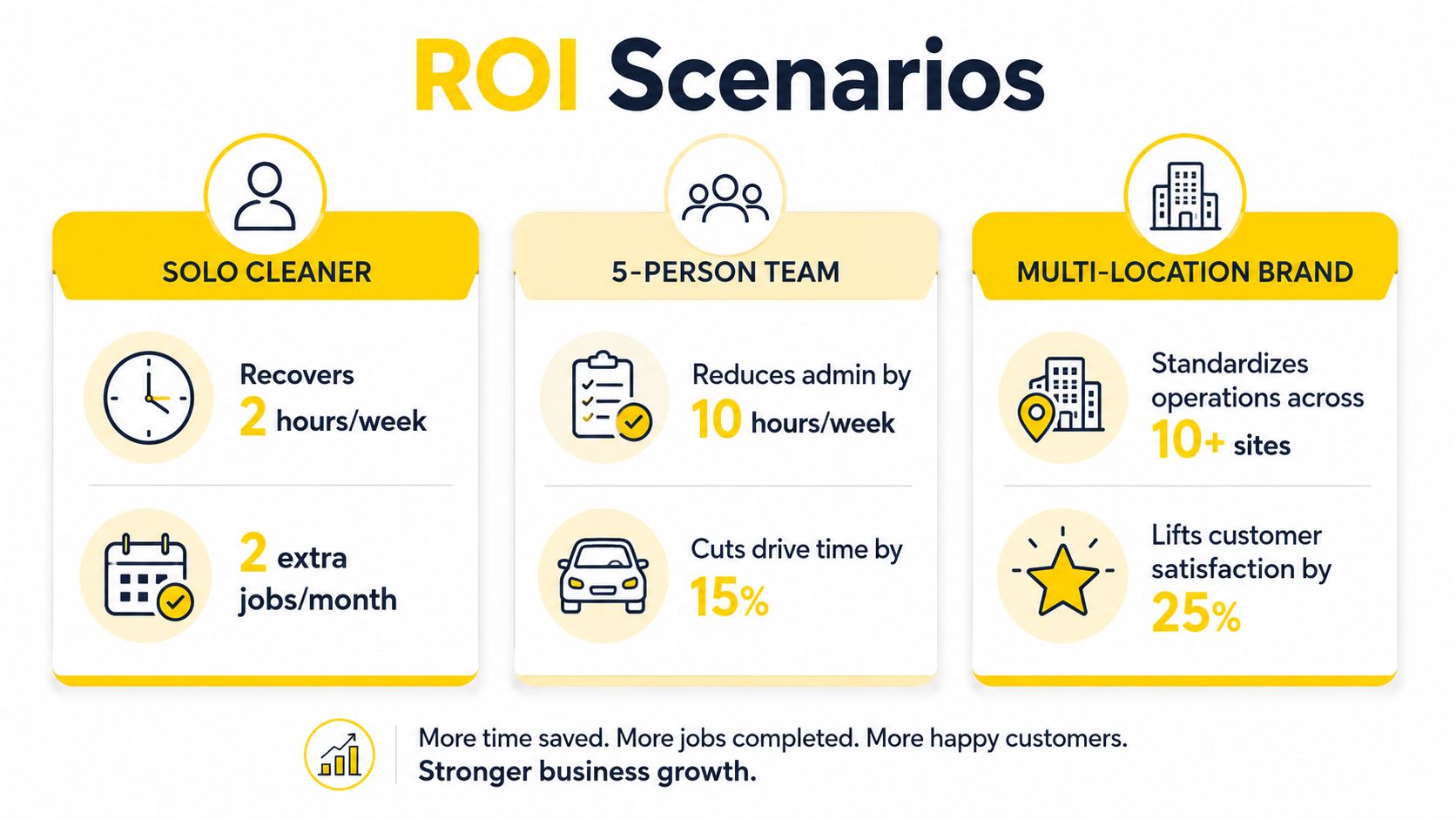
The payback isn't in the subscription fee. It's in the cleaner handoff from lead to estimate to booked visit, and in the fact that the owner stops carrying the whole operation in their head. If that chain is weak, the software won't save you. If it's tight, the software pays for itself by making good work easier to repeat.
Stop asking whether you need scheduling software in the abstract. Ask where your biggest leak is right now, lead capture, rescheduling, crew dispatch, or follow-up, and fix that first. If you're still living in spreadsheets, the first move is not a fancy all-in-one package, it's a workflow that your team will use.
The other question is switching cost. If the new system can't ingest your current customers, recurring jobs, and inquiry flow without a mess, it's not ready for prime time. Keep the change small enough that the team can absorb it, but not so small that you end up doing everything twice.
You should also decide whether hiring and scheduling belong in the same planning conversation. For many cleaning businesses, they do. Keep learning from the practical material on Estimatty's blog and the hiring-side articles at pipehirehrm.com/blog, then pick one workflow to automate in the next two weeks instead of stalling for another month.
If you want the lead capture, estimating, and scheduling pieces to stop fighting each other, Estimatty is built to turn cleaning inquiries into usable estimates and booked visits without forcing your office to retype everything. Visit Estimatty and map the first workflow that's costing you time today, then fix that path before you buy anything bigger.