
October 14, 2026
Average Commercial Cleaning Rates: Your 2026 Pricing Guide
Discover average commercial cleaning rates by facility type and size. Learn pricing models, hidden cost drivers, and how to quote with Estimatty in minutes.

Wednesday, April 15, 2026
Stop losing leads. Our guide to online booking software cleaning business covers features, pricing, and how to convert inquiries into jobs 24/7.
.png)
You finish a long day in the field, check your phone, and see a missed call from a new prospect. Then a voicemail. Then silence. By the time you call back, they’ve already booked someone else.
That’s the daily reality for a lot of cleaning companies. Not because they do poor work, but because their sales process still depends on someone answering the phone, replying to a form, and sending an estimate fast enough to keep the lead warm.
That’s why online booking software cleaning business owners use well isn’t just a scheduling tool. At its best, it closes the gap between inquiry and booked job. It captures the lead, gathers the job details, gives the customer a path forward, and gets payment moving without your team chasing every step manually.
Most articles stop at calendars and reminders. Those matter. But the main financial impact comes earlier in the process. If a prospect has to wait for an estimate, many of them leave before your schedule even becomes relevant.
The leak usually starts after hours.
Residential customers shop when they’re off work, when the kids are asleep, or when they finally get around to comparing providers on their phone. If your site says “call for pricing” or sends them into a generic contact form, you’re asking them to wait. Most won’t.
Housecall Pro highlights the scale of this problem. 80% of homeowners factor in online booking availability when selecting a service provider, 96% expect a user-friendly professional website, and home services businesses miss about 27% of inbound calls according to the data cited in this breakdown of cleaning business software with online booking.
A lot of cleaning websites still behave like digital brochures. They list services, show a few photos, maybe add testimonials, then end with a phone number and a contact form.
That setup creates friction.
If you want a good outside perspective on reducing friction across the buying journey, this guide on how to increase online sales is worth reading. The principle applies directly to cleaning. Every extra step between interest and action costs you bookings.
Practical rule: If a customer is ready to buy at 9:30 p.m., your site should let them move forward at 9:30 p.m.
Owners often focus on the missed call itself. The bigger issue is what happens next.
This is why I treat 24/7 booking as a revenue tool first and a convenience feature second. It doesn’t replace service quality. It protects the chance to deliver it.
For companies that still rely heavily on manual phone coverage, a stopgap can help. This article on a 24-hour phone answering service is useful if you’re comparing live answering with automation. But if your goal is cleaner operations, the better fix is a system that lets the prospect self-serve immediately.
What works:
What doesn’t work:
If your business still depends on catching every call live, you’re operating with the doors partly closed.
Think of modern booking software as your digital front desk, sales coordinator, and payment clerk working at the same time.
The strongest systems do more than place an appointment on a calendar. They move the customer from interest to commitment with as little delay as possible.
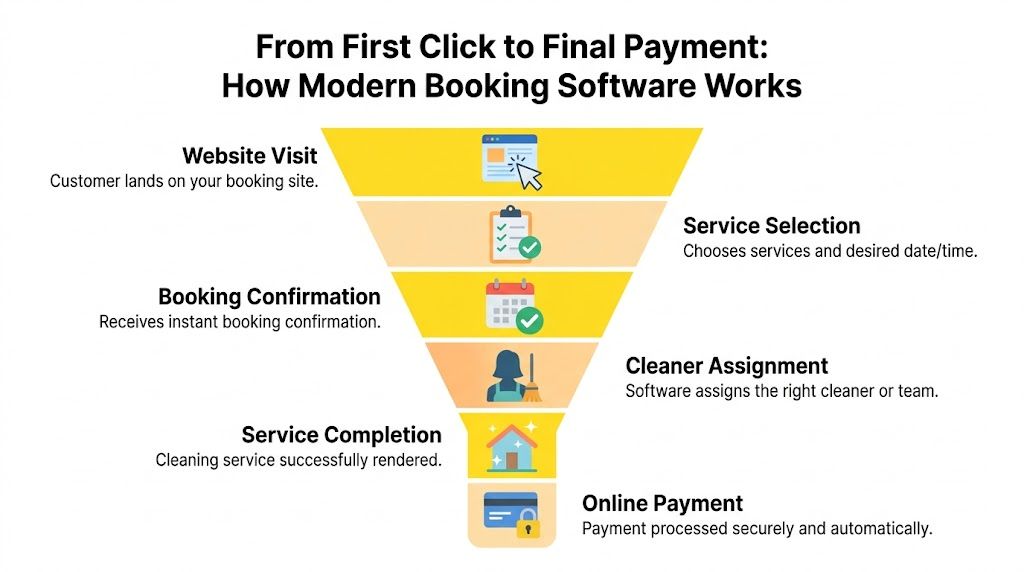
Most software vendors talk about scheduling. That’s too late.
The bigger problem sits between inquiry and booking. The market gap is clear: 40% to 60% of inquiries never convert to bookings because prospects wait hours or days for manual estimates, which is exactly why instant estimation matters, as noted in this analysis of booking system limitations.
If you’re evaluating how AI can automate this first response layer, this article on AI sales automation for cleaning services maps the process well.
A practical setup usually looks like this:
Website visit
The prospect lands on your site from search, social, a referral, or a Google Business Profile.
Service selection
They choose house cleaning, deep cleaning, move-in or move-out, office cleaning, or another package.
Job details captured
Good systems ask the details that affect pricing and fit. Bedrooms, bathrooms, square footage, add-ons, frequency, pets, access notes, and urgency all matter.
Estimate delivered
Many businesses still lose people at this stage. If the customer has to wait for an email or callback, the process stalls.
Booking confirmation
Once the buyer is comfortable, they select a slot and get a confirmation.
Payment and reminders
Deposits, prepayments, card capture, reminders, and receipts all happen automatically.
Some tools are strong once the job is already sold. Square Appointments, Jobber, and other scheduling-first platforms help customers book online and automate reminders. That’s useful.
But if your biggest leak is slow estimating, you need software that handles the front end, not just the calendar. Estimatty, for example, is built to engage website and phone leads, gather cleaning-specific job details, and send instant estimates before the lead drifts away. That’s a different category of value than simple appointment scheduling.
For a broader marketing lens on how digital booking influences lead capture, Silva Marketing has a solid piece on online appointments. It’s relevant because the booking button itself isn’t the win. The win is reducing hesitation.
The best system feels simple to the customer and strict behind the scenes. Easy booking on the front end, controlled rules on the back end.
On your side, the workflow should create order:
When that’s in place, your team spends less time babysitting leads and more time servicing booked work.
Cleaning businesses outgrow generic booking tools fast.
A salon calendar or a basic appointment plugin may look fine in a demo. Then you try to price a deep clean, manage recurring visits, assign a two-person crew, add extras, and screen for service area rules. That’s when the cracks show.
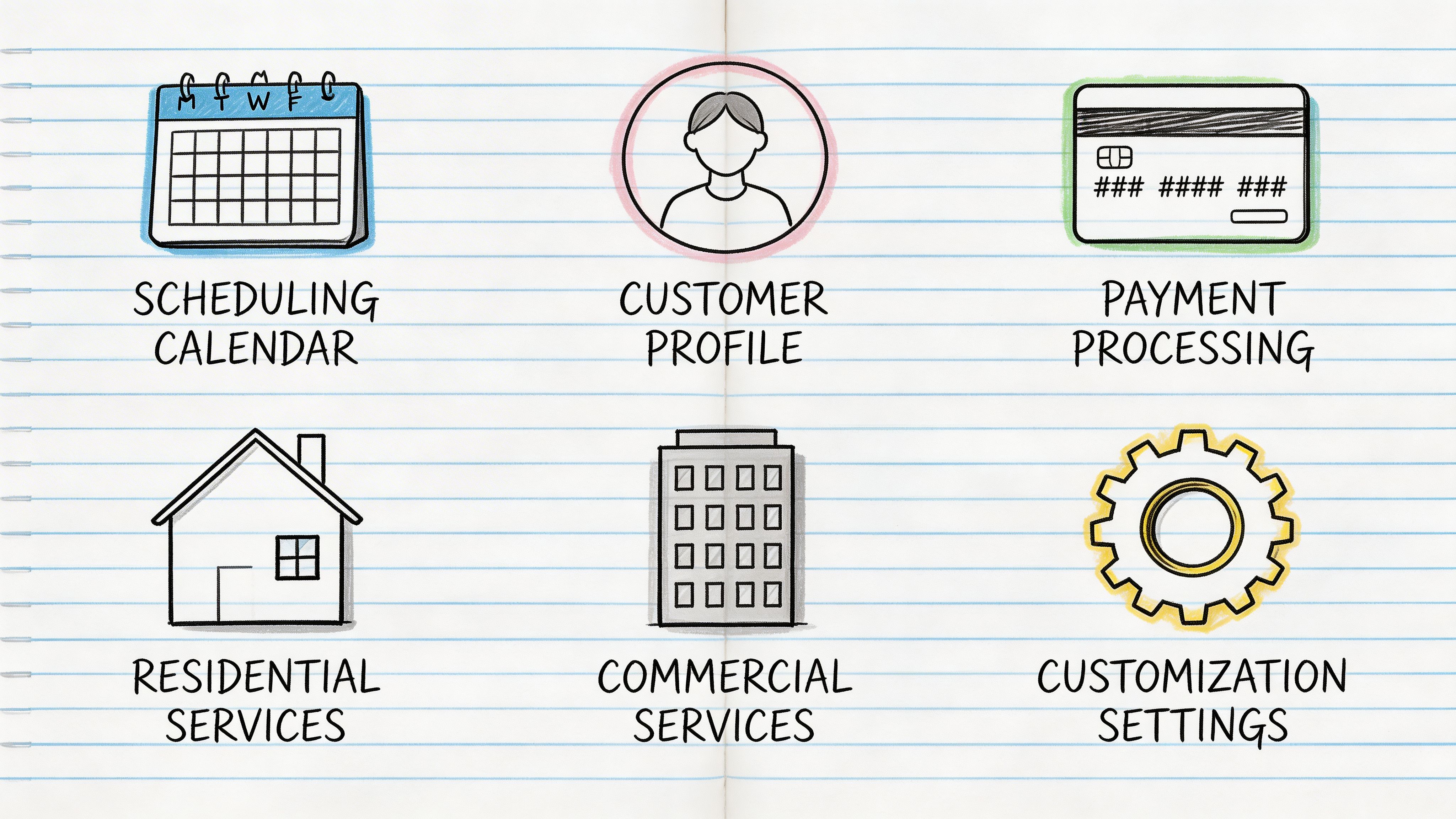
Residential work has patterns. Weekly, biweekly, monthly. First-time deep clean followed by maintenance clean. Add-ons like oven, fridge, inside windows, or laundry.
The software should support that without forcing your office to patch it manually.
Look for:
Commercial cleaning has different pressure points. Office suites, common areas, site access, after-hours windows, multi-location accounts, custom scopes, and approval chains.
A system built only for simple household bookings usually struggles here.
Commercial-focused teams should care about:
This is one feature owners underestimate.
If the form only asks for name, phone, and preferred date, your staff still has to chase basic facts. That creates delays and inconsistent pricing. Better intake forms standardize what gets collected up front.
According to the verified data, platforms using AI-driven scheduling optimization can achieve up to 79.3% autonomous resolution of booking-related support tickets, and customizable intake forms that collect critical job parameters help standardize estimating accuracy and reduce callbacks as described on Square’s cleaning services page.
Bad intake creates bad estimates. Bad estimates create thin margins, awkward customer calls, and rescheduling headaches.
If cleaner availability is part of your booking problem, this guide to online employee scheduling is a useful companion. Booking only works well when staffing rules are just as clear as pricing rules.
| Feature | Why It's Critical for Cleaners | Good for Residential | Good for Commercial |
|---|---|---|---|
| Custom intake forms | Captures bedrooms, bathrooms, square footage, surfaces, access needs, and add-ons before your team gets involved | Yes | Yes |
| Instant estimates | Keeps leads from waiting on manual follow-up | Yes | Yes |
| Recurring service settings | Supports weekly, biweekly, and monthly scheduling without manual workarounds | Yes | Sometimes |
| Multi-crew scheduling | Matches job size and complexity to available staff | Yes | Yes |
| Service area rules | Prevents out-of-zone bookings and pricing mistakes | Yes | Yes |
| Add-on pricing controls | Protects margin on extras like oven, fridge, or interior windows | Yes | Sometimes |
| Deposits or prepayment options | Improves commitment and cash flow before service day | Yes | Yes |
| Automated reminders | Cuts down on missed appointments and no-answer arrivals | Yes | Yes |
| Customer profiles and history | Helps with repeat service, preferences, gate codes, and issue tracking | Yes | Yes |
| Multi-location account handling | Keeps commercial accounts organized under one customer umbrella | Rarely | Yes |
| Reporting and analytics | Shows where leads stall, what books, and what services perform best | Yes | Yes |
Owners get distracted by polished dashboards and generic CRM features.
I’d put these lower on the list unless your fundamentals are already tight:
The right software should fit the way cleaners price, schedule, and fulfill work. If it can’t handle that, it’s admin software wearing a booking label.
Software choice gets expensive when owners buy for appearance instead of workflow.
A cleaner decision starts with one question: where are you losing the sale? If your issue is after-hours calls, you need constant coverage. If it’s estimate delays, you need instant estimation. If it’s messy dispatching, you need stronger scheduling and crew management.
Not all pricing structures hurt in the same way.
Per-user pricing can be fine for a solo cleaner or a small office team. It becomes less attractive as you add supervisors, dispatchers, or field leads who all need access.
Flat monthly pricing is simpler to forecast. Owners usually prefer it when they want stable software costs.
Commission-based or transaction-heavy pricing can feel light at the start, but it can punish growth if a big share of your bookings flows through the platform.
The main mistake is buying the cheapest plan, then discovering it lacks the workflows that convert and fulfill jobs.
A lot of cleaning companies still treat payment as the final step. Better platforms bring it forward.
The verified data shows that modern booking software supports prepayments and deposits at the time of booking, and features like Instapay can reduce payment float from the typical 3 to 5 days to same-day availability, which changes working capital for smaller operators, as described on Housecall Pro’s maid service software page.
That affects more than convenience.
Choose software that helps you collect money at the right time, not software that leaves your office chasing it after the clean.
Many otherwise solid systems fail here.
If your booking platform doesn’t connect to the rest of your operation, your team ends up retyping data into accounting tools, texting staff manually, and handling hiring in disconnected systems.
The integration layer should cover:
If you’re building a connected stack, start with a software provider that documents its integrations clearly.
For hiring, it also helps to think ahead. If you’re staffing up, pipehirehrm.com is relevant, and get.pipehirehrm.com/blog is useful for cleaning employee hiring workflows. A booking system can bring in demand quickly. If your hiring process is slow, growth still stalls.
Before you commit, ask these:
If the answer to any of those is no, keep looking.
A software rollout doesn’t need to drag on. Most delays come from unclear pricing rules, sloppy service definitions, and skipping test bookings.
A simple launch plan beats a complicated one every time.
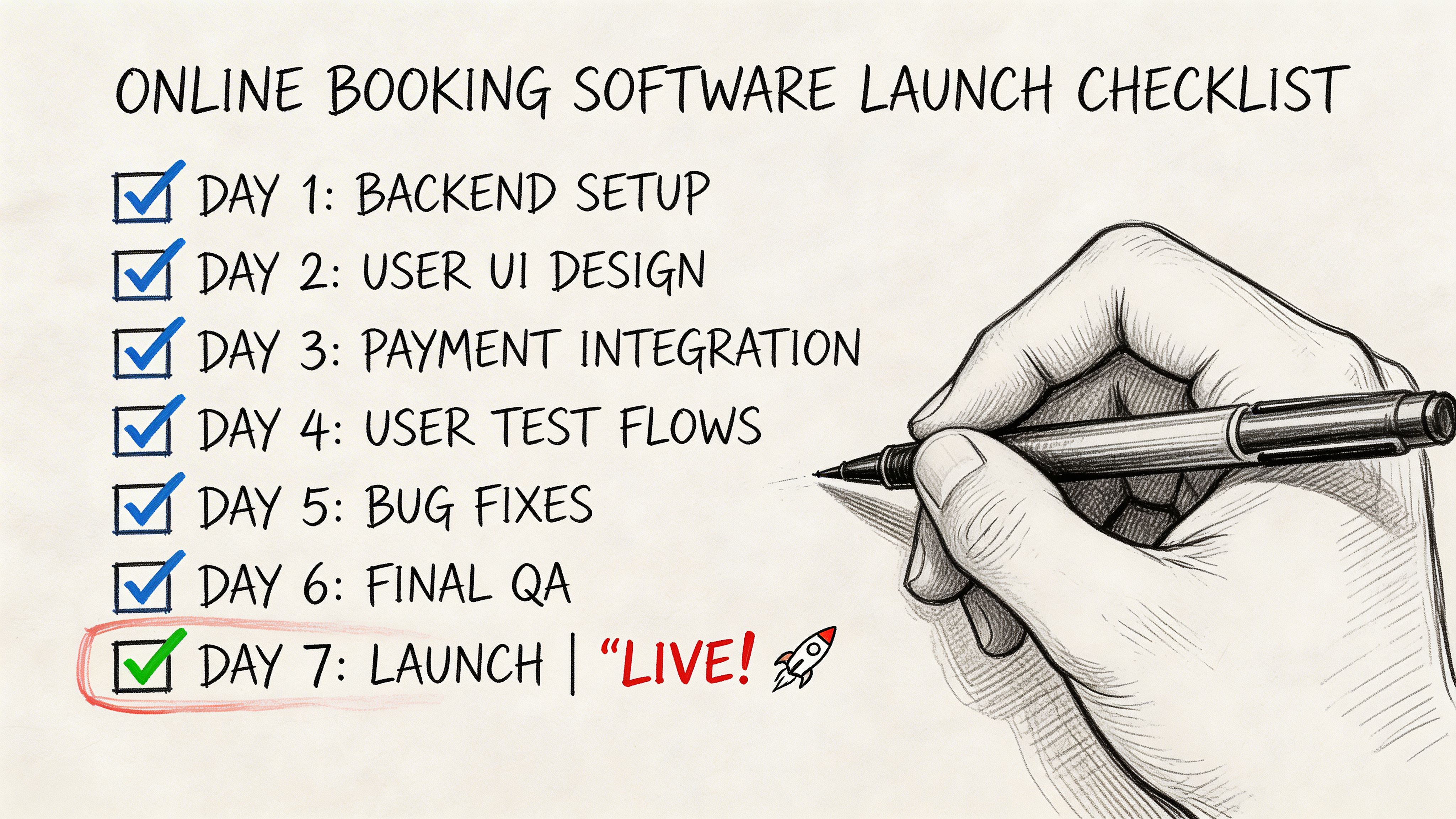
Start with your actual offers, not what the software demo suggests.
List your core services plainly:
Then define how you estimate each one. If you use bedrooms and bathrooms for one service and square footage for another, build that logic in from the start.
A lot of booking errors come from weak geography settings.
Decide:
This is also where you block unrealistic booking windows. Don’t let customers book a same-day afternoon clean if your crews are already full by noon.
This is the step owners rush, then regret.
Ask only what helps you price, assign, and deliver the job well. That usually includes home size, service frequency, access notes, pets, parking constraints, and selected extras.
Keep it short, but don’t make it shallow.
If your team has to call most leads to collect missing basics, the booking form isn’t finished.
Turn on the parts that reduce chasing.
Set up:
This is a good point to watch a walkthrough before testing your live flow:
Use your own phone. Use a friend. Use a family member who isn’t familiar with your business.
Test for:
Don’t test as the owner who already knows what every button means. Test as a distracted customer who wants the job booked fast.
Launch the system, but stay close to it.
For the first week, review every inquiry and booking. Look for patterns. Customers may get stuck on one question, skip one add-on, or misunderstand service differences. Tighten the form and pricing rules early.
If you want extra setup ideas after launch, estimatty.com/blog is a useful place to keep learning from real cleaning workflows instead of generic SaaS advice.
The value of booking software looks different depending on the size of the operation.
What stays consistent is this: the businesses that win usually remove delay from the first contact, then tighten the handoff into scheduling and payment.
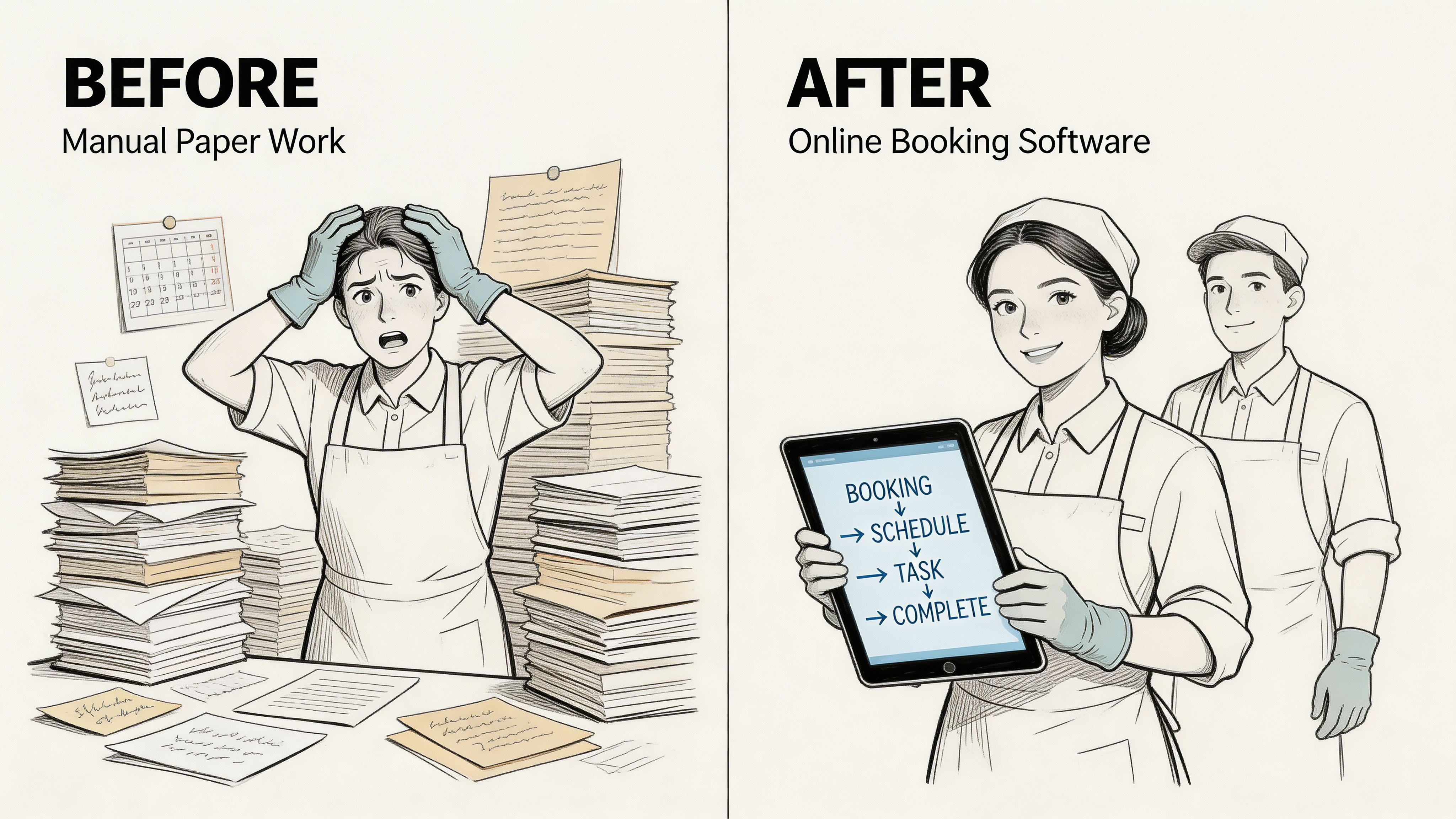
A solo operator is usually doing everything. Cleaning, driving, invoicing, answering calls, sending follow-ups.
In that setup, the best workflow is simple. Website visitor arrives, enters job details, receives an estimate, chooses a time, and gets confirmation without waiting for a callback.
The owner should track:
A resource like this case study on sending estimates 24/7 is helpful because it shows the practical side of replacing after-hours silence with automated response.
This team has more moving parts. The pain usually shifts from lead capture alone to coordination.
The software now needs to support crew assignment, cleaner availability, recurring schedules, and customer notes that prevent mistakes on site. If the owner still handles estimates manually, sales slows down just as fulfillment gets more complex.
Useful KPIs here include:
| KPI | Why it matters |
|---|---|
| Lead conversion rate | Shows whether prospects move from inquiry to booked work |
| Average job value | Reveals whether add-ons and proper scoping are happening |
| Recurring customer share | Indicates stability of the client base |
| Schedule utilization | Helps spot open gaps or overbooked days |
| Payment collection speed | Shows whether billing is smooth or delayed |
Commercial operators need consistency across branches, supervisors, and sales channels.
The workflow often starts with a request for service, then a structured estimate process, then site-specific scheduling and billing. Online booking software helps most when it creates a standard front-end intake and reduces the amount of tribal knowledge trapped with one admin or one estimator.
The KPIs shift slightly:
Track the bottleneck, not just the outcome. If bookings are weak, find out whether the problem is inquiry quality, estimate delay, schedule friction, or payment hesitation.
What changes across these three examples isn’t the need for automation. It’s where automation matters first.
Manual intake still works for some owners, right up until growth exposes every weak point in the process.
The phone rings while you’re on site. A form comes in after hours. A prospect wants pricing now, not tomorrow morning. Your office replies late, the customer keeps shopping, and the job goes elsewhere. That cycle repeats until you realize the business isn’t short on demand. It’s short on speed and consistency.
That’s why online booking software cleaning business owners choose today has to do more than manage appointments. It has to help convert the lead before the lead disappears. The calendar matters, but the earlier handoff matters more.
Audit your current process thoroughly. Look at where people wait, where staff retype information, where estimates stall, and where payment gets delayed. Then fix those points in order.
The companies that keep relying on voicemail and manual follow-up will stay busy. The companies that automate inquiry, estimation, booking, and payment will scale with far less friction.
If you want a practical way to reduce lead leakage, send instant estimates, and give prospects a 24/7 path to book, take a look at Estimatty. It’s built for residential and commercial cleaning businesses that need faster response without adding more admin work.