October 23, 2026
How to Start Commercial Cleaning in 2026
Learn how to start commercial cleaning in 2026 with proven steps for pricing, staffing, licensing, and automation that win recurring contracts.

Monday, August 31, 2026
Find the right home cleaning software with this buyer's guide covering must-have features, ROI, integrations, and onboarding tips for cleaning businesses.
You've probably lost a cleaning job this way: a homeowner submits an estimate request after dinner, your phone is buried under missed calls, and you discover the inquiry the next morning. By then, another cleaner has responded, scheduled the visit, and collected the deposit. Your problem isn't a lack of effort. It's a lead-to-job process that depends on you being awake and available.
Home cleaning software should solve that operational gap. The right platform captures inquiries, builds estimates, schedules the correct crew, collects payments, and keeps the customer record intact. The wrong platform gives you a polished calendar while leaving the most valuable part of the workflow, converting demand into booked work, manual.
A homeowner submits an estimate request at 9:47 PM. The solo operator misses the notification until morning. A competitor responds within 15 minutes and books the deep clean. The owner didn't lose because the service was worse. The owner lost because the buying moment passed.
That scenario happens across residential cleaning, especially for urgent visits, move-out work, holiday preparation, and customers comparing several providers at once. A form that sends an email into an unattended inbox isn't automation. It's delayed administration.
The category is no longer small or experimental. One industry estimate valued the cleaning service software market at USD 1.43 billion in 2022 and projected it to reach USD 2.45 billion by 2030, while another estimated USD 2.397 billion in 2024 and forecast USD 6.454 billion by 2035. The estimates differ, but both point to sustained investment in scheduling, estimates, dispatch, billing, and customer management, as documented by Market Research Future's cleaning service software market overview.
Manual lead handling creates a cost for every inquiry that waits, not only for the jobs that are visibly lost. Someone must read the message, ask for home details, calculate labor, prepare an estimate, follow up, find availability, and enter the job again on a schedule. That work consumes owner time in a solo operation, office time in a small team, and coordination time across a multi-crew company.
The software decision should therefore start with one question: how much of the lead-to-job flow can happen without human re-entry? A platform that responds immediately, preserves the customer's details, and moves an accepted estimate into scheduling has a direct commercial role.
Practical rule: Buy software to remove revenue delays first, then buy it to make administration more comfortable.
For a solo cleaner, one missed deep clean can represent a meaningful hole in the week. For a small team, repeated delays create idle capacity and force the owner to chase work manually. For a multi-crew operation, slow routing and follow-up can leave several crews underbooked while new inquiries sit untouched.
That's why a serious buyer should evaluate service business software for the complete workflow, not compare calendar colors and dashboard screenshots. Scheduling matters, but scheduling demand you never captured won't grow the business.
Home cleaning software connects the customer record, estimate, schedule, field instructions, and payment status in one workflow. A homeowner submits a form or arrives through a Google lead source. The system creates or updates the contact, captures details such as square footage, bedrooms, surfaces, service type, and urgency, then uses those inputs to build an estimate.
The homeowner receives a branded estimate link instead of waiting for a phone call. After acceptance, the system can collect a deposit, create the job, and assign it to a crew route based on availability, territory, skills, and priority. The approved scope and line items stay attached to the job, so the cleaner works from the same version the customer accepted.
On service day, the crew needs a mobile view showing the address, access notes, scope, add-ons, and customer history. A cleaner can check in, add notes, and upload completion photos. Once the work is finished, the invoice should reconcile with the original record, rather than forcing the office to rebuild the job from messages or paper notes.
This shared data model is the core design principle described in field quoting software guidance. An accepted estimate should become a work order without manual re-entry. Copying details between systems creates transcription errors, scope confusion, rework, and margin leakage.
| Step | Manual Process | Software-Managed Process |
|---|---|---|
| Lead capture | Inquiry arrives by form, phone, or email and waits for review | Lead creates a contact and triggers an immediate response |
| Scoping | Owner asks questions and calculates labor manually | Pricing logic uses captured home and service details |
| Estimate | Staff creates and sends a document | Branded estimate link is generated and delivered |
| Acceptance | Customer calls or emails to confirm | Customer accepts and can pay a deposit online |
| Scheduling | Office re-enters details on a calendar | Accepted estimate becomes a job and uses availability rules |
| Field delivery | Cleaner relies on paper notes or messages | Crew uses mobile instructions, check-in, photos, and notes |
| Billing | Invoice is rebuilt after completion | Invoice uses the approved job record and payment status |
Read about field service mobile software for cleaning businesses before choosing a platform. A mobile app helps only when it reflects the same customer, estimate, and job data used by the office.
A product that creates estimates but cannot schedule leaves a handoff. One that schedules without preserving scope and pricing creates another. The purchase is not a collection of isolated modules. It is continuity from first inquiry to paid completion.
Most software demos show every feature at the same volume. That's a mistake. A branded portal and a revenue dashboard may look impressive, but they won't compensate for slow response times, weak pricing logic, or a schedule that requires duplicate entry.
Rank capabilities by the business result they create.
These features directly affect whether demand becomes booked work:
This is the layer that prevents another 9:47 PM inquiry from waiting until morning. Industry descriptions of field-service systems emphasize real-time calendars, dispatch boards, crew assignment, job-status tracking, and route optimization, as summarized in Capterra's field-service software resource.
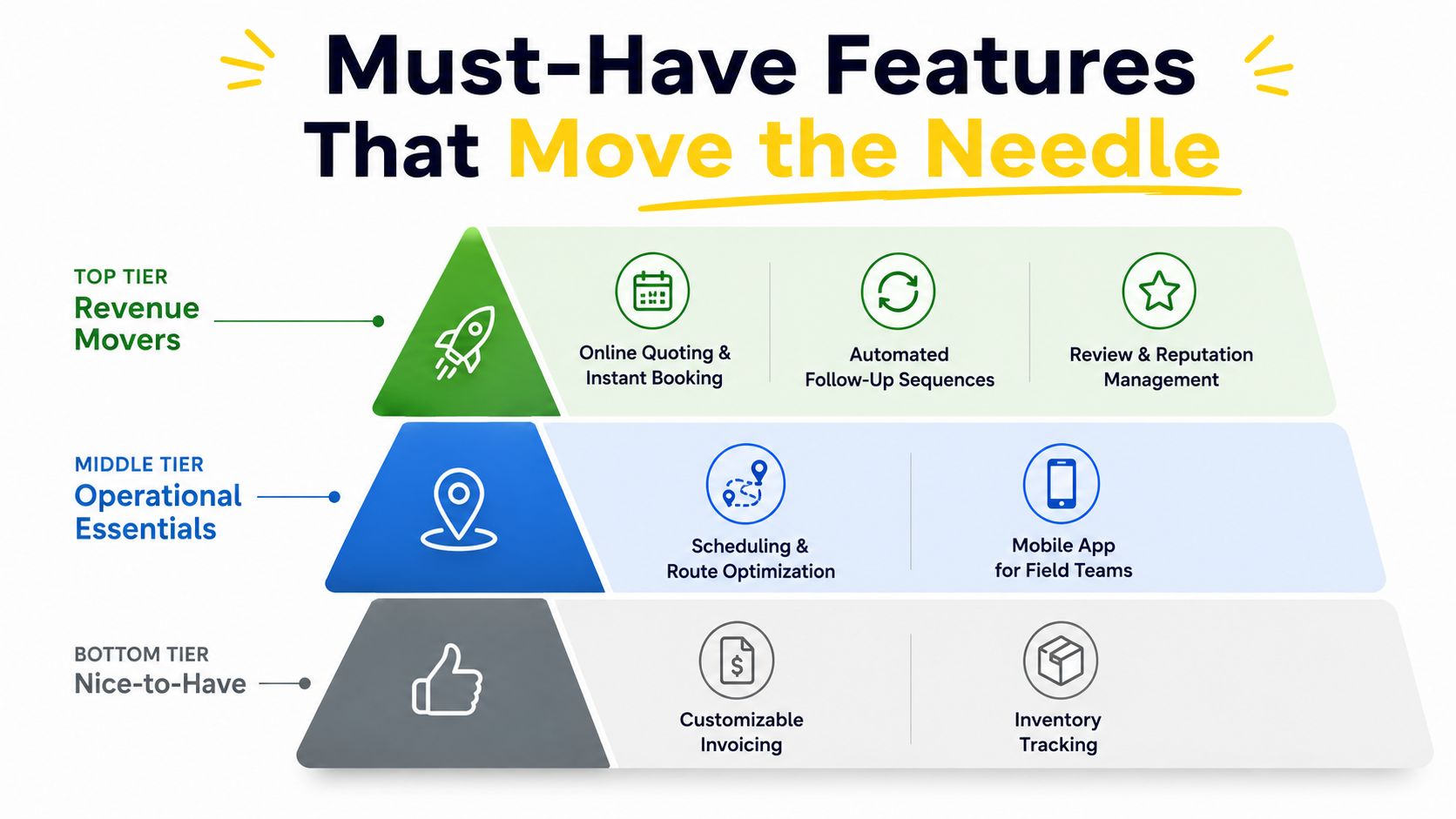
These capabilities protect the margin after the job is sold:
These tools don't replace revenue movers. They make the booked workflow reliable enough to repeat.
Portals, referral tracking, gift cards, and basic reporting can help once the operating data is clean. They shouldn't decide the purchase.
Reporting deserves particular scrutiny. If invoices, job costs, cancellations, and completed work aren't recorded consistently, the dashboard only displays noise with attractive graphics. Fix the transaction flow first, then analyze it through job scheduling software guidance for cleaning businesses.
A trial should prove the first two tiers before you spend time configuring the third. Ask the vendor to demonstrate a new lead becoming an estimate, an accepted estimate becoming a job, and a completed job becoming an invoice. If that chain breaks, no portal will rescue the implementation.
Software pricing should follow your operating model, not your ambition. Independent 2026 coverage describes cleaning tools ranging from about $19 to $369 per month, with quote-only, scheduling-only, and all-in-one products using different pricing structures, as outlined in this cleaning software pricing comparison. Those plans can charge per user, by tier, or at a flat rate, so the advertised starting price rarely tells you the actual cost.
| Operation Size | Recommended Type | Monthly Cost Range | Best-Fit Capabilities | Watch Out For |
|---|---|---|---|---|
| Solo cleaner | Quoting-only or light scheduling | About $20 to $80 | Estimates, instant responses, online booking, payment connection | Paying for dispatch and dashboards you won't use |
| Small team | Scheduling-plus platform | About $50 to $150 per user | Crew mobile access, route planning, reminders, invoicing | Per-user pricing that expands faster than revenue |
| Multi-crew business | All-in-one suite | About $150 to $400 | Lead routing, recurring templates, dispatch, billing, reporting | Lock-in, complex setup, and cleaner-based fees |
A solo cleaner handling a modest weekly workload rarely needs a full operations suite. A lightweight estimator and scheduler connected to Stripe can be more practical than a large platform with functions you never open. The test is simple: can you answer inquiries, calculate estimates, accept a booking, collect payment, and see the day's work without copying information?
If the product requires extensive configuration before it can handle a normal residential visit, it's too heavy for the operation.
For a team with several cleaners, mobile access and route logic usually matter more than executive dashboards. The office needs to assign the right job, give the crew accurate instructions, and see whether the work is underway. A scheduling-plus platform earns its place when it eliminates repeated calls, manual route decisions, and paper instructions.
Review how the vendor counts users. A plan that charges for every cleaner can make the actual bill rise sharply as staffing changes, even when the core workflow stays the same.
An all-in-one suite becomes easier to justify when the company manages multiple crews, recurring work, territories, or locations. Lead routing, repeat-job templates, dispatch control, and consolidated reporting can replace a patchwork of spreadsheets and messaging threads.
Don't ignore migration risk. Export customer records, estimate history, job data, and invoices before signing a long contract. A platform that makes growth easier but makes departure impossible is an operational liability.
Integrations should be tested with real workflow events, not admired in a marketplace directory. The question isn't whether a platform “integrates with accounting.” The question is whether a paid invoice reaches the accounting system correctly without someone downloading and uploading a file.
Start with four buckets.
A platform may connect to HubSpot, Salesforce, or cleaning-focused products such as Jobber and Housecall Pro. During the trial, submit a new website inquiry and confirm that it creates a contact and a draft estimate. If the contact appears without the inquiry details, the integration is incomplete for sales use.
Zapier, Make, and n8n can move information between forms, CRMs, calendars, and accounting tools. Use them for gaps that are unavoidable, not to compensate for a platform with a fragmented core. Buyers comparing broader ecosystems can browse tool connections to see how integration layers are typically organized.
Twilio, RingCentral, Google Voice, and Aircall can support click-to-text, missed-call text-back, and call tracking. Reply to an automated message during the trial and verify that the response logs against the right customer record. If staff must search a second inbox to understand the conversation, the handoff will fail under pressure.
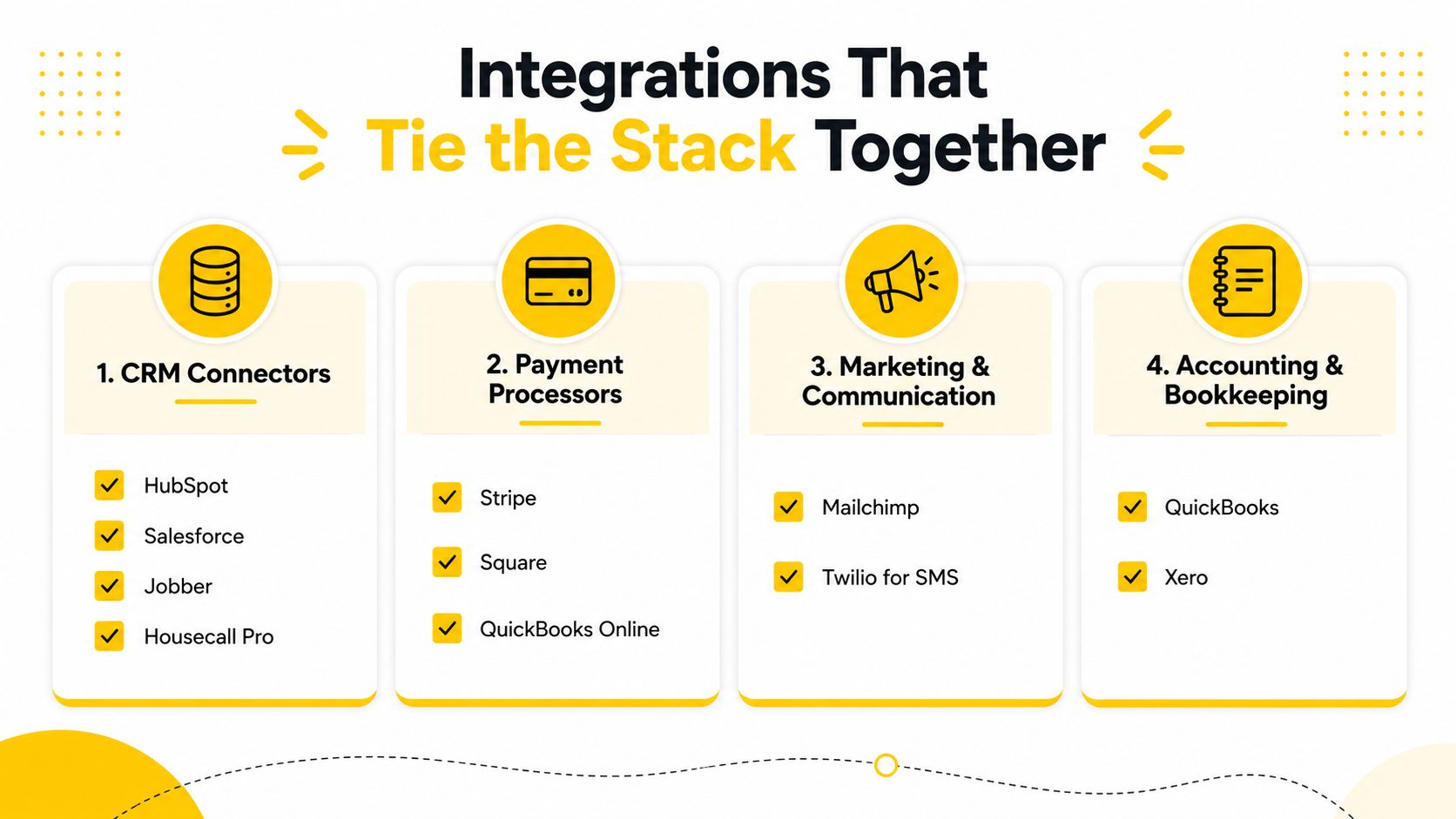
Stripe, QuickBooks, Google Calendar, and Outlook often sit close to the center of the workflow. Run a complete test: accept an estimate, pay it, complete the job, and confirm that the invoice and payment status sync to QuickBooks without manual export. Also test calendar conflicts, rescheduling, and cancellation behavior.
The practical configuration approach is covered in this Zapier and CRM integration guide. Keep the rule simple: if the platform needs more than two glue tools to feel complete, choose another platform. Every bridge adds another failure point, subscription, permission set, and troubleshooting queue.
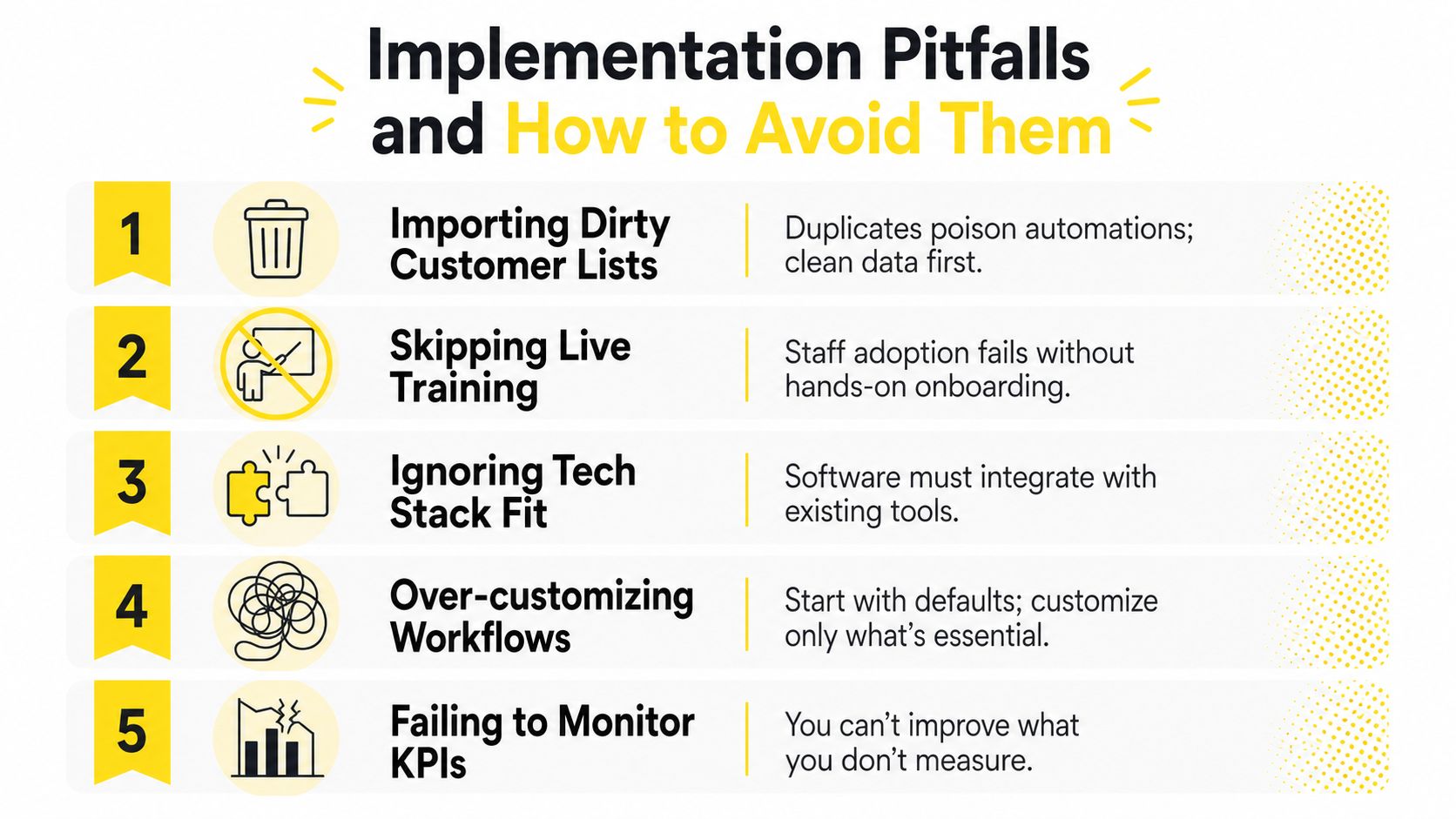
Good software can still produce a poor outcome if the implementation is casual. Cleaning businesses often rush from contract signature to launch, import every old record, configure dozens of automations, and expect the office to learn through mistakes. That approach turns software into an expensive source of confusion.
Importing dirty customer lists: Duplicate records trigger duplicate messages, conflicting preferences, and unreliable reporting. Run a deduplication pass before import and standardize phone numbers, email addresses, service addresses, and customer status.
Skipping live training: A recorded video won't answer the office manager's question while a cleaner is waiting for job instructions. Book at least two paid onboarding sessions with the vendor, one for administrators and one for field users.
Over-automating reminders: Customers appreciate useful communication, not a stream of identical notifications. Cap reminder sequences at two touches per visit, then review replies and opt-outs.
Building complex templates too early: A template based on assumptions can reproduce the same mistake across every recurring visit. Run real jobs first, then clone proven jobs into templates after the first month.
Ignoring mobile usability: A polished desktop dashboard doesn't help a cleaner standing at a locked property. Test every essential workflow on a phone before go-live, including check-in, notes, photos, directions, and status changes.
Use the first days to clean and map data, not to redesign every screen. Train administrators next, configure only the core estimate-to-invoice path, and run pilot jobs with real customers before moving the entire schedule.
During the final days, audit failed notifications, duplicate contacts, mobile access, payment status, and customer-facing language. Keep the old process available as a controlled backup, but don't let staff split new jobs across two systems indefinitely. One source of truth is the point of the migration.
Implementation advice: Launch the smallest complete workflow, then improve it with evidence from actual jobs.
A solo residential cleaner in suburban Denver might begin with a narrow operating problem: inquiries arrive while the cleaner is working, recurring clients need rebooking, and nearby visits aren't grouped efficiently. A quote-to-job flow can capture the request, send an estimate, trigger a rebook reminder, and place accepted work into a route batch. The owner still cleans the homes, but the administrative gap between inquiry and scheduled visit no longer depends on memory.
That scenario is useful because it shows what automation changes without pretending that software creates demand by itself. The owner must still price correctly, deliver the promised scope, and retain customers. The platform prevents routine sales and scheduling work from consuming the same hours needed for service delivery.
A three-crew operation in Tampa faces a different constraint. Paper dispatch sheets create version problems, phone conversations stay outside the customer record, and SMS updates are difficult to coordinate. Replacing those handoffs with shared scheduling, integrated communication, and mobile job instructions gives the office a clearer operating picture and gives crews one current source of job information.
You shouldn't copy a vendor's case study without comparing the underlying conditions. Track your own response time, estimate acceptance, average ticket, recurring rebooking, route density, crew utilization, cancellations, and payment completion. Those measures tell you whether the software is improving the economics of your operation.
A useful example is this instant-estimates case study, but treat it as a workflow reference, not a guarantee. The relevant question is what changed between inquiry and booking, and whether your team has the pricing discipline, service capacity, and follow-up process to support the same mechanism.
Your pricing model should also reflect the work itself. A 2026 residential cleaning calculator lists a general guideline of $0.05 to $0.10 per square foot, while another calculator gives a typical range of $135 to $280 per visit for a 2,000-square-foot home, as shown on this cleaning price calculator. Use those figures as reference points, then build your own logic around home size, bedrooms, surfaces, condition, add-ons, travel, and local costs.
The buying decision comes down to one operational test: can the software move a qualified lead from first contact to paid, correctly scheduled work without repeated manual entry? If yes, calculate the full monthly cost at your current team size and the next one. If no, don't pay for more features. Fix the broken handoff first.
Estimatty gives residential and commercial cleaning businesses an AI-powered web and voice estimator that captures service details, sends estimates by SMS and email, and supports booking around the clock. If your biggest leak sits between inquiry and scheduled work, visit Estimatty and evaluate whether its estimate flow fits your existing CRM and scheduling process.