October 12, 2026
Cleaning Office Prices: A Practical Pricing Guide for 2026
Learn how cleaning office prices really work in 2026. Compare per square foot, hourly, and monthly models, plus tips to estimate and present winning quotes.

Wednesday, July 8, 2026
Build a commercial cleaning pricing calculator to win more jobs. Our 2026 guide covers formulas, tech setup & best practices for accurate estimates.

A prospect lands on your site at 8:47 p.m. They manage a small office, need recurring janitorial service, and want a ballpark estimate before they schedule a walkthrough. They click around, find a contact form, type a message, and wait.
By morning, they've already moved on to the cleaner who answered instantly.
That's the core problem with most commercial cleaning pricing calculator setups. They aren't calculators at all. They're lead forms wearing a pricing label. They collect a name, phone number, and maybe square footage, then dump the lead into someone's inbox. The owner calls back hours later, gives a rough number off the top of their head, and hopes the margin holds.
That process breaks in two places. First, response speed. Second, pricing consistency. If you want recurring commercial work without bleeding profit, your estimate system has to do more than gather contact info. It has to ask the right questions, apply your pricing rules, and move the lead into your workflow without manual cleanup.
A commercial buyer who requests pricing at night is not asking for a full site survey. They are asking whether your company has a process. A generic contact form answers that question badly. It creates delay, hides how you scope work, and forces your team to rebuild the estimate from scratch the next day.
That hurts more than speed. It affects trust.
Commercial clients expect a quick range, clear assumptions, and a path to the next step. If your website only collects a name, email, and “tell us about your project,” the prospect has to do the work your sales system should be doing. Many leave. The ones who stay often enter the conversation focused on price only, because you have not shown them a structured way to assess scope, frequency, or service level.
I learned this the hard way. When pricing lived in my head and inquiries landed in a basic form, the same building could get three different budget numbers depending on who replied and how rushed they were. That creates margin problems internally and credibility problems externally.
The issue is not just that manual follow-up takes time. The issue is that simple forms collect the wrong information in the wrong order.
A prospect asks for janitorial pricing. Your team gets an email with a phone number and rough square footage. Then the detailed work begins. You have to find out facility type, cleaning frequency, restroom count, floor mix, access restrictions, and whether they want day porter support or after-hours service. Until that happens, any number you send is half guesswork.
That kind of intake makes your company look reactive. Buyers notice.
A good comparison comes from other service industries where unclear pricing slows decisions and increases shopping behavior. If you've ever read demystifying Australian moving rates, you've seen the same pattern. Buyers want pricing context, but they also want proof that the provider uses a repeatable system instead of making up numbers on the fly.
Practical rule: Your first response should reduce uncertainty, not create another round of questions.
A real commercial cleaning pricing calculator is not a fancier contact form. It acts as the front end of your sales operation.
It should qualify the opportunity, apply your pricing rules, and return a useful estimate range without asking your team to clean up the submission manually. That changes the economics of lead handling. The calculator works after hours, captures buying intent while it is still fresh, and passes structured information into your pipeline so the next step is a walkthrough, not detective work.
That is the same operational shift behind moving from in-home estimates to online estimates. The companies that make this change do not just respond faster. They standardize pricing, reduce owner dependency, and give office staff a clearer process for follow-up.
The payoff is bigger than convenience. A better calculator gives prospects a smoother buying experience and gives your team cleaner data to sell, schedule, and price with confidence.
A form collects contact details. A calculator qualifies scope and starts the job sale.
Square footage matters, but it's only the starting point. If your commercial cleaning pricing calculator asks for size and nothing else, it will underprice complex buildings and overprice easy ones. Both hurt you.
The calculator has to collect the details that change labor time, supply use, access, and risk. That starts with asking better questions.
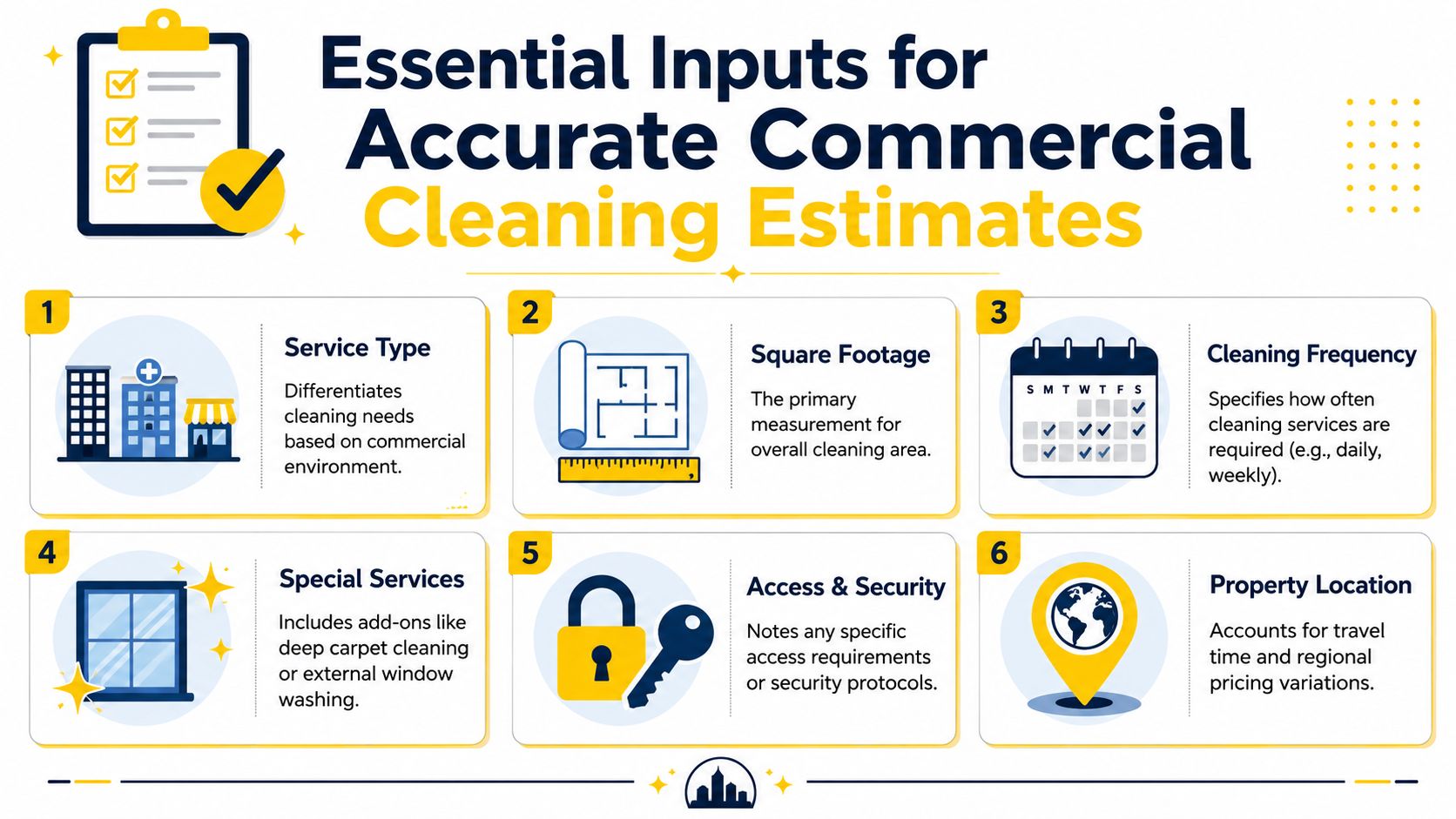
The first variable is facility type. It has to come before the rate. General office cleaning averages $0.09 to $0.17 per square foot, while medical facilities average $0.14 to $0.29 per square foot because sanitization standards are stricter, according to ISSA's commercial cleaning rates guidance. A calculator that treats those as the same building type is broken.
The second is cleanable square footage, not just total square footage. Common areas, storage rooms, server closets, and low-touch spaces don't always get the same service level. If you price the whole footprint at one rate, you'll distort labor.
The third is frequency. Daily, weekly, biweekly, and monthly service are not interchangeable. A building cleaned often may need less buildup removal per visit. A building cleaned less often can take more labor each time.
A practical intake flow should capture:
If your team needs help pricing labor correctly once those details are collected, this guide on how to calculate labor cost per hour is worth reviewing with whoever owns your estimating process.
If an estimate feels easy to produce, check whether you skipped the inputs that actually control labor.
Take two buildings with the same size. One is a standard office with light traffic. The other is a medical clinic with exam rooms, higher-touch surfaces, and stricter sanitization expectations. Same square footage. Different job.
That's why single-rate calculators fail. They treat area like the whole story when labor is shaped by what's inside that area.
A simple checklist helps spot scope gaps before they become pricing mistakes:
| Input | Why it matters |
|---|---|
| Facility type | Changes service intensity and production assumptions |
| Surface types | Affects equipment, chemicals, and labor pace |
| Restroom count | Increases recurring detail work and supply use |
| Frequency | Alters per-visit workload and contract structure |
| Access constraints | Changes scheduling efficiency and crew time |
| Add-on services | Should be priced separately, not buried in base scope |
Most underbidding starts before the math. It starts when the calculator asks shallow questions.
Once the inputs are solid, the pricing logic has to protect the business. At this stage, many owners go wrong. They collect good scope details, then still price by instinct.
That doesn't scale. It also makes training impossible because nobody knows whether the number came from a rule or a mood.
Most commercial cleaning businesses rely on one of three models:
| Model | Best use | Risk |
|---|---|---|
| Per square foot | Recurring contracts with clear scope | Can hide complexity if inputs are weak |
| Hourly rate | One-time work or uncertain scope | Easy to undercharge if time expands |
| Flat contract rate | Stable recurring service | Dangerous if built on bad assumptions |
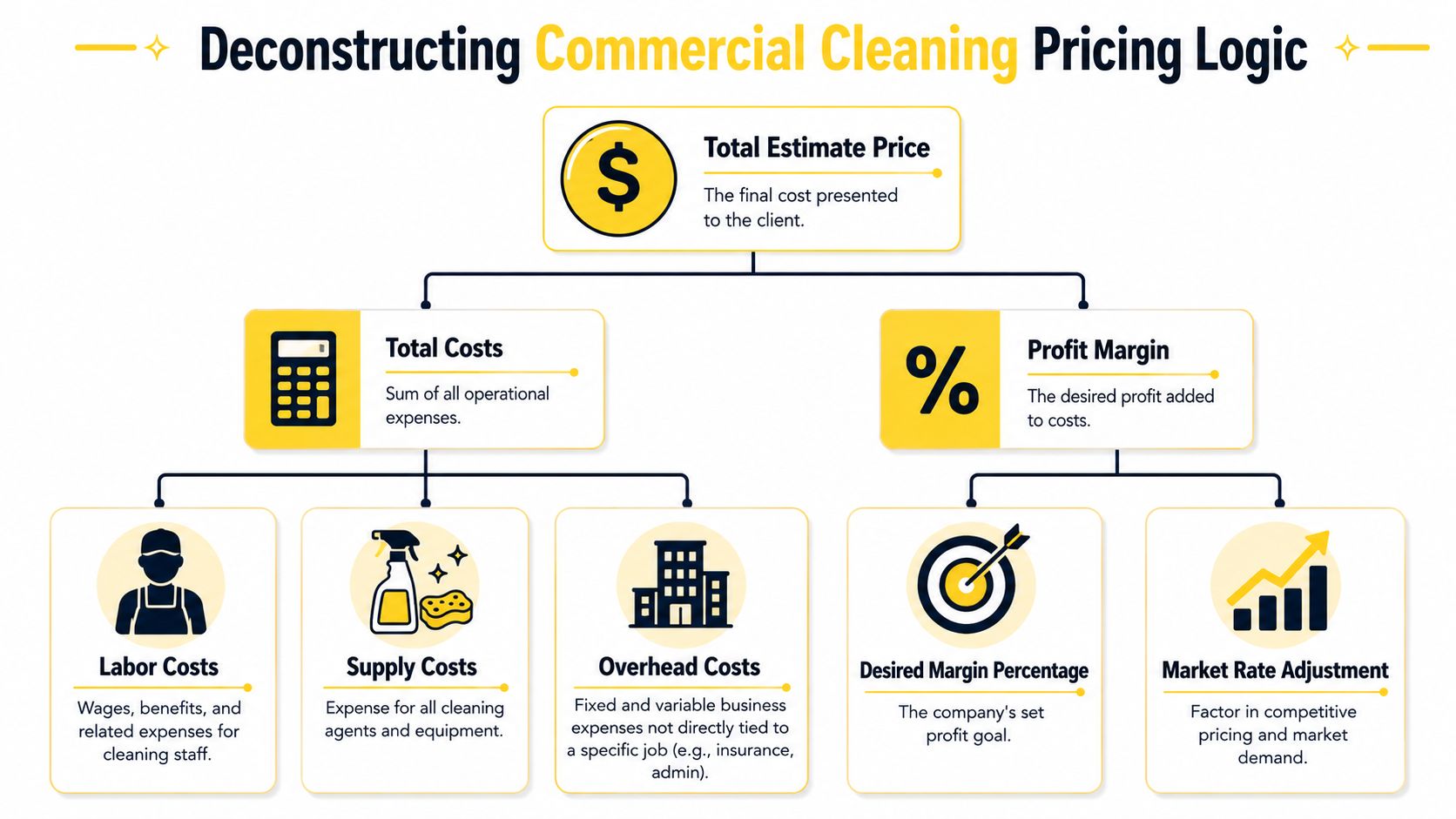
The math underneath should still be the same. The standard formula is Total Cleaning Rate = (Labor + Overhead) × Markup (%), and most businesses incorporate a profit margin of 10% to 30% into the final bid, based on Nilfisk's commercial cleaning rate guidance.
That formula matters because it forces discipline. You're not pulling numbers from the market and hoping they cover costs. You're building from your own operation outward.
Start with labor, because that's usually where the job is won or lost. Then add overhead. Then apply markup intentionally.
For many operators, the typical sequence looks like this:
That last point matters more than most owners think. If carpet shampooing, floor scrubbing, or deep cleaning gets folded into the monthly base, the client stops seeing it as extra value. Your team still does the work, but the contract stops paying for it cleanly.
This video gives a useful visual breakdown of pricing structure before you build your own rules into software:
Owners often ask what competitors are charging before they know their own floor. That's backwards. You need your minimum viable price first, then a market adjustment.
Insurance is part of that reality. If you're pricing commercial work without accounting for proper coverage, your estimate isn't complete. This overview of how ISU provides insurance for cleaning services is a good reminder that overhead isn't just soap, liners, and equipment depreciation.
Margin check: The cleanest-looking contract can still be a bad sale if your pricing logic doesn't include the true cost of delivery.
If you want to tighten your model further, use a documented pricing framework instead of scattered spreadsheets. This resource on how to price cleaning jobs is a practical reference for turning those inputs into a repeatable estimate structure.
A calculator should do one thing exceptionally well. It should stop unprofitable jobs from looking acceptable.
A prospect lands on your site at 9:30 p.m. They want a ballpark price before they give you their phone number. If your calculator opens with twelve fields and no context, they leave. If it walks them through the scope in the same order a good estimator would, they stay, finish, and enter your pipeline with usable information.
That difference has very little to do with the math.
A calculator that converts works like a trained sales coordinator. It asks the next sensible question, filters out irrelevant inputs, and gives the buyer confidence that your company understands commercial scope. That is how a pricing tool starts acting like a 24/7 sales engine instead of a dead-end web form.
The usual failure point is simple. The screen asks for name, company, email, phone, square footage, frequency, service date, notes, and a few scope details all at once. The buyer has to decide what matters before you have helped them think through the job.
That creates two problems. Completion drops, and the estimates you do get are built on weak inputs.

Commercial cleaning scope is rarely flat enough for a fixed form. A medical office should trigger different follow-up questions than a standard office. A multi-tenant building needs different prompts than a single-site warehouse. If the calculator cannot adjust, it misses the labor drivers that decide whether a job is profitable.
Conditional logic fixes that. When a buyer selects floor care, the tool should ask about floor type, finish condition, and service frequency. When they select post-construction or higher-touch environments, the flow should tighten around debris level, access limits, and disposal needs.
The best-performing calculators use fewer visible fields, but they collect better data because the sequence makes sense.
A practical intake flow should:
Buyers will answer detailed questions when the path feels relevant.
The conversion lift also depends on what happens behind the screen. If your calculator needs to pass data into scheduling, CRM, proposals, and follow-up campaigns, the front end and the integration layer have to be designed together. Teams that have handled larger website builds will recognize the same issue in projects involving comprehensive e-commerce integration services. Front-end simplicity usually comes from disciplined back-end structure.
Prospects judge your operation before they ever speak to your team. A clumsy calculator suggests messy handoffs, slow quoting, and inconsistent service. A clean, conversational flow signals that your systems are organized.
That matters because the calculator is doing two jobs at once. It is collecting scope data, and it is selling the experience of working with your company.
If you want to tighten that handoff from anonymous visitor to qualified lead, this guide on converting website visitors into customers is a useful next read.
You do not need more fields. You need better sequencing, clearer prompts, and a result that feels credible enough for a prospect to take the next step.
A calculator earns its keep when it reduces office work, shortens response time, and gives the team one reliable record of the opportunity. If staff still have to retype scope details into the CRM, email a manager, and build a proposal from scratch, the calculator is acting like a lead form with extra steps.
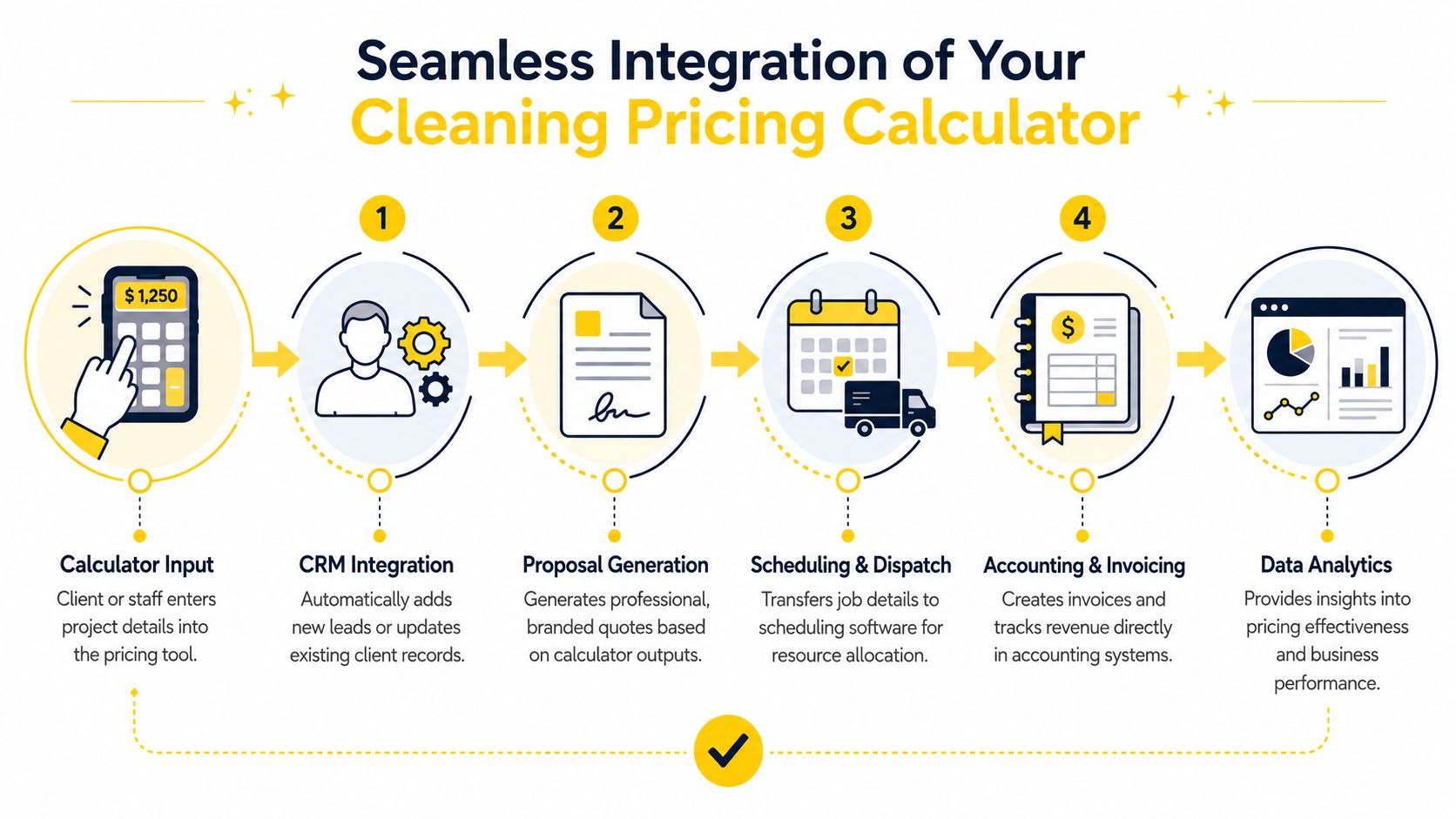
The better setup is one connected path. A prospect enters building size, service frequency, and any specialty needs once. That information should then create or update the contact record, alert the right person internally, and trigger the next action based on the type of job.
A practical workflow usually includes:
This does not require a custom build in every case. Tools like Zapier can connect your calculator to your CRM, email platform, and dispatch software. The part that matters is the logic behind the trigger. If intake fields are inconsistent, automation breaks fast.
I learned that the hard way. Once we standardized the inputs and mapped each answer to an action, the calculator stopped being a website feature and started acting like a 24/7 sales engine. If you want examples of how teams are applying that model, this guide to AI estimate software for cleaning businesses is a useful reference.
Labor is still the cost center that punishes sloppy process. Every minute your coordinator spends chasing missing square footage, unclear frequency, or an unnamed decision-maker is paid time that produces nothing. The calculator should remove that waste by collecting usable scope data upfront and sending it to the systems your team already works in.
Set clear rules around handoff:
A good calculator reduces rework. It also exposes bottlenecks. If estimates are coming in but proposals are delayed, the issue is no longer lead flow. It is workflow design.
That is why integration matters so much. True value is not the instant price on the screen. True value is the system behind it that captures the lead, routes it correctly, and keeps the sales process moving without extra admin.
An instant estimate is useful. A booked job is better. The companies that get the most value from a commercial cleaning pricing calculator treat it as the front end of a follow-up system, not the finish line.
The first response should be immediate, but the second move matters just as much. If the estimate comes in after hours, the buyer should still receive a clean handoff the next business day. That follow-up needs to reference the details they already entered, confirm any assumptions, and move them toward a walkthrough or final scope review.
Not every lead needs the same message. Some buyers are ready to talk now. Others are comparing vendors and need reassurance that your process is organized.
A useful post-estimate sequence usually includes:
If your process still relies on somebody manually rebuilding that context from scratch, your estimate system isn't doing enough work.
The hidden value in a calculator is operational insight. Over time, the patterns in submitted estimates tell you what the market is asking for, which service combinations show up most often, and where your team may need capacity.
That can shape hiring. If estimate demand keeps clustering around floor care, post-construction cleanup, or larger recurring accounts, you can recruit for that skill set instead of hiring blindly. For teams building field staff more intentionally, resources like pipehirehrm.com and the hiring content at get.pipehirehrm.com/blog can support that planning.
It also improves the sales script. If buyers repeatedly hesitate at one part of the flow, rewrite that question. If one service bundle gets attention but low close rates, the issue may be positioning, not demand. This is the kind of operational loop that makes AI estimates software for cleaning worth studying from a systems perspective, not just a lead-gen perspective.
The best estimate workflow teaches you how your buyers think, not just what they asked for.
A calculator becomes powerful when it does three things at once. It captures the lead, structures the estimate, and gives the business cleaner data to act on. That's how you stop guessing on price, stop missing after-hours inquiries, and stop treating sales follow-up like an improvised chore.
If you want a faster way to turn inquiries into consistent, automated estimates, Estimatty gives cleaning businesses a 24/7 web and voice estimator built for real-world sales workflows. It captures lead details, sends instant estimates, and helps your team respond with more speed and less manual admin.