September 21, 2026
Inside and Out Cleaning: A Practical Pricing Guide
Learn what inside and out cleaning really includes, how pricing works, and which add-ons actually pay off for residential and commercial estimates.

Thursday, June 18, 2026
Find the best time clock for small business in 2026. Our guide for cleaning pros covers geofencing, payroll integration, & job costing to cut costs & save time.
.png)
Payroll week tells you the truth about your business. If your cleaners text hours from the field, scribble start times on paper, or “remember” missed stops at the end of the week, you're not running payroll. You're rebuilding it.
That gets expensive fast in cleaning. Crews move between sites. Jobs run long. Breaks get fuzzy. One person clocks in from the parking lot, another forgets to clock out, and someone in the office has to sort out the mess before checks go out. Most owners don't buy a time clock because they love software. They buy one because they're tired of paying for bad records.
The best time clock for small business isn't the flashiest app or the biggest brand. It's the one that fits how your team works in the field, cuts down payroll cleanup, and gives you labor data you can trust when you price work.
If you run a cleaning business, you've seen the same pattern. A crew says they were on-site at 8:00. The customer says they arrived later. Someone forgot to note a lunch break. Another employee rounded up because “it was only a few minutes.” By itself, each mistake looks small. Added together over a pay period, it eats margin.
A widely cited study from the American Payroll Association found that employee time theft costs U.S. employers about 2.2% of gross payroll, and 43% of hourly employees admitted to some form of time theft, according to the U.S. Chamber's overview of time and attendance software. In cleaning, that matters because labor is usually the line item that decides whether a job made money or just kept everyone busy.
Paper feels simple until payroll day. Then you start chasing missing entries, decoding handwriting, comparing schedule notes to what occurred, and guessing which version is closest to the truth.
The cost usually shows up in three places:
Practical rule: If you can't see actual hours by job and by employee without asking three people, your timekeeping system is already costing you money.
Good payroll starts with clean inputs. If you want a helpful plain-English refresher on wage calculations, records, and processing basics, review this expert payroll advice from Bookkeeping and Accounting before you choose software. Then look at your own labor burden, travel time, and non-billable hours with a closer eye using this guide on how to calculate overhead costs.
Owners sometimes resist time clocks because they don't want to come off as heavy-handed. That's the wrong frame. In a cleaning company, a modern time clock isn't about surveillance. It's about keeping payroll honest, break records consistent, and overtime visible before it becomes a surprise.
When a system captures clock-in and clock-out records automatically, the business stops depending on memory. That alone reduces arguments, rework, and payroll corrections. For a small team, that kind of control doesn't make the company rigid. It makes it stable.
There are four common setups, and each one works better in some cleaning operations than others. Too many owners buy the wrong category first, then blame the software.
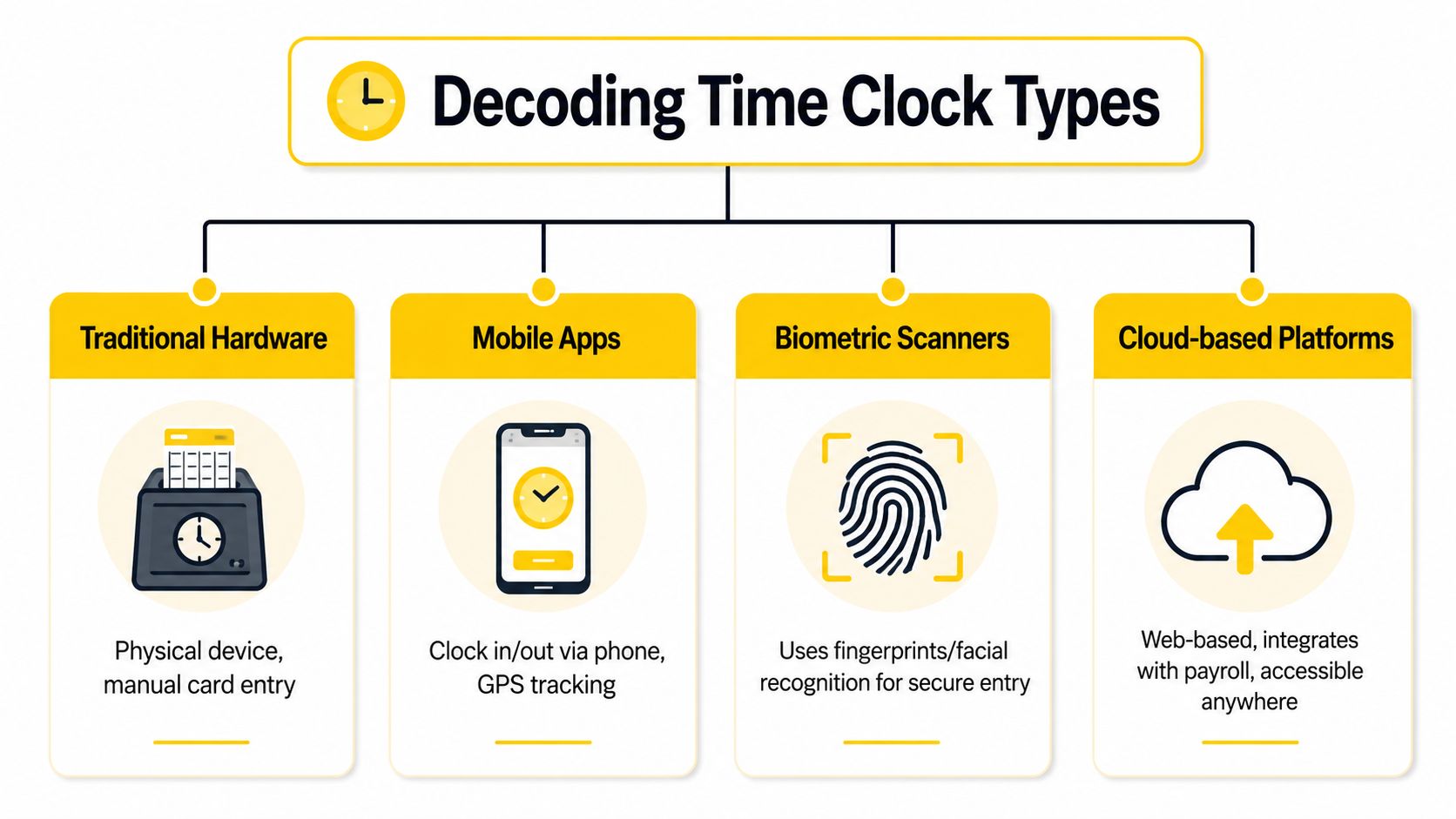
This is the wall-mounted unit near an office, warehouse, or supply room. It works best when employees start and end in one place.
For a cleaning business with a central shop and predictable shifts, hardware can be fine. For field crews driving straight to homes or commercial accounts, it usually creates extra steps. People still end up texting arrival times because the clock sits in the wrong place.
Best fit: One location, stable shifts, low mobility.
Weak spot: Poor match for scattered routes and residential work.
Mobile apps fit how cleaning teams move. Employees clock in from a phone or tablet at the job site, and the office can review punches without waiting for paper.
That's one reason service businesses have shifted away from dedicated devices. A 2025 study found that 63% of service-based small businesses now use iPad-based employee time tracking, reflecting a move toward flexible consumer-grade tools for mobile teams, as noted in this review of time clock trends for small businesses.
If your crews are always on the road, start by understanding what a strong clock-in app for field teams should do before you look at vendor demos.
Biometric systems use fingerprints or face recognition to verify the person clocking in. In plain terms, they make it much harder for one worker to clock in for another.
This category matters most when you've had buddy punching, recurring attendance disputes, or a lot of payroll edits. The drawback is practical, not theoretical. Some teams don't want extra hardware, and some field operations need a more mobile setup than a fixed scanner allows.
The best control is the one your crew will actually use every day without workarounds.
Cloud platforms are usually the engine behind the whole system. They store time records, handle approvals, tie into payroll, and give managers visibility across jobs, crews, and locations.
Most cleaning companies eventually end up here because cloud tools can support mobile punches, reporting, and admin controls in one place. The question isn't whether cloud matters. It's whether the vendor built the platform for a field business or for people sitting in one building all day.
Feature lists get bloated fast. Vendors love to show dashboards, color-coded reports, and glossy admin screens. In cleaning, the best time clock for small business comes down to a shorter list. You need the features that stop payroll leakage and make field operations easier.
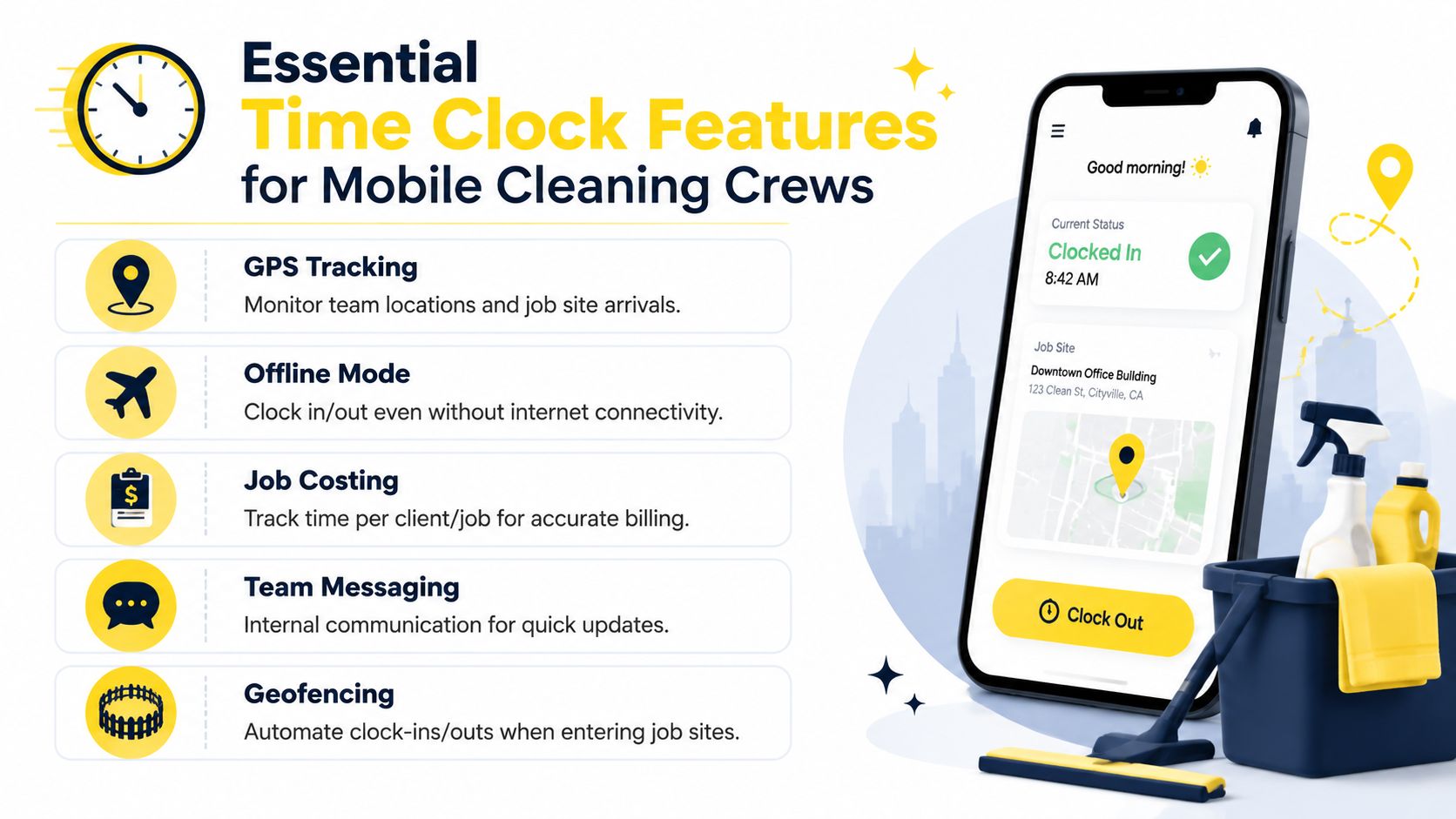
For distributed crews, biometric authentication and geofencing matter most for accuracy. Expert software evaluations treat both as high-impact capabilities because they tie a punch to a real person and an approved location, which cuts time theft and reduces payroll reconciliation work, according to this expert review of employee time clock software.
That sounds technical. In practice, it solves two everyday problems:
If you only add one layer of control to a field operation, start there.
Some functions don't look exciting in a demo, but they matter in real routes and real buildings.
A strong scheduling layer also matters because the time clock only tells part of the story. If your office is still juggling jobs manually, it helps to compare your setup against practical advice on online employee scheduling for cleaning teams.
Payroll accuracy keeps you from overpaying. Job costing tells you whether a customer is worth keeping at the current rate.
Without job-level time, you don't know if a recurring house takes one cleaner or two, whether first-time cleans always run long, or which “easy” commercial account burns labor every week. Owners often think they have a pricing problem when they really have a tracking problem.
If your system can't show labor by client, it can't help you protect margin.
Some tools are fine to have later, but they shouldn't drive the purchase:
| Feature | Useful when | Usually not the first priority |
|---|---|---|
| Advanced analytics dashboards | You already trust the raw data | They don't fix bad punches |
| Complex custom workflows | You have layered approvals | Small teams often won't use them |
| Built-in chat overload | You manage many supervisors | Text replacement alone won't solve scheduling |
| Dedicated hardware bundles | You operate from one main location | Mobile crews often need flexibility first |
For cleaning crews, simple beats fancy. The winner is the tool your staff can learn quickly, use on every stop, and trust when payroll closes.
A solo cleaner doesn't need the same setup as a growing multi-crew operation. Buy for the business you run now, then leave some room to grow.
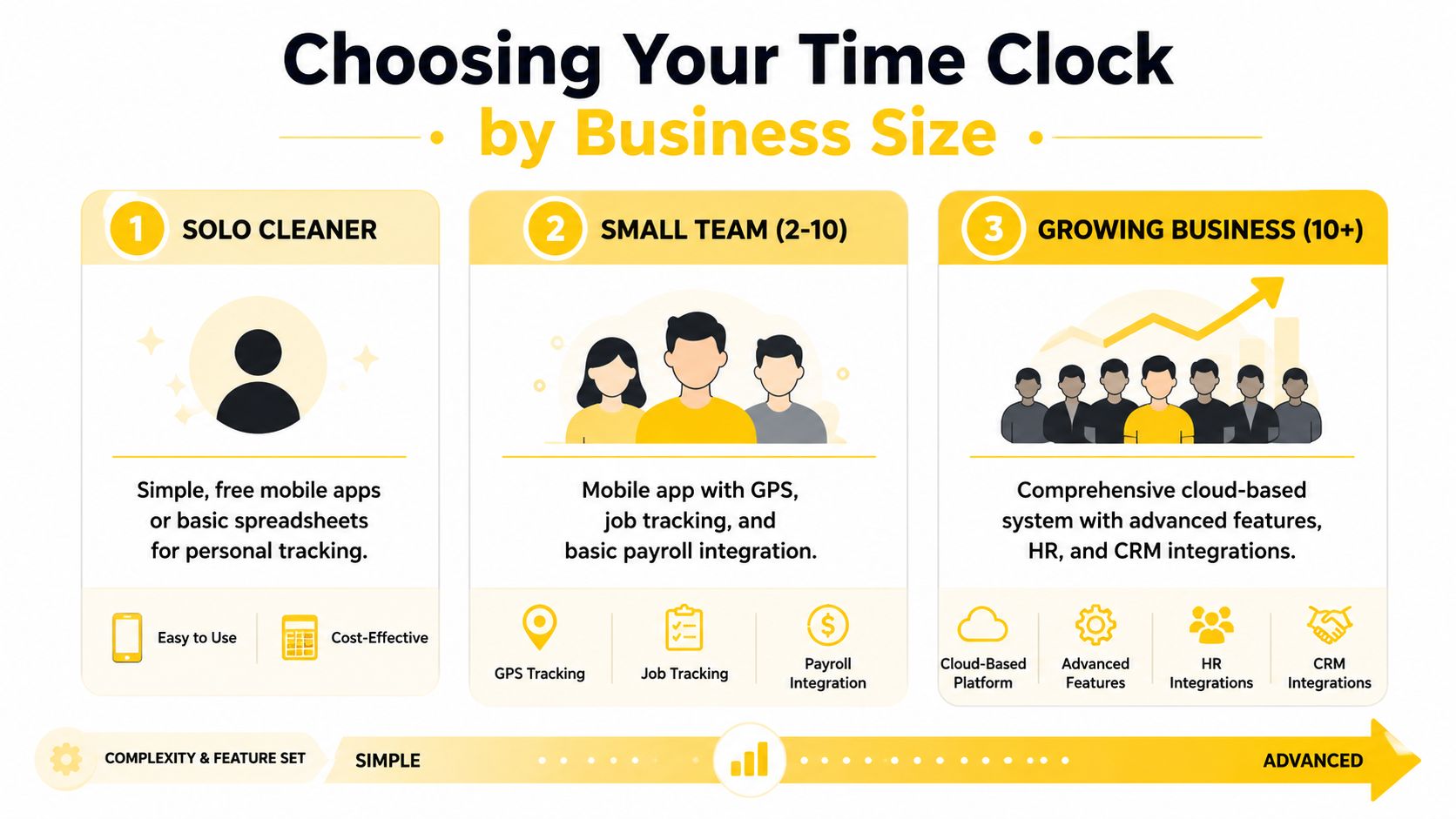
If you're still doing the work yourself, keep it lean. You need a mobile app that tracks time by client and makes it easy to review where your week went. Fancy approvals and layered permissions won't help you much.
Your main goal at this stage is consistency. Start every job the same way, stop every job the same way, and review hours by customer every week. If you're still comparing tools, this roundup of apps for small business operations can help you think through what belongs in your stack.
Best setup: Mobile app, simple job tagging, easy export.
Skip for now: Enterprise reporting, deep admin controls, complex hardware.
Once you have a few cleaners on the road, the stakes change. You're not just tracking your own labor anymore. You're trying to prevent payroll disputes, monitor arrival patterns, and keep job records clean enough for billing and review.
This is the point where mobile punch-in, geofencing, and schedule visibility become worth paying for. A tablet at the office won't solve field problems if your team starts at customer locations.
Best setup: Mobile-first system with location controls, supervisor review, and payroll-friendly exports.
What breaks: Manual edits, texts for clock-ins, and apps that don't track labor by job.
At this size, one weak process gets repeated across many people and many jobs. That's where a basic app starts to strain.
You need stronger permissions, better reporting, cleaner roll-ups by crew or branch, and a system that can support either biometric options or tighter identity validation where needed. If you're also hiring aggressively, it's smart to review operational resources from pipehirehrm.com alongside your time clock search, because onboarding and time tracking should fit together instead of living in separate silos.
Growing companies don't just need time records. They need records that managers can audit without chasing everyone for explanations.
Most owners treat time clocks like a payroll utility. That's too narrow. Value emerges when labor data feeds pricing decisions.
If you clean a three-bedroom home every two weeks, you should know how long that scope takes with your crew, not how long you hope it takes. The same goes for move-outs, deep cleans, post-construction jobs, and recurring office work. When time entries are tied to specific jobs, you stop pricing from memory and start pricing from evidence.
A 2026 U.S. Bureau of Labor Statistics report noted that 71% of service businesses lose profits due to manual hour logging and inaccurate job costing, and that integrating real-time labor data from a time clock with an AI-driven sales estimator closes that gap by supporting pricing based on actual performance, as summarized by TimeClockWizard's analysis of labor data and estimating.
The workflow is straightforward:
That's the missing link in most advice about the best time clock for small business. They talk about payroll and attendance, but not about how better time data improves selling.
Cleaning jobs vary constantly. Condition changes. Add-ons creep in. Customers understate square footage, pet hair, buildup, and bathroom count. If your estimate process never learns from completed work, you keep repeating the same pricing mistakes.
A connected operation works better. Time tracking gives you the labor truth. Your estimate process uses that truth to price the next job more accurately. If you're evaluating software, make sure the vendor can connect with the tools you already rely on by reviewing available integrations for estimating and operations.
Better estimates don't start in sales. They start in operations.
Software demos are built to make everything look easy. Ask harder questions. A vendor worth buying from should answer clearly without dancing around the practical stuff.
You're usually balancing three things: control, ease of use, and admin time.
A tighter system with location limits and identity checks gives you cleaner records, but it needs a clean rollout. A looser app may be easier to launch, but you may spend that saved effort fixing payroll exceptions later. For many cleaning companies, the sweet spot is a mobile-first system with strong field controls and simple office workflows.
Watch for these problems early:
A good vendor helps you remove friction. A bad one gives you another screen to manage.
The best time clock for small business is the one that fixes the problem already hurting you most. If payroll keeps drifting, choose stronger punch controls. If scheduling creates confusion, choose a tool that fits mobile crews. If your prices feel off, choose a system that tracks labor by job so you can price with more confidence.
For cleaning companies, this decision isn't about buying software for the sake of being modern. It's about protecting labor dollars, reducing office cleanup, and making better calls with real field data. That's why the right time clock acts more like a profit tool than an expense.
Keep the standard simple. Your system should be easy for cleaners to use, hard to game, and useful to the office without hours of manual correction. If it does those three things, it will save time where it counts and give you a clearer view of which jobs, teams, and customers are helping your business grow.
For more ideas on building a stronger operation around hiring and team management, it's worth browsing the practical articles on get.pipehirehrm.com/blog as you tighten the rest of your systems.
If you want your labor data to improve how you sell, not just how you run payroll, take a look at Estimatty. It helps cleaning businesses turn real job information into faster, more consistent estimates so you can price with more confidence and protect margin as you grow.