September 21, 2026
Inside and Out Cleaning: A Practical Pricing Guide
Learn what inside and out cleaning really includes, how pricing works, and which add-ons actually pay off for residential and commercial estimates.

Sunday, March 29, 2026
QuickBooks vs FreshBooks for your cleaning company? Get a detailed comparison on invoicing, payroll, scalability, and pricing to choose the right software.
.png)
For cleaning business owners, the choice between QuickBooks and FreshBooks really boils down to your ambition. If you're a solo cleaner or a small crew just needing straightforward invoicing, FreshBooks is a great place to start. But if you have your sights set on scaling up, hiring more staff, and really digging into your job profitability, QuickBooks is the undisputed industry standard.
Picking your accounting software is one of the most important decisions you'll make for your cleaning company. This isn't just about sending invoices; it's the system that tracks your cash flow, manages expenses for cleaning supplies, and ultimately tells you if you're actually making money. The debate isn't about which one is "better" in general, but which one is better for your cleaning business—both today and two years from now.
Think of it this way: FreshBooks is fantastic for its simplicity. You can create beautiful, professional-looking estimates and invoices in minutes. It's clean and incredibly user-friendly.
QuickBooks, on the other hand, is built for complexity and scale. As your cleaning business grows, your needs will get more complicated. You'll need to manage payroll for your cleaning employees (perhaps using an integrated tool like pipehirehrm.com), track the profitability of a large commercial contract versus a series of residential jobs, and generate detailed reports for your accountant. This is where QuickBooks shines.
Starting with a simpler tool feels tempting, but trust me, migrating years of financial data because you've outgrown your software is a massive headache. Choosing the right platform from the get-go saves you a world of trouble down the line.
Before we get into the nitty-gritty details, let’s take a high-level look at how these two platforms stack up for a cleaning service. This table cuts right to the chase, focusing on what matters most when you're running a cleaning crew.
| Feature | QuickBooks | FreshBooks |
|---|---|---|
| Best For | Growing and established cleaning businesses | Solo cleaners and small teams |
| Core Strength | Deep accounting, job costing, and reporting | Simple, beautiful invoicing and time tracking |
| Payroll | Robust built-in options (QuickBooks Payroll) | Basic; relies on third-party integrations |
| Reporting | Advanced and highly customizable profit/loss | Basic financial overviews and dashboards |
| Learning Curve | Moderate; more features to learn | Very low; intuitive from day one |
| Long-Term Value | High; it grows with your business | Limited; many businesses outgrow it |
This quick comparison should already give you a gut feeling for which direction to lean. QuickBooks is the powerhouse for businesses with a growth plan, while FreshBooks is the sprinter, perfect for getting started quickly and looking good while doing it.
This flowchart visually maps out that exact decision-making process.
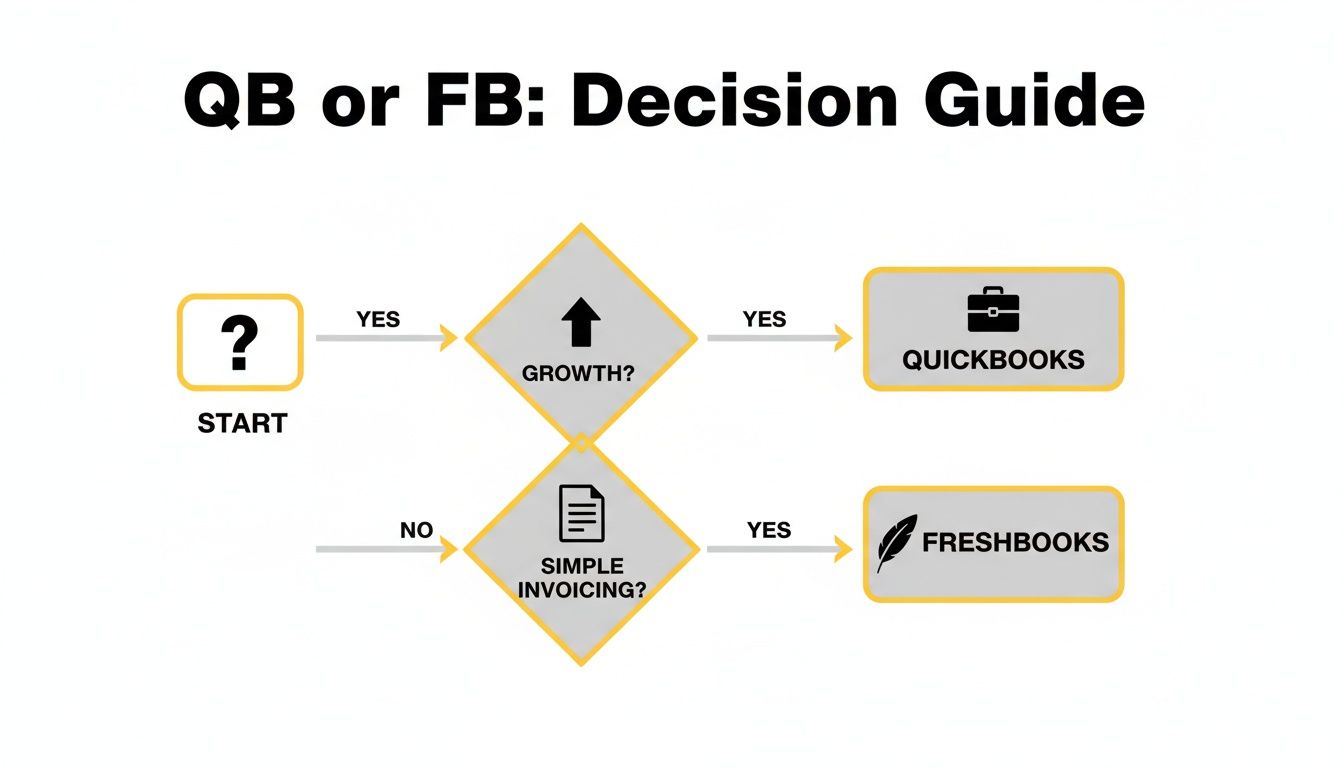
As the chart shows, your choice really hangs on whether you need simple invoicing now or a scalable system for the future. If you're doing your due diligence and want to see how these tools fit into the larger market, this QuickBooks vs Xero vs Sage comparison offers great perspective. And for a broader look at tools designed specifically for our industry, don't miss our guide on the best cleaning business software over on the estimatty.com/blog.
When you’re comparing QuickBooks and FreshBooks, it quickly becomes obvious that QuickBooks isn't just another accounting tool. For millions of small businesses, it’s the default financial engine. This isn't by accident; it's the result of decades of refinement, creating a platform built to handle the complex financial realities that pop up as a service business—like yours—starts to grow.
That widespread adoption has some serious real-world perks for your cleaning company. Think about it: practically every accountant and bookkeeper in the country already knows QuickBooks. You'll never have to hunt for a professional who can help you, nor will you have to pay them to learn your software first. They can jump right in, whether you need help setting up your books or sorting out your year-end taxes.
The sheer scale of its user base tells a compelling story.
QuickBooks dominates the small business accounting landscape, projected to hold a 62.23% market share by 2026. In stark contrast, FreshBooks, while popular with freelancers, brought in US$113 million in 2023—a figure 71 times smaller than the US$8 billion generated by QuickBooks Online alone.
This isn't just a vanity metric. It shows the massive difference in scale and resources between the two. If you’re planning to grow your cleaning business from a handful of homes to a full-scale commercial operation, those numbers tell you which system was built for that journey.
While FreshBooks is fantastic for simple invoicing, QuickBooks is designed for the messy, detailed financial work that comes with scaling a business. It’s built on a double-entry accounting system, the same professional standard your accountant uses. This ensures your books are always balanced and ready for anything, whether you're applying for a business loan or just want total confidence in your numbers.
For a cleaning business owner, this means you can finally move beyond just tracking what comes in and what goes out. You can start asking the tough, strategic questions:
Getting solid answers requires a system that can properly categorize every single dollar. For business owners new to the platform, learning how to categorize expenses in QuickBooks is a critical first step toward unlocking these deeper financial insights.
Maybe the single greatest advantage of QuickBooks' size is its enormous ecosystem of connected apps. With over 650 third-party integrations, you can plug QuickBooks into virtually any other tool you use to run your cleaning business. This turns your accounting software into a true central hub, cutting out tedious manual data entry and getting all your systems on the same page. This is exactly where a good CRM becomes your accounting software’s best friend; our guide to the best CRM for cleaning business shows how these tools should work in tandem.
For example, you can easily connect:
This massive network means that no matter what challenge you face as you grow, there's almost certainly an app that integrates with QuickBooks to solve it. This incredible adaptability is why it remains the industry standard—it’s not just about what it can do for you today, but what it empowers you to do tomorrow.
Let’s be honest—getting paid is what keeps your cleaning business running. The way you handle estimates, create invoices, and process payments says a lot about your professionalism and directly impacts your cash flow. This is where the QuickBooks vs. FreshBooks debate really heats up. While both platforms get the job done, their approaches are worlds apart, leading to very different experiences for you and your clients.
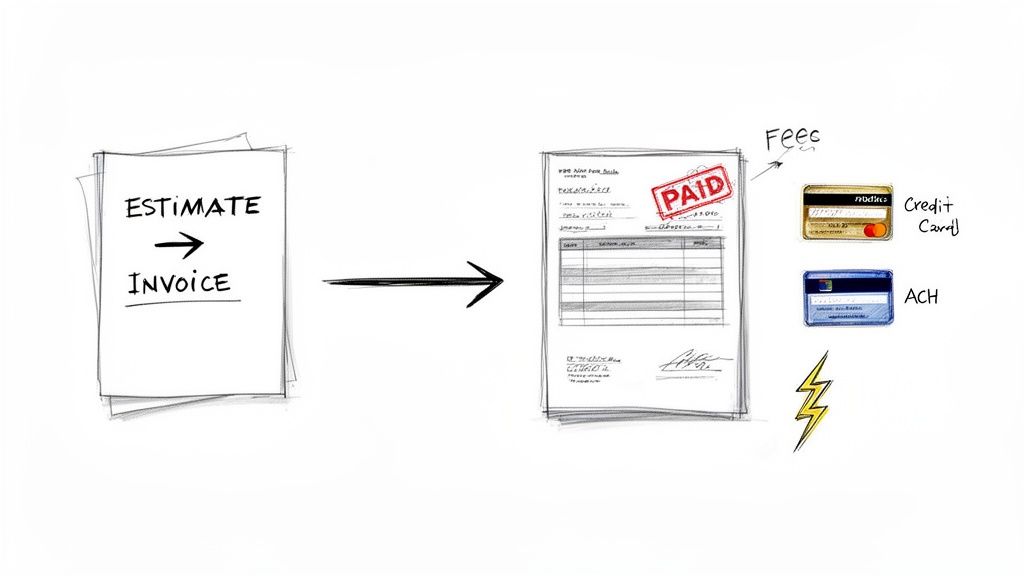
FreshBooks literally built its name on invoicing, and it’s obvious from the moment you use it. The platform is engineered to help you craft beautiful, professional-looking invoices with just a few clicks. For a solo cleaner or a small residential team, this simplicity is a massive advantage.
QuickBooks, on the other hand, sees invoicing as just one component of a much larger financial machine. Its invoicing is powerful and deeply woven into its accounting core, but it definitely lacks the polished, intuitive feel that FreshBooks prides itself on.
When it comes to pure aesthetic appeal and ease of use, FreshBooks is the clear winner. Its templates look modern right out of the box, and adding your logo and brand colors is dead simple. Setting up recurring invoices for your weekly or bi-weekly residential clients is completely painless.
QuickBooks offers powerful customization, but it feels more like a traditional accounting program. You have a ton of control over the details, but it takes more work to get your invoices looking sharp. Where it really pulls ahead, though, is in its deeper automation. You can set up complex, rule-based recurring invoices that FreshBooks can't handle, which is a lifesaver for commercial contracts with variable charges or add-on services.
The bottom line: FreshBooks is for the cleaning business owner who wants to fire off a great-looking invoice in minutes. QuickBooks is built for the owner who needs robust, rule-based invoicing that ties directly into a full-scale accounting system.
In the cleaning industry, the estimate is where you win or lose the job. The way you create and present your estimates sets the tone for the entire client relationship, and it’s a major point of difference between QuickBooks and FreshBooks.
This is also where specialized tools can completely change the game. The most successful cleaning businesses are moving beyond creating estimates by hand. For a truly professional and automated system, you need to learn how to create cleaning service quotes that consistently win new clients.
An AI-powered estimator like Estimatty, for example, can generate instant, accurate estimates 24/7 right on your website. The best part? It can be connected to either QuickBooks or FreshBooks using Zapier, automatically pushing approved jobs straight into your accounting software. This takes the manual work off your plate and ensures every estimate is perfect.
Once the client says yes and the invoice is sent, it's time to get paid. Both platforms have their own integrated payment solutions: QuickBooks Payments and FreshBooks Payments (which is powered by Stripe). Here’s how they stack up.
| Feature | QuickBooks Payments | FreshBooks Payments |
|---|---|---|
| Credit Card Fee (Online) | Starts at 2.9% + $0.25 | Starts at 2.9% + $0.30 |
| ACH Bank Transfer Fee | 1% (max $10) | 1% (with ACH fee caps on some plans) |
| Deposit Speed | Standard is 2-3 business days; next-day available | Standard is 2 business days |
The processing fees are neck and neck. However, QuickBooks has a slight but important edge with its $10 maximum fee on ACH transfers. If you’re handling large commercial cleaning contracts, those savings can really add up over a year. For smaller residential jobs, the user-friendly payment flow in FreshBooks is fantastic and encourages clients to pay right away.
As your cleaning company grows and you start hiring, the choice becomes even clearer. Finding and retaining good cleaners is tough, and using hiring tools like Pipehire is a must. When you're managing a team and running payroll, predictable cash flow is non-negotiable. This makes the powerful payment tracking and deep financial reporting in QuickBooks the more logical and scalable choice.
Sure, getting invoices out and getting paid keeps the lights on. But if you're serious about growing your cleaning company, you have to look beyond the day-to-day grind. To build a profitable, scalable business, you need to think like a CEO—and that means truly understanding your numbers. This is where the QuickBooks vs. FreshBooks debate gets really interesting, moving past simple tasks and into long-term strategy.
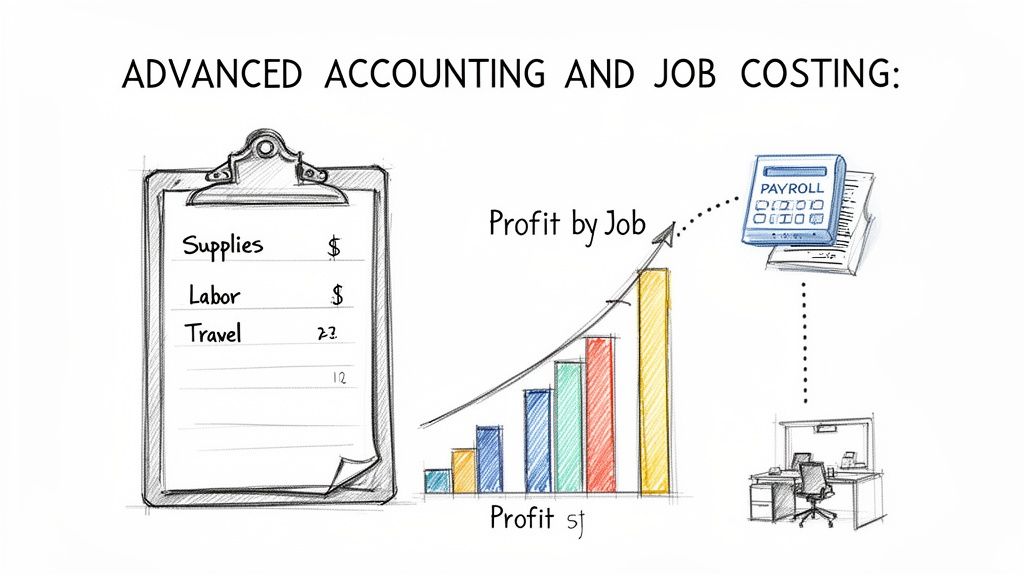
While FreshBooks lets you track time and expenses against a project, QuickBooks offers true job costing. For a cleaning business, this isn't just a fancy feature—it’s how you find your most profitable work. It lets you meticulously track every dollar, from your team's hours on-site to the cost of cleaning supplies, and pin it directly to a specific client or job. This answers the single most important question for growth: where are we actually making money?
With QuickBooks, you can finally get a real answer. Is that big commercial contract you landed as profitable as you hoped? Or are your residential deep cleans the quiet money-makers keeping your business healthy? By assigning every expense to a job, you get a clear profit and loss statement for each and every client.
FreshBooks gives you a high-level overview by letting you tag expenses to a project, but it just doesn't have the accounting horsepower for that kind of granular analysis. It's a bird's-eye view, not a detailed financial breakdown.
For a growing cleaning business, this difference is everything. You can't set profitable prices or build accurate estimates if you're just guessing at your true costs. QuickBooks provides the hard data to make smart decisions; FreshBooks leaves you flying blind.
Having solid financial data is the foundation for any expansion. In fact, our guide on how to scale a service business details several strategies that simply aren't possible without this kind of financial clarity.
Once you start adding more cleaners, more vans, and more clients, two things become absolutely critical: managing your supplies and paying your people. This is where the gap between QuickBooks and FreshBooks becomes a chasm.
The financial reality behind these platforms explains a lot. In 2023, QuickBooks Online's staggering US$8 billion in revenue absolutely dwarfed FreshBooks' US$113 million—a 71-fold difference. That scale allows QuickBooks to build out sophisticated, in-house tools like inventory and double-entry accounting that are vital for growth. You can dive deeper into these QuickBooks statistics on electroiq.com. Meanwhile, FreshBooks still imposes client limits that can actively hold your business back.
At the end of the day, all this advanced accounting is about one thing: better reports that lead to better decisions. FreshBooks gives you clean, simple reports that are perfect for a quick check-up on what you've earned and spent. They’re fine for a solo operator.
QuickBooks, on the other hand, delivers the kind of deep, customizable reports that operations managers and multi-crew owners need to drive real growth. You can easily create reports that show you:
This is the information that empowers you. You can confidently adjust pricing for new estimates, get a handle on your costs, and spot the best opportunities to expand. When you're managing a growing team, this isn't a "nice-to-have"—it's an absolute must for building a business that lasts.
When you’re comparing QuickBooks vs FreshBooks, it's easy to get fixated on the monthly price tag. But that's a rookie mistake. Picking your accounting software is a major business decision, and the real cost is measured in user fees, growth potential, and how the platform feels to use every single day.
FreshBooks is known for its gorgeous, almost impossibly simple interface. If you're a solo cleaner just getting your feet wet, you'll love it. You can whip up clean-looking estimates and invoices in minutes, no accounting degree required. It honestly feels more like a beautifully designed app than serious financial software.
Then there's QuickBooks. Let's be honest—it has a bit of a learning curve. The dashboard is packed with features and can feel like a lot to take in at first. But that depth is exactly what makes it a powerhouse for a cleaning business with plans to grow beyond a one-person show.
On the surface, FreshBooks looks like the cheaper option, especially with its starter plans aimed squarely at freelancers. The problem is, those low prices hide a cost that sneaks up on you as your cleaning business expands.
The biggest issue is the per-user pricing model. The base plan might seem like a bargain, but as soon as you need to add an office manager or team supervisor to the account, the costs start to climb. Fast.
The Scalability Trap: We see this all the time in user feedback. FreshBooks scores an impressive 4.5/5 on G2 for ease of use, which makes it a hit with solo operators. But its model of charging $13/month for each additional user becomes a serious drag on growth. In sharp contrast, QuickBooks plans are built for teams. The Advanced plan, for instance, runs $220/month for up to 25 users, letting you give access to key staff without getting nickel-and-dimed. This FreshBooks vs QuickBooks breakdown from epicbooks.io offers more detail on how their target markets differ.
This is where you start to see the real value in QuickBooks. Its plans are designed to scale with you, not penalize you for adding the people you need to run a bigger operation.
The "best" software really comes down to who’s clicking the mouse.
Think of this as a foundational choice. You can start with something simple and face a painful data migration later, or you can build your business on a platform that will support you for the long haul. A key part of that foundation is setting profitable prices from day one, and using a smart cleaning cost calculator ensures the numbers you're plugging into your software are actually making you money.
Ultimately, your choice says a lot about your ambition. FreshBooks is an excellent starting point for a freelancer. But for building a scalable, profitable cleaning empire, QuickBooks is the only real long-term play.
After laying everything out, the QuickBooks vs. FreshBooks decision really boils down to one simple question: What are your ambitions? There’s no single "best" software, but there’s definitely a right choice for your cleaning business, depending on where you are today and where you plan to be in a few years.
For solo cleaners just starting out, or maybe a small two-person team, FreshBooks looks incredibly attractive. Its main selling point is its simplicity. You can jump right in, create gorgeous invoices, and send out professional estimates with almost zero frustration. It's built to get you paid fast so you can spend your time cleaning, not fumbling with accounting software.
But that simplicity is a double-edged sword.
If you have any plans to grow—and I mean any—QuickBooks is the only serious long-term choice. It’s the clear winner for any cleaning business looking to hire employees, take on bigger commercial contracts, or simply understand which services are truly making money.
QuickBooks gives you the powerful, double-entry accounting system you need to build a sustainable business. This isn't just about having more buttons to click; it's about gaining the financial insight to make smart decisions that will fuel your growth, not hold you back.
The 'best' software is the one that supports your vision. Think of your accounting system not as a quick fix for invoicing, but as a long-term investment in your company's financial health.
Let's break it down one last time so you can make your choice with confidence:
Ultimately, choosing FreshBooks prioritizes today's ease of use, while choosing QuickBooks is an investment in your future success. For more expert advice on building and scaling a service business, the articles on the Estimatty blog are a fantastic place to continue your research.
Choosing between QuickBooks and FreshBooks always brings up some real-world questions for cleaning business owners. I get it. You're not just picking software; you're building the financial backbone of your company. Let's tackle some of the most common questions I hear to help you settle the "QuickBooks vs. FreshBooks" debate for good.
Absolutely. In fact, it's a pretty common path. Many cleaning businesses start with FreshBooks because it’s so simple and then "graduate" to QuickBooks when their needs get more complex. This usually happens when you start hiring employees, need to track the profitability of big commercial jobs, or want to manage your cleaning supply inventory.
Just go in with your eyes open. Making the switch isn't a one-click affair. You'll have to export all your data—clients, past invoices, expenses—and map it correctly into QuickBooks. It's a project, so if you see serious growth on the horizon, it's worth thinking about whether starting with QuickBooks from day one might save you a headache later.
When it comes to creating and sending estimates, both get the job done, but they feel very different. FreshBooks wins on style points; its estimates look great and the process is incredibly slick, which can definitely help you stand out to a homeowner.
But for a modern cleaning business using a tool like Estimatty.com for instant estimates, the real question is about what happens after the estimate is accepted. Both QuickBooks and FreshBooks can be linked to Estimatty through Zapier, which is great for automatically creating an invoice. The key difference is that QuickBooks has the muscle on the back-end to handle the complex job costing and financial tracking that a big, accepted estimate requires.
You can learn more about crafting bids that win on the get.pipehirehrm.com/blog.
This is a big one. The short answer is no, not for your daily tasks. You can absolutely handle sending invoices, recording payments, and tracking expenses on your own without an accounting degree.
However, the real power of QuickBooks is its professional, double-entry accounting system—it’s the same system your CPA uses. My strong advice? Bring in an accountant to help with the initial setup. They’ll make sure your chart of accounts is structured perfectly for a cleaning business. A quick check-in a couple of times a year is also a smart move to keep your books clean for tax time and give you confidence when you're applying for a business loan.
Let's be real. If you're a brand-new solo cleaner, the higher price of QuickBooks can feel like a stretch. If your main goal is just to send a handful of invoices each month, the elegant simplicity of FreshBooks is probably the smarter, more budget-friendly choice.
But the moment your ambition goes beyond solo work, the value of QuickBooks becomes crystal clear. Thinking about hiring your first cleaner through a service like pipehirehrm.com? Need to manage inventory so you don't run out of supplies? Want to see exactly which jobs are making you the most money? That’s where QuickBooks shines. The investment quickly pays for itself by giving you the financial clarity you need to grow smart and avoid expensive mistakes.
Ready to turn more website visitors into booked jobs? Estimatty provides an AI-powered estimator that delivers instant, accurate estimates to your prospects 24/7, converting leads while you sleep. See how it works at https://www.estimatty.com.