September 21, 2026
Inside and Out Cleaning: A Practical Pricing Guide
Learn what inside and out cleaning really includes, how pricing works, and which add-ons actually pay off for residential and commercial estimates.

Thursday, May 14, 2026
Stop no-shows and lock in revenue. Learn to write and automate the perfect confirm appointment email for your cleaning business with proven templates and tips.
.png)
A solid confirm appointment email is so much more than just a calendar placeholder. It's the moment you turn a casual inquiry into a committed customer, securing real revenue for your cleaning business. It’s your single best defense against no-shows and the first step in building a professional, trust-based relationship with a new client.
Let's shift our perspective. That confirmation email isn't an administrative chore; it's one of the most powerful revenue-protection tools you have. Every time one of those emails lands in a client's inbox, you're not just confirming a time—you're cementing a commitment and setting crystal-clear expectations.
Think about it: this one simple message turns a soft lead into a locked-in job. This is absolutely critical for cutting down on the no-show appointments that can slowly bleed a service business dry. For us in the cleaning industry, an empty slot on the schedule isn't just a bit of downtime. It's lost income, wasted travel time, and a crew that's getting paid to wait.

To see the real-world difference this makes, let's look at the before and after.
| Area of Impact | Without Confirmations | With Automated Confirmations |
|---|---|---|
| No-Show Rates | High and unpredictable, leading to lost revenue. | Drastically reduced, protecting your daily income. |
| Client Perception | May seem disorganized or unprofessional. | Seen as organized, reliable, and respectful of their time. |
| Scheduling | Chaotic, with last-minute gaps and scrambling. | Stable and predictable, allowing for efficient crew management. |
| Team Morale | Frustration from wasted time and schedule changes. | Higher, as teams can count on a full day's work. |
Implementing a solid confirmation process moves your business from the left column to the right. The benefits aren't just theoretical; they show up on your bottom line.
No-shows hit your business where it hurts—your wallet. They throw your entire schedule into disarray, waste your team's valuable time, and leave revenue gaps that are nearly impossible to fill on short notice. It’s a frustratingly common problem, but the good news is, it's almost entirely preventable with the right confirmation strategy.
A professionally crafted confirmation email gives the appointment a sense of finality. When a client sees the date, time, and service details neatly laid out, it prompts them to mentally (and often physically, with a click) commit to the booking. For a deeper dive on this, you'll want to check out our guide on how to reduce no-show appointments in your business.
Your very first interactions shape a client's entire perception of your business. This is why using a tool like Estimatty is so effective; its AI sales agent can send instant estimates and automated follow-ups that immediately establish you as a professional operation. When a client receives that sharp, detailed confirmation, it sends a powerful message: your business is organized, you're reliable, and you value their time as much as your own.
This isn’t just a hunch; the data backs it up.
A systematic review of 29 different studies found that appointment reminders cause a massive 34% drop in non-attendance rates on average. It's a practice that's now standard, with 88% of leaders in the service industry relying on automated reminders to keep their schedules full.
Ultimately, this single email is more than just logistics. It’s a core part of your sales and customer retention strategy, and it directly protects the revenue you work so hard to earn.
A confirmation email isn't just a formality—it's your first real chance to prove you’re a professional outfit that has its act together. Getting this right sets the tone for the entire customer relationship. Let's break down how to build a confirmation email that actually works, getting you the response you need and leaving clients impressed from the get-go.
It all starts with the subject line. Your client’s inbox is a battlefield. To win, you need to be clear and direct, not clever. Forget vague subjects like "Your upcoming service." They get ignored.
Something like, "Please Confirm: Your Cleaning Service for [Date]" or "Action Required: Confirm Your Appointment with [Your Company Name]" works wonders. It creates a little bit of urgency and tells them exactly what you need them to do. Open rates will thank you for it.
Once they open the email, the clock is ticking. You have seconds to give them the information they need and get them to act. Make it easy for them.
A well-structured email like this does more than just confirm a booking; it helps turn a fresh lead into a solid, paying customer. If you're curious about that initial conversion process, we have a whole guide on how to convert website visitors into customers.
Every part of your email should be pushing the client toward one single action. And no, a simple "reply to confirm" buried in the text won't cut it. You need a big, obvious button that's impossible to miss.
The most critical piece of the puzzle is a bold button with clear, action-oriented text like "Confirm Your Appointment." It takes all the guesswork out of the equation. Your client sees it, clicks it, and their booking is locked in. It’s that simple.
For more great examples of how to reduce no-shows with clear communication, take a look at these excellent resources on professional reminders for busy teams. When you nail these elements, your confirmation email stops being a chore and starts being a tool that builds trust and secures revenue.
Getting your confirmation email right is a huge win, but when you send it is what really packs your schedule and puts an end to costly no-shows. A perfectly timed confirm appointment email is the difference between a happy, prepared client and a frustrating, empty slot in your calendar.
Frankly, it's all about creating a smart, automated sequence that keeps the appointment on your client's radar without being annoying. This is how you stop no-shows in their tracks and build the kind of predictable revenue that lets you sleep at night.
This infographic lays out the essential pieces of a great confirmation email—the very foundation of your reminder system.
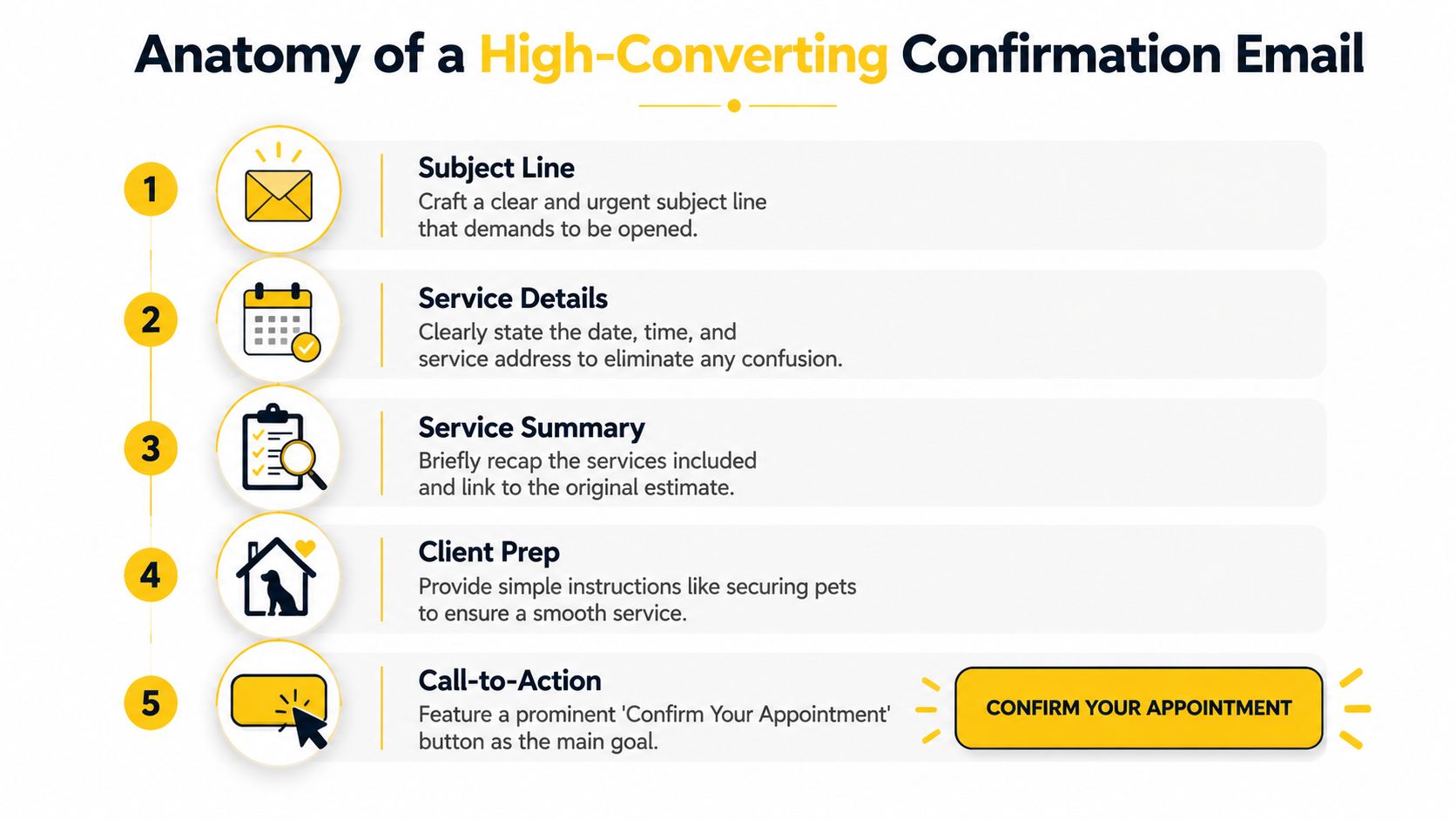
As you can see, every single part—from that crucial subject line down to the call-to-action—has a job to do. They all work together to make it incredibly easy for the client to say, "Yes, I'm confirmed."
Look, one email is good. But a carefully planned sequence? That's powerful. While texts are fantastic for quick pings (everyone reads them!), email is your best friend for sending richer details, like how clients should prep for their cleaning or linking back to their estimates.
Data from Apptoto’s 2026 Guide backs this up, showing the best times to send emails are often early in the morning—think 5am, 9am, or 10am. That’s when homeowners are grabbing coffee and planning their day. You can dive deeper into their research by grabbing the full ebook from Apptoto.
So, what does a proven sequence look like for a cleaning business? Here’s a blueprint I’ve seen work wonders:
This multi-step approach ensures you’re connecting with clients at just the right moments. The best part? It's easy to automate with the right scheduling software for your cleaning business, so you can secure your schedule without lifting a finger.
Let’s be honest, manual follow-ups are the single biggest time-suck when you're trying to scale a cleaning business. If you want to break free from the back-and-forth and put your confirmations on autopilot, you've come to the right place. We're going to walk through how to build a seamless workflow that takes a lead from their first inquiry to a locked-in job on your calendar.
Think about all the hours you or your admin spend chasing clients, resending details, and manually updating your schedule. Every minute spent on that is a minute you're not spending on marketing, improving your service, or hiring great cleaners—a process that can be a real headache without the right systems, like those offered by platforms such as pipehirehrm.com.

The whole point here is to build a system that works for you around the clock, even when you're sleeping. It all starts the moment a potential customer interacts with your business. For example, using a smart tool like Estimatty, a client can get an instant estimate on your website, and that single action can kick off your entire confirmation sequence through both email and SMS.
This isn’t just about chasing the latest tech trend; it’s a proven business strategy. The healthcare industry figured this out years ago, with 88% of organizations now using automated reminders to keep their schedules packed. The results speak for themselves. One study found that simply implementing automated reminders boosted completed daily appointments by a staggering 37%.
For a cleaning business, that kind of efficiency is gold. It means you can finally tackle those frustrating 15-30% no-show rates and grow your bookings without having to hire more office staff. If you're looking to really fine-tune your client communication, digging into different automated email reply strategies can make your workflow even more effective.
The real magic happens when your tools start talking to each other. You can use a simple connector like Zapier to link Estimatty directly to your CRM or master calendar. When a client accepts their estimate, the appointment just appears on your schedule. No one on your team has to lift a finger.
Ultimately, this isn't just about saving a few hours here and there. It's about building a truly scalable system that frees you up to focus on what you do best: delivering an amazing service and growing your company. To get more ideas on the right tech stack, check out our guide on the best house cleaning booking software to round out your automated setup.
Let's be real—clients are going to cancel or need to reschedule. It happens. But how you handle these moments is what separates a good cleaning business from a great one. This isn't just about losing a slot; it's a golden opportunity to show your professionalism and build some serious client loyalty.
Instead of making clients jump through hoops or feel guilty for changing plans, give them a dead-simple way to make a change. This one small move keeps the lines of communication open and stops clients from just ghosting you, which is a far bigger headache for your schedule.
Your appointment confirmation email is the perfect place to start. A single, friendly sentence can completely change the dynamic.
Try adding a simple instruction right in your confirmation email, like: “Need to reschedule? Just reply to this email, and we'll find a new time that works for you.”
This little phrase does wonders. It turns a one-way notification into a genuine conversation, making clients feel heard and supported, not like they're breaking a rule.
This simple strategy is your best defense against no-shows. When people know it’s easy to adjust their booking, they’re far more likely to reach out instead of just disappearing. It shows you’re a flexible, client-first business that understands life gets messy sometimes.
Of course, you still need to protect your business. Your confirmation and reminder emails should also clearly state or link to your cancellation policy. You can be flexible while still having boundaries that prevent last-minute changes from costing you money. No one likes surprises, so be upfront.
And when a cancellation does happen? Don't just write it off as lost revenue. Set up an automated follow-up. A few weeks later, your system can send a friendly email saying, "We've missed you! Ready to get that sparkle back in your home?" This is a brilliant, low-effort way to recapture that booking down the road.
Automating these touchpoints is the key to managing them all without adding hours to your plate. If you're looking for more ways to manage client communications efficiently, see how a virtual receptionist for a small business can help take this off your hands.
Alright, so you have the basic framework down, but I know from experience that’s when the real questions start popping up. Let's dive into some of the most common sticking points I hear from other cleaning business owners. I want to give you the straight answers that will help you nail this from day one.
If you only get one thing right, make it this: a big, obvious, can't-miss Call-to-Action (CTA) button that says "Confirm Your Appointment." Seriously. Everything else in that email is just supporting cast for this star player.
Think about it from your client's perspective. They're busy. They're scanning. Make it dead simple for them to give you the "yes" you need. That button should be easy to see and tap, whether they're on a tiny phone screen or a giant desktop monitor. Without that clear action, you're just sending a friendly FYI, not securing a paid job on your calendar.
The difference between a simple notification and a powerful confirmation email is a button. Your goal isn't just to inform; it's to get a firm commitment. That button is the bridge from a potential booking to a guaranteed job.
This is a balancing act, for sure. You don't want to annoy your clients, but you absolutely can't afford to be forgotten. I've found the magic number is a sequence of 2-3 emails, timed just right.
Here’s the cadence that has proven to be golden:
When you pair this with a quick "we're on our way" text the day of the service, you've created a bubble of communication that's helpful, not harassing. It makes you look incredibly professional and organized.
Yes. A thousand times, yes. Attaching or linking to the original estimates is one of the smartest things you can do. It's all about transparency.
This single move heads off so many potential problems. It reminds the client exactly what services they agreed to and, crucially, what the price is. There's no room for "I thought it included..." or "I didn't expect it to be that much..." on cleaning day. It builds a massive amount of trust.
Tools like Estimatty are brilliant for this because they can automate the whole process, baking the estimate right into your confirmation workflow. It’s a simple step that prevents last-minute haggling and ensures your team arrives to a happy, prepared client.
Ready to stop chasing leads and start locking in jobs automatically? Let Estimatty handle your estimates and follow-ups 24/7. Learn more about how Estimatty can transform your sales process at https://www.estimatty.com.