September 21, 2026
Inside and Out Cleaning: A Practical Pricing Guide
Learn what inside and out cleaning really includes, how pricing works, and which add-ons actually pay off for residential and commercial estimates.

Monday, February 2, 2026
Discover how scheduling software for cleaning business can streamline bookings, boost productivity, and grow profits with expert tips and implementation steps.
.png)
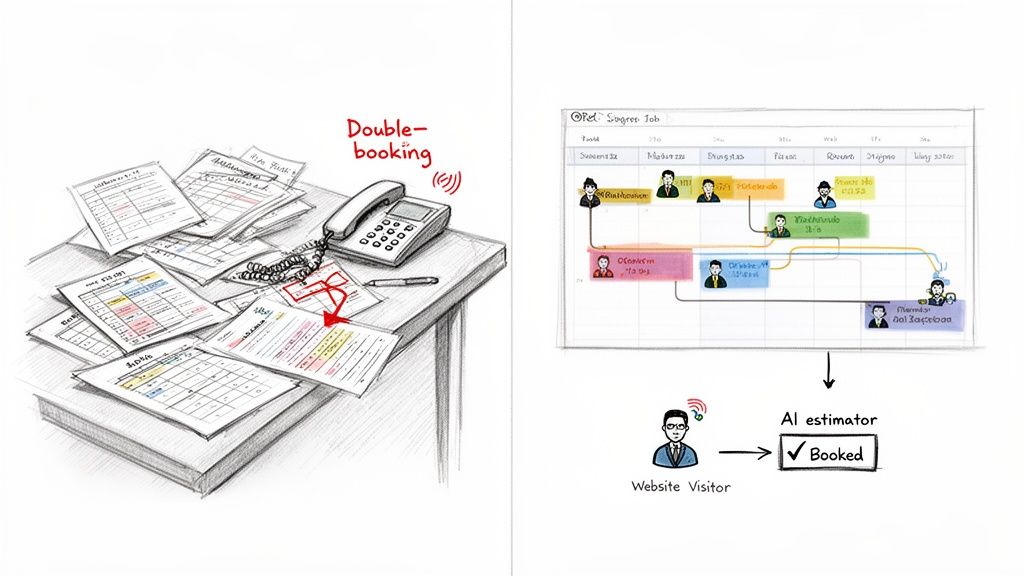
Is your desk buried under paper schedules? Are you constantly on the phone, trying to untangle double-bookings and last-minute cancellations? If that sounds familiar, you know the daily chaos of running a cleaning business all too well.
This is where the right software isn't just a nice-to-have—it's the core of a profitable, scalable operation. It's what lets you finally stop reacting to problems and start proactively managing your business by automating job assignments, optimizing routes, and making client communication a breeze.
The sheer energy it takes to manage a cleaning business can feel like a never-ending juggling act. Between the paper calendars, the back-and-forth calls, and the constant schedule shuffles, you're stuck in a cycle of stress that holds your business back. Modern scheduling software breaks that cycle. It’s not just a digital calendar; it’s your operational command center.
Imagine this: instead of spending your mornings manually mapping out the most efficient routes or calling cleaners to confirm their next stop, an automated system does it for you. Suddenly, you have the time to focus on what really matters—strategy, sales, and keeping your clients happy.
The market for this kind of software is exploding for a reason. Valued at around $500 million in 2025, it’s projected to hit $1.8 billion by 2033. That’s a massive 15% compound annual growth rate.
But what does that mean for you on the ground? Real-world data shows companies using these tools see a 25% boost in efficiency, and 70% report happier customers simply because their teams show up on time. The message is clear: manual chaos is out. Precise, profitable scheduling is in.
This shift is about swapping operational headaches for strategic growth. And when you start connecting your scheduler to other powerful tools, the benefits really stack up.
For example, think about integrating an AI estimator like Estimatty. A potential customer lands on your site, gets an instant, accurate estimate, and accepts it. Boom. All their information—name, address, service details—is automatically pushed into your scheduler as a booked job. No more manual data entry, fewer errors, and you’re converting leads into paying customers 24/7. This kind of streamlined intake doesn't just save time; it can even improve team safety, as you can see here: https://www.estimatty.com/blog/when-a-cleaning-job-turns-dangerous-how-better-intake-systems-can-protect-your-team.
To truly get out of the weeds, adopting a solid employee shift scheduling app is a non-negotiable first step. It’s the foundation for building a more resilient, efficient, and profitable company.
The right software doesn’t just organize your day; it creates the capacity you need to scale. It turns lost time from administrative tasks into billable hours and new client opportunities.
Ultimately, this is about building a system that works for you, not the other way around. It’s how you finally get ahead of the curve, make sure your teams are where they need to be, and deliver the kind of five-star service that turns one-time customers into lifelong clients.
Let's be honest, picking the right software for your cleaning business isn’t a simple “add to cart” decision. The shiny tool that works wonders for a solo cleaner can become a frustrating bottleneck once you have a few crews on the road. To avoid the classic mistake of investing in a platform you'll outgrow in six months, you need to get crystal clear on what you actually need.
Think of it this way: are you just trying to patch today's scheduling headaches, or are you building a foundation for the business you want to have next year? You need a bit of both. Start by identifying the absolute non-negotiables that will solve your biggest operational pains right now.
First things first, the software has to be great at its core job: scheduling. If the calendar is a clunky, confusing mess, you've just swapped one set of problems for another. You're looking for an intuitive, visual interface that you can understand in a single glance.
Your essential checklist for scheduling should absolutely include:
A mobile app isn't just a "nice-to-have" feature anymore; it's essential. When your cleaners can clock in, see detailed job instructions, and message the office directly from a job site, you eliminate a massive amount of back-and-forth. That's time you can now spend on growing the business, not managing it.
Once you've got the fundamentals locked down, it's time to find the features that will actively save you money and open up new ways to make it. This is what separates a simple digital calendar from a true business management machine. For a wider look at building out your requirements, this complete guide to small business scheduling software offers some great strategies to think about.
Think about the real-world scenarios. A frantic call comes in for a last-minute move-out clean. Instead of guessing who might be nearby, real-time location tracking shows you exactly which team is closest. Boom. You just captured revenue that would have otherwise gone to a competitor.
Another huge win is a dedicated client portal. Imagine your customers being able to see their schedule, request a new service, or pay an invoice online without ever having to call you. This self-service approach is a massive convenience for them and a huge time-saver for you. A great client experience starts with a great system, which is why figuring out the best CRM options for your cleaning business is such a critical piece of the puzzle.
Finally, don't forget your team. As you grow, finding and keeping good people is everything. Tools like Pipehire can be a lifesaver for hiring your cleaning employees, but your scheduling software plays a huge role in keeping them happy and productive once they're on board. You can find out more on their blog: get.pipehirehrm.com/blog. Clear instructions and easy communication go a long way.
To help you visualize this, I’ve broken down the key features based on your business size. It’s a quick way to see what’s a “must-have” versus a “nice-to-have” depending on where you are in your growth journey.
Use this checklist as your starting point. Being honest about your current needs—and your realistic future goals—is the single best way to ensure you choose a software partner that will help you grow, not hold you back.
A scheduling calendar is a good start, but an integrated one is where you'll find real leverage. The true power of today's scheduling software lies in its ability to talk to your other tools, building an automated ecosystem that works around the clock. This isn't just about organizing your day; it's about creating a growth engine that runs itself, freeing you from endless admin work.
The single most important connection to make? The one between your lead generation and your scheduling calendar. When these two systems are in sync, you smash the biggest bottleneck in any service business: manually moving customer info from an inquiry to a booked job. This simple link prevents data entry errors, closes the gap between interest and booking, and gives your new clients a fantastic first impression.
Let's paint a picture. It's 10 PM on a Tuesday, and a potential client lands on your website. Instead of filling out a "contact us" form and hoping for a call back, they use an AI-powered tool like Estimatty. In less than a minute, they have a professional, accurate estimate for a deep clean and they click "Accept."
This is where the magic really kicks in. A tool like Zapier can act as the digital glue, instantly grabbing that accepted estimate and pushing all the details straight into your scheduling software. Before you've even had your morning coffee, the system has automatically created:
This hands-off process turns a late-night inquiry into a confirmed job without you lifting a finger.
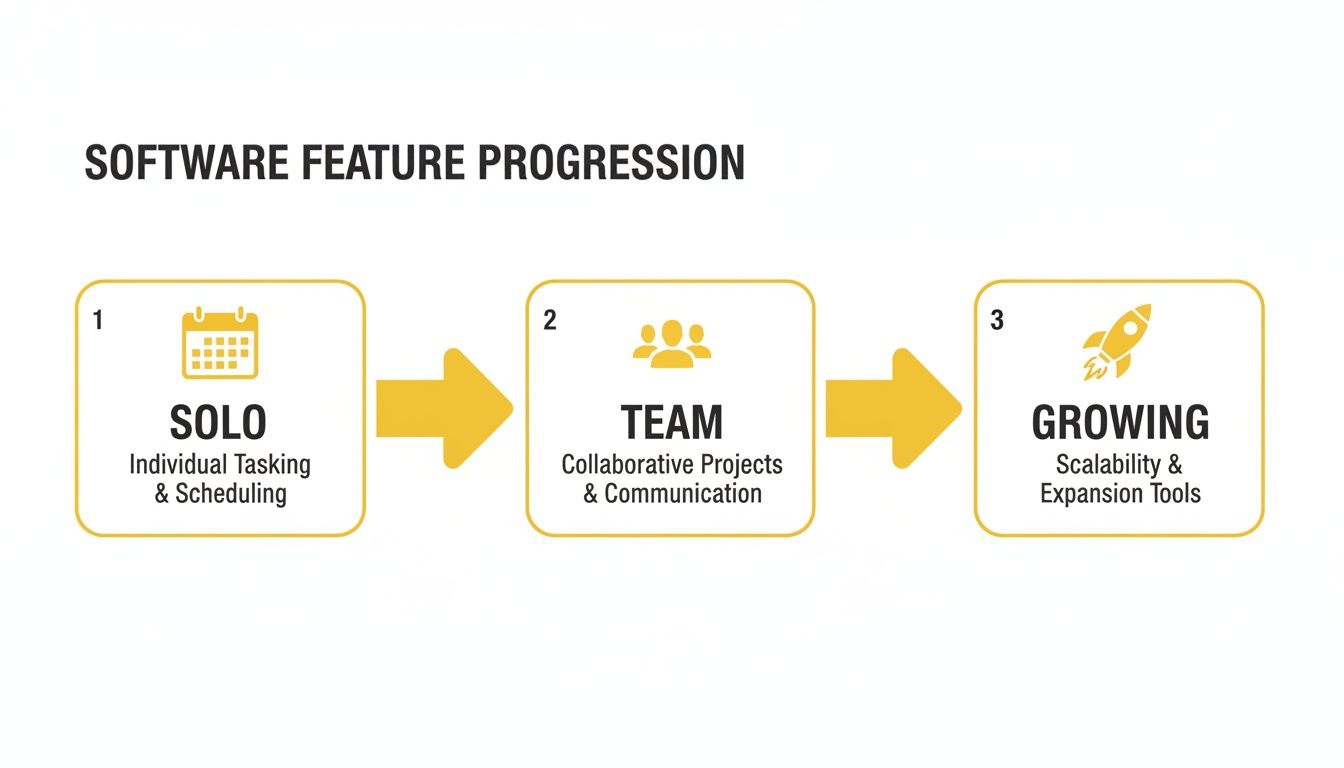
As you can see, as your business grows from a solo operation to a full-fledged team, the need for these kinds of integrated, automated features becomes absolutely critical for scaling efficiently.
Look, this isn't just about saving a few minutes here and there. It's about accuracy and professionalism. There are no typos from rushing to copy-paste information. The client gets immediate confirmation that their job is officially in your system. That frictionless experience sets a positive, professional tone right from the very first interaction.
You can actually read about how a real cleaning team built this kind of 24/7 sales agent by checking out the story behind Estimatty.
By connecting your estimating and scheduling tools, you are essentially building a digital assembly line for new business. Leads come in one end, and confirmed, ready-to-schedule jobs come out the other, with almost zero manual intervention required.
Ultimately, automating your workflow is about making your business smarter, not just busier. It frees you and your office staff from soul-crushing repetitive tasks, slashes the risk of human error, and helps you capture business you would have otherwise missed. And when you're ready to grow, finding the right people is key; platforms like Pipehire can be a huge help in finding cleaning pros who are comfortable in a tech-forward company. This level of efficiency is what finally gives you the time to focus on the things that really grow your business: marketing, training your team, and building great client relationships.
Bringing new software into your business can feel like a huge, scary leap. But it doesn't have to be a nightmare. With a smart plan, you can make the transition feel less like a system overhaul and more like a simple, powerful upgrade for your entire operation. The real win isn't just choosing the right scheduling software for a cleaning business—it's how you weave it into the fabric of your daily work.
Your first move happens long before you pay for a subscription. It all starts with your data. Think about it: your client list, job history, and unique pricing are the engine of your business. Before you import a single contact, it's time for a digital spring cleaning.
This is your chance to archive clients you haven't heard from in years, standardize how you name your services (is it "Deep Clean" or "Deluxe Cleaning"?), and double-check that your pricing for recurring jobs is spot-on. Starting with clean, organized data will save you from a massive headache down the road.

Tempting as it is to go all-in, a gradual rollout is your best friend. My advice? Run your new software alongside your old method for about a week. This "parallel period" is your safety net. It lets you spot and fix any weird glitches or incorrect settings without bringing your business to a screeching halt.
During this soft launch, tackle one core piece at a time:
Key takeaway: Frame the new app as a tool that makes their jobs easier—not a new way for the office to watch their every move. Show them the real-world benefits: clearer schedules, instant access to job notes, and no more "did you get my text?" back-and-forth.
Here’s the hard truth: your team’s attitude will make or break this entire investment. If they hate using the software, you've just bought a very expensive digital calendar that no one uses. Getting them on board is everything.
Show them how this new system solves their biggest frustrations. Explain how it helps them get paid accurately and on time, how it makes clocking in a breeze, and how they can pull up client-specific instructions with a single tap. When your crew starts seeing the mobile app as their most reliable tool, you know you've succeeded.
In fact, small and medium-sized cleaning businesses are leading the charge, spending around $1.3 billion a year on software. They're flocking to tools that integrate seamlessly, sending instant SMS estimates and real-time updates that can boost qualified leads by 35%. Want to see what that 24/7 automation looks like in the real world? Check out this Estimatty case study.
By focusing on a smooth rollout and getting your team excited, you’re not just buying software—you’re building a more efficient, profitable, and modern cleaning business.
So, you’ve invested in new software. Is it just a glorified digital calendar, or is it actually putting more money in your pocket? You need to know. Proving the value of this tool isn't about a gut feeling; it’s about tracking the right numbers to see a clear, undeniable return on your investment (ROI).
The right scheduling software should do a lot more than just organize your day. It should be a profit-generating machine. Let’s break down exactly what you should be measuring, from the hard cash savings to the "softer" benefits that are the secret sauce to long-term growth.
First, let's talk about the numbers you can take to the bank. These are the direct financial gains you see when your operations get smarter and tighter. Before you flip the switch on the new system, you need to know your baseline. What do your numbers look like right now? After a few months with the new software, you’ll compare the old data to the new.
This is where the rubber meets the road. Zero in on these key performance indicators (KPIs):
The whole point is to watch your operational efficiency turn directly into higher profits. A 10% reduction in travel time or a 15% increase in jobs per week isn't just a nice-to-have; it's tangible proof that your software is paying for itself, and then some.
Not every win shows up immediately on a balance sheet, but that doesn't make them any less critical for building a business that lasts. These "softer" metrics are all about customer happiness and your ability to grow without everything falling apart.
Keep a close watch on these signals:
At the end of the day, it's all about connecting these improvements back to your bottom line. Knowing how to price your cleaning services is the first step, and seeing a strong ROI from your software proves you can deliver on that pricing efficiently. This data is your evidence that you can handle more clients without drowning in more administrative busywork.
Jumping into the world of scheduling software can feel like a big leap. You've got questions, and I've heard them all from owners just like you who are ready to stop juggling spreadsheets and start scaling their business. Here are some straight answers to the things I get asked most often.
I get it, budget is always a top concern. The price tag on these tools can really vary. For a solo cleaner or a small crew, you're typically looking at something in the $30-$50 per month range. If you're running a larger operation and need the heavy-duty features like route optimization and deep-dive reporting, you could be looking at a few hundred dollars a month.
Here's how I tell owners to think about it: this isn't an expense, it's an investment. Stack that monthly fee up against the hours you'll get back from not doing manual admin work. Think about the fuel you'll save from smarter routing. Always, always use the free trial period. Get your hands dirty and make sure it actually fits your day-to-day before you pull out your credit card.
This is probably the most important question you can ask. If your team hates the app, you've wasted your money. It’s that simple.
The good news is, the best software is built for the people in the field, not just the person in the office. The mobile apps are usually clean, simple, and intuitive. Your crew should be able to see their schedule, pull up job notes, and tap a button to say they're done. A few taps, and that's it.
My advice? Before you commit, watch the demo videos that show the mobile app in use. Better yet, get a sales rep on a call and have them show you a live walkthrough. If it looks clunky or confusing to you, imagine how your crew will feel. You need a tool that makes their day easier, not one that adds another headache. And if you're looking to build a tech-savvy team, resources like Pipehire can help you find the right people.
Of course. In fact, if a platform can't do this well, you should run in the other direction. This is a core function.
Setting up weekly, bi-weekly, or monthly jobs should be dead simple. You set the schedule once, and the system automatically puts those appointments on your calendar forever. It saves an incredible amount of time and makes sure you never accidentally drop the ball on a loyal customer.
Here's a pro tip: look for a system that lets you assign a specific cleaner or team to a recurring client. It sounds like a small thing, but it's huge for building trust and delivering that consistent, top-notch service your regulars love.
This is where the magic really happens. Modern software doesn't live on an island; it connects with your other tools through direct integrations or a connector like Zapier. This is how you build a smooth, automated workflow.
Imagine this: a potential customer lands on your website and gets a price from your estimating tool, like Estimatty. The moment they accept that estimate, the system automatically creates a new client profile and a work order right in your scheduling software. No more copy-pasting.
That single connection bridges the gap between a curious visitor and a booked job. It makes your business look incredibly professional from the very first interaction.
Ready to create that seamless flow from the first click to the final payment? Estimatty acts as your 24/7 AI sales agent, giving customers instant, accurate estimates and pushing those booked jobs right into your workflow. See how it works and turn more website visitors into happy clients at https://www.estimatty.com.